
Port Forwards (Port forwarding) feature allows remote computers on the Internet to connect to a specific computer or service within the private LAN.
Different services use different service ports, please verify the service port number before the configuration.
Important:
Make sure the Cudy router gets a Public IP (WAN IP) from your Internet Service Provider, if it’s a Private IP address that means there is another NAT device in front of Cudy. You need to open the service ports on that device as well.
For how to verify the IP Address is a public one or private one, please refer to this link:
http://en.wikipedia.org/wiki/Private_network
How to check the WAN IP of Cudy?
Wireless Router & Mesh (System Status->WAN->Status)

4/5 Router (System Status->Cellular/4G->Status)

Note:
1. Usually, if the Public IP and IP Address are the same, it means you've got a Public IP. The IP Address is the WAN IP Address you get from your Internet Service Provider. The Public IP above is the IP Address the other device can find you over internet. So if the Cudy router gets private IP address, you need to figure out which device use this Public IP and open ports on it.
2. For most of the cellular router, the internet service provider usually gives the private IP Address. So, if you want to do the port forwards, please contact your internet service provider to assign you a public IP address or do the port forwarding in their part.
Step 1: Open a web browser and go to http://cudy.net or http://192.168.10.1.
For details, please refer to How to log into the web interface of Cudy Router?
Step 2: Click Advanced Settings -> Port Forwards in the Network section.

Step 3: Click Add to append one entry to the list. Input the parameters as you want into the field as below.
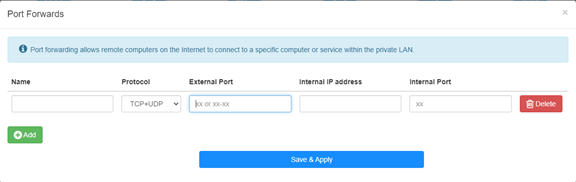
For example: According to the following configure, TCP port 5000, UDP port 5001 and both TCP/UDP port 6000 of host 192.168.10.18 will be opened to the internet.

Name:
Name of the entry, used to facilitate memory
Protocol:
TCP, UDP or TCP+UDP
External Port:
Service port on the WAN side which can be accessed to from the internet
Internal IP address:
IP address of the host, which will open the port to the internet
Internal Port:
Service port of the host in the LAN
Note:
Generally, internal port is the same as the external port.
Step 4: Click 'Save & Apply' to save the settings.
Go to the Status page and check the WAN IP Address of the router. Now you can try to use the http:// WAN IP: port number to visit the service you have opened.
42 comments
Tengo un LT 500, la interfaces no es como esta , me dice wan / vpn y también tengo cliente wireguard ,como pudiera hacer, porque la ip addres y la publica son diferentes
@Dear Robert,
1. Please check if the firmware is the latest firmware.
2. Please tell us how do you set the port forward rules?
“I have a cudy 4g LTE N300 with an openvpn client that gives me a dedicated IP, there is no way to port forward to my web server even if I reach the router with the IP suggested from my VPN service. The port forward does a back loop and returns to router configuration pages.”
I have a cudy 4g LTE N300 with an openvpn client that gives me a dedicated IP, there is no way to port forward to my web server even if I reach the router with the IP suggested from my VPN service. The port forward does a back loop and returns to router configuration pages.
no way to connect my home assistant from external device. i was doing it since 2022 with static public ip and avm fritz router but with this device is impossible to set up..cudy m3000…i still have time to return the device thaks to amazon
@关于ipv6的端口转发,你好
目前Cudy路由器官方固件还不支持IPV6到IPV4的端口转发功能,无法设置。
“博主,你好!
最近使用tr3000路由器使用ipv6时测试端口转发,发现无法映射到内网ipv4地址,请问有解决办法吗?”