
I router Cudy hanno un'interfaccia web integrata e questa pagina web interna non richiede l'accesso a Internet. Puoi connettere il tuo dispositivo al Cudy Router tramite Wi-Fi o Ethernet per accedere alla pagina di gestione web.
Passaggio 1: collega il tuo computer al tuo Cudy Router tramite Wireless o Cablato.
Se Wireless: il nome Wi-Fi predefinito e la password è stampata sull'etichetta inferiore del router.
Se cablato: collega il tuo computer a uno dei < strong data-mce-fragment="1">Porte LAN sul retro del router tramite un cavo Ethernet.
Passaggio 2: apri un browser web (Google, Firefox, ecc.) e inserisci http://cudy.net o http://192.168.10.1 nella barra degli indirizzi.
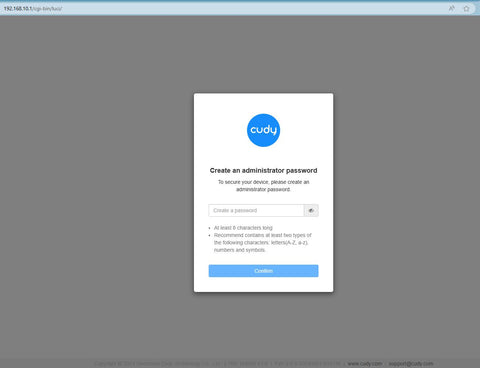
Passaggio 3: verrà visualizzata la pagina di accesso di seguito . Scegli la lingua di visualizzazione della pagina di gestione web e la password richiesta è "admin" oppure devi creare una password.

 < /p>
< /p>
Risoluzione dei problemi:
Se la pagina di accesso non viene visualizzata, prova i seguenti passaggi per la risoluzione dei problemi:
1. Assicurati che http://cudy.net o http://192.168.10.1 sta digitando nella barra degli indirizzi e non nella barra di ricerca.
2. Se il computer è impostato su un indirizzo IP statico, modifica le sue impostazioni per ottenere automaticamente un indirizzo IP e un indirizzo del server DNS.
3. Utilizza un altro browser web e riprova.
4. Cambia diversi dispositivi client.
5. Riavvia o reimposta il router e controlla di nuovo.
Come ripristinare: con l'alimentazione accesa, premere e forare il pulsante/foro Reset per 8 secondi.< /p>
6. Cancella i cookie del browser.
7. Disabilita e abilita l'adattatore di rete in uso.
288 commenti
the link works but when I put in the password is doesn’t work
@Estimado Pedro,
1. Por favor, vaya a la página «Configuración General» para comprobar la función VPN.
2. Si aún así no la encuentras. Creo que el router no funciona en modo Router Inalámbrico o en modo WISP. No hay función VPN cuando lo configuras en modo Punto de Acceso, Extensor y Cliente.
“Tengo el router D84D-3600H configurado por PC y no hay manera de instalar una VPN. No sale el ícono de VPN.
Por favor indíquenme como lo debo hacer,pará ver el icono de la VPN.
Gracias 🫂🫂”
Tengo el router D84D-3600H configurado por PC y no hay manera de instalar una VPN. No sale el ícono de VPN.
Por favor indíquenme como lo debo hacer,pará ver el icono de la VPN.
Gracias 🫂🫂
@Marcelo,
Estimado cliente:
Gracias por contactar con el equipo de apoyo de cudy. Compruebe si ha utilizado la fuente de alimentación correcta. Si utiliza la fuente de alimentación en el embalaje, intente reemplazar otra fuente de alimentación DC 12v. Si el problema sigue ahí, creo que el enrutador está defectuoso. Póngase en contacto con el vendedor para solicitar una garantía.
“Tengo un Cudy LT 400 y no hay manera de configurarlo .. le puse una tarjeta DIGI y lo necesito para unas cámaras de vigilancia .. pero no hay forma ! Necesito que me den una guía bien explicada de cómo hacerlo funcionar porque al encenderlo solo se ilumina 4G y cuando busco en el móvil, no aparece nada ni siquiera para poner nombre y contraseña que está en la etiqueta del router .. Gracias !”
Tengo un Cudy LT 400 y no hay manera de configurarlo .. le puse una tarjeta DIGI y lo necesito para unas cámaras de vigilancia .. pero no hay forma ! Necesito que me den una guía bien explicada de cómo hacerlo funcionar porque al encenderlo solo se ilumina 4G y cuando busco en el móvil, no aparece nada ni siquiera para poner nombre y contraseña que está en la etiqueta del router .. Gracias !