
Topologia di rete comune:

Passaggio 1: apri un browser web e vai a http://cudy.net o http://192.168.10.1.
Per i dettagli, fare riferimento a Come accedere all'interfaccia web di Cudy Router?
Passaggio 2: verrà visualizzata la finestra Configurazione rapida , scegli 'Wireless Extender', quindi vai a 'Avanti'.< /p>

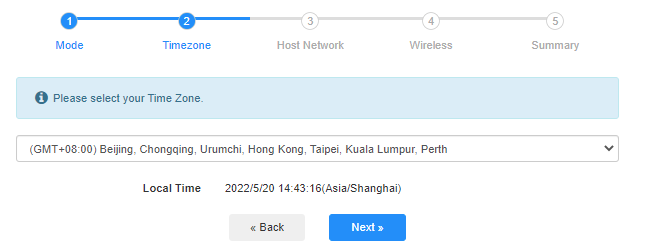
 Passaggio 3: Scegli il tuo "fuso orario.
Passaggio 4: seleziona la rete host che desideri estendere. Fai clic su "Connetti".

 Passaggio 5: Inserisci la password wireless della rete host.

 Nota: Crea assicurati che la password wireless digitata sia corretta, altrimenti la configurazione non potrà avere successo.
Passaggio 6: personalizza il nome Wi-Fi ( SSID) e la password è la stessa della rete host.

 Passaggio 7: Fai clic su "Salva e salva. Applica' per completare la configurazione.

 Passaggio 8: Riconnetti i tuoi dispositivi wireless alla nuova rete Wi-Fi.

 Nota:< /strong>
1. Se si configura la modalità Wireless Extender utilizzando un dispositivo cablato, questo dispositivo potrebbe non disporre di Internet dopo la configurazione. Scollega e ricollega il cavo Ethernet o disattiva e attiva l'adattatore di rete per acquisire la nuova connessione.
2. Dopo aver configurato il router Cudy in modalità Wireless Extender, l'indirizzo IP verrà assegnato dal router host e l'indirizzo IP predefinito 192.168.10.1 non sarà in grado di accedere. Se è necessario accedere nuovamente al router Cudy, digitare '< a href="http://cudy.net/" data-mce-href="http://cudy.net/" data-mce-fragment="1">http://cudy.net' nel tuo browser o cerca l'indirizzo IP del router Cudy nell'elenco dei client del router host.
69 commenti
приобрел роутер cudy BE 3600 WR 3600E v1.0, прошивка 2.3.15, подключаю его по инструкции в режиме усилитель сигнала , ввожу все как полагается пароль от основной сети , далее роутер создает две сети с приставкой EXT, пароль как у основной сети оставляю, прохожу все пути мне пишет подключитесь к новой сети , я подключаюсь интернета нет. Захожу в приложение связи Cudy с основным роутером нет, делаю повторно процедуру все так же новая сеть появляется интрнета нет. Что делать ??? До этого был роутер тоже Cudy wr3000 там был режим WISP с этим режимом мне удавалось расширить сеть. В WR3600E такого режима нет, токлько усилитель сигнала.
@Dear Teresa,
1. Please update the latest firmware for your RE1200 and check again.
2. If the problem remains, Has RE1200 been connected to the WiFi signal of the main router? If the RE1200 has been connected to the WiFi signal of the main router, are you connected to the 5GHz WiFi signal of the main router or the 2.4GHz WiFi signal? Generally speaking, 5GHz has higher performance, so it is recommended that you connect to a 5GHz signal.
3. If RE1200 has successfully connected to the WiFi signal of the main router, please describe the specific problems currently encountered. For example, mobile phones and other terminals cannot search for RE1200’s WiFi signal? Mobile phones and other terminals search for RE1200’s WiFi signal but cannot connect? Mobile phones and other terminals can search for RE1200’s WiFi signal and connect, but cannot access the Internet?
In addition, please adjust the placement to the appropriate place according to the color of the RE indicator light. Solid blue light indicates that the WiFi signal connection between the RE1200 and the main router is good.
“I have the Cudy RE1200 and I’m having endless problems, keeps disconnecting, I’m at my wits end!”
I have the Cudy RE1200 and I’m having endless problems, keeps disconnecting, I’m at my wits end!
@Уважаемый Владимир,
Пожалуйста, перейдите в раздел «Общие настройки» — на страницу функции «WISP». Там вы сможете включить эту функцию и настроить устройство в качестве Wi-Fi-повторителя.
“CUDY LT500D не получается настроить его как репитор. при первичной настройке нету раздела для выбора режима модема… как это можно исправить?”
CUDY LT500D не получается настроить его как репитор. при первичной настройке нету раздела для выбора режима модема… как это можно исправить?