
Topologia di rete comune:

Passaggio 1: apri un browser web e vai a http://cudy.net o http://192.168.10.1.
Per i dettagli, fare riferimento a Come accedere all'interfaccia web di Cudy Router?
Passaggio 2: verrà visualizzata la finestra Configurazione rapida , scegli 'Wireless Extender', quindi vai a 'Avanti'.< /p>

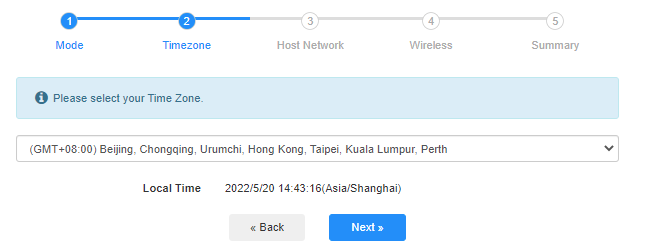
 Passaggio 3: Scegli il tuo "fuso orario.
Passaggio 4: seleziona la rete host che desideri estendere. Fai clic su "Connetti".

 Passaggio 5: Inserisci la password wireless della rete host.

 Nota: Crea assicurati che la password wireless digitata sia corretta, altrimenti la configurazione non potrà avere successo.
Passaggio 6: personalizza il nome Wi-Fi ( SSID) e la password è la stessa della rete host.

 Passaggio 7: Fai clic su "Salva e salva. Applica' per completare la configurazione.

 Passaggio 8: Riconnetti i tuoi dispositivi wireless alla nuova rete Wi-Fi.

 Nota:< /strong>
1. Se si configura la modalità Wireless Extender utilizzando un dispositivo cablato, questo dispositivo potrebbe non disporre di Internet dopo la configurazione. Scollega e ricollega il cavo Ethernet o disattiva e attiva l'adattatore di rete per acquisire la nuova connessione.
2. Dopo aver configurato il router Cudy in modalità Wireless Extender, l'indirizzo IP verrà assegnato dal router host e l'indirizzo IP predefinito 192.168.10.1 non sarà in grado di accedere. Se è necessario accedere nuovamente al router Cudy, digitare '< a href="http://cudy.net/" data-mce-href="http://cudy.net/" data-mce-fragment="1">http://cudy.net' nel tuo browser o cerca l'indirizzo IP del router Cudy nell'elenco dei client del router host.
69 commenti
@Christos,
Dear Customer,
Thanks for contacting the Cudy support team.
Yes, but you need to update the latest firmware 2.3.0 of WR1500 first. Then the router will support the range extender mode and WISP mode to connect the main WiFi.
https://www.cudy.com/pages/download-center/wr1500-1-0
“Hello.
Cudy WR1500 Wireless Router Wi‑Fi 6 with 3 Gigabit Ethernet Ports support wireless connection with the home internet route and act as repeater?”
Hello.
Cudy WR1500 Wireless Router Wi‑Fi 6 with 3 Gigabit Ethernet Ports support wireless connection with the home internet route and act as repeater?
@Uschi,
You can enable the WISP function to connect the main WiFi and share the network to all the client on LT400. Please have a try.
“Can I use the Cudy N300 4G LTE in Wireless Extender Mode?
In the Cudy App is no option for Wireless extender.”
Can I use the Cudy N300 4G LTE in Wireless Extender Mode?
In the Cudy App is no option for Wireless extender.
@Widny,
Dear Widny,
Thank you for contacting Cudy support team.
Sorry to tell you that all Cudy 4G/5G routers don’t support Bridge mode. We will provide feedback to the R&D department for evaluation to add this function.
“Good afternoon, I’m looking for a 5G router with Bridge mode and was wondering if your Cudy New 5G NR SA NSA AX3000 supports that feature.”