
Il router Cudy LTE è dotato di una porta LAN/WAN, quindi possiamo modificare la modalità di funzionamento della porta e utilizzare una rete 4G/5G come soluzione di backup per l'accesso a Internet. Quando la porta LAN/WAN funziona in modalità WAN, il router si connetterà alla rete 4/5G se il servizio di rete originale fallisce.
Topologia di rete comune:

Passaggio 1: assicurati che la rete 4/5G sia già stata configurata correttamente.
Passaggio 2: collega la porta LAN/WAN del router al modem o alla porta di rete.
Nota: assicurati di avere già un modem o che la connessione Internet provenga da una presa Ethernet che ti fornisce Internet.
Passaggio 3: apri un browser web e vai su http://cudy.net o http://192.168.10.1.
Per i dettagli, fare riferimento a Come accedere nell'interfaccia web di Cudy Router?
Passaggio 4: vai a Impostazioni avanzate->Cambio LAN/WAN.

Passaggio 5: fai clic su "Passa a WAN", quindi il router si riavvierà e applicherà le impostazioni.
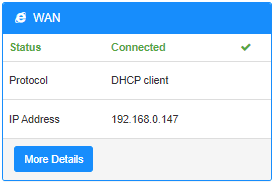
Passaggio 6: al termine della configurazione, vedrai lo stato di seguito nella pagina Stato del sistema.
18 commenti
Hallo,
ich habe das gleiche Problem wie hier am 02.08.2025 geschildert:
“Hello I have internet being fed from another router (“Network A”) to my Cudy LTE Modem/Router (“Network B”). If Network A loses internet but is still working as a network (just no internet). The Cudy LTE failover does not kick in because it does not realize the internet is down. I tried changing the online detection settings but that did not work.”
@Dear H,
Our technical support has contacted you via email. Please check.
“Hello I have internet being fed from another router (“Network A”) to my Cudy LTE Modem/Router (“Network B”). If Network A loses internet but is still working as a network (just no internet). The Cudy LTE failover does not kick in because it does not realize the internet is down. I tried changing the online detection settings but that did not work.”
Hello I have internet being fed from another router (“Network A”) to my Cudy LTE Modem/Router (“Network B”). If Network A loses internet but is still working as a network (just no internet). The Cudy LTE failover does not kick in because it does not realize the internet is down. I tried changing the online detection settings but that did not work.
@Dear Molon,
The function depends on the “Advanced Setting” —“Online Check” function. Did you disable it. If yes, please enable it.
“Hello, first my cuddy Lte n300 working well on 4g. My point is I configure WAN, and when I put my câble, the router switch on WAN/4G. Until now everything is working as expected but if my main router has a connectivity issue, the cuddy router still continu to work on WAN whereas there is no more connectivity. So I don’t see the automatic switch on 4G”
Hello, first my cuddy Lte n300 working well on 4g. My point is I configure WAN, and when I put my câble, the router switch on WAN/4G. Until now everything is working as expected but if my main router has a connectivity issue, the cuddy router still continu to work on WAN whereas there is no more connectivity. So I don’t see the automatic switch on 4G