
MAC Filter è una tecnologia utilizzata nei router wireless per impedire l'accesso non autorizzato alle reti. L'indirizzo MAC è un identificatore univoco assegnato a ciascun dispositivo su una rete. Un router wireless utilizza un indirizzo MAC per identificare il dispositivo e determinare a quale rete deve connettersi..
Passaggio 1: Apri un browser web e vai a http://cudy.net< /a> o http://192.168.10.1.
Per dettagli, fare riferimento a Come accedere all'interfaccia web di Cudy Router?
Passaggio 2: Fai clic su Impostazioni avanzate -> Filtro MAC nel Sicurezza.

Passaggio 3: Controlla le impostazioni nella pagina Filtro MAC.

• Per bloccare i dispositivi specifici
1. Seleziona 'Consenti tutto tranne l'elenco'.
2. Seleziona i dispositivi da bloccare nell'elenco dei dispositivi online relativo all'indirizzo MAC e all'indirizzo IP.


Se il dispositivo online che desideri bloccare non è presente, vai a a Stato del sistema->Dispositivi- >copia il MAC Indirizzo->torna a Filtro MAC->Personalizza e incolla l'indirizzo MAC.
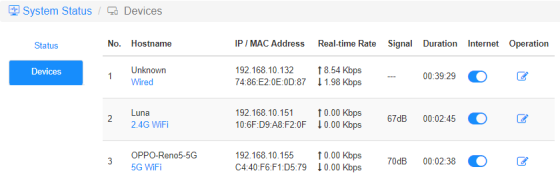
3. Salva e salva Applica e il dispositivo selezionato non sarà più in grado di accedere a Internet dal router.
• Per consentire dispositivi specifici
1. Seleziona 'Consenti solo elencoy'.
2. Seleziona i dispositivi a cui consenti l'accesso a Internet.

3. Salva e salva Fai domanda e solo i dispositivi selezionati potranno accedere a Internet.
Ecco un modo semplice per fare lo stesso del filtro MAC.
Stato del sistema-> Dispositivi
Internet
Abilita e disabilita l'icona Internet per controllare l'accesso a Internet di ciascun dispositivo.
'OPPO-Reno5-5G' non può accedere a Internet tramite il router sottostante.

Operazione
Fai clic su Operazione l'icona può specificare un nuovo nome per il dispositivo.

Limitazione temporale dell'accesso a Internet
Il periodo di tempo durante il quale i dispositivi possono accedere a Internet.
Esempio: il dispositivo "Computer" può utilizzare Internet solo lunedì dalle 10:00 alle 20:00.


12 commenti
@Dear tonalt,
Our technical support has sent you the solutions via email. Please check.
“it seems that an activated mac-filter also has an effect on the guest-network in the sense that the router doesn’t connect a guest to the internet! LT700E.
i think most people don’t like this and even worse: the activated mac filter on the guest network is not editable and it even worser it doesn’t use the mac table that is defined for the main wifi network.
so the mac filter is completely useless if one allows a guest-network.
probably i am wrong and the guest network can connect a guest to the internet with an activated mac-filter. but if so, please tell what i can do, to achieve this.”
it seems that an activated mac-filter also has an effect on the guest-network in the sense that the router doesn’t connect a guest to the internet! LT700E.
i think most people don’t like this and even worse: the activated mac filter on the guest network is not editable and it even worser it doesn’t use the mac table that is defined for the main wifi network.
so the mac filter is completely useless if one allows a guest-network.
probably i am wrong and the guest network can connect a guest to the internet with an activated mac-filter. but if so, please tell what i can do, to achieve this.
@Dear William and Dragan,
Thank you for your kindly advice! We will provide your feedback to the product department for evaluation. In fact, we already have this plan to develop this feature.
“I completely agree with William. I just can’t believe this kind of oversight was made. MAC filtering still hasn’t been added to the latest firmware 2.3.12. Please update the firmware and give us that function.”
“I just bought the Cudy WR11000 WiFi 7 Router and want to use it as an Access Point with MAC Filtering. But I just found out that there is no way to enable MAC Filtering when it is in Access Point mode. Why? You need to allow MAC Filtering in Access Point mode Not just only in Router mode! Please update the firmware and give us that function. I am on the latest firmware version 2.2.19.”
mine is WR3600
I completely agree with William. I just can’t believe this kind of oversight was made. MAC filtering still hasn’t been added to the latest firmware 2.3.12. Please update the firmware and give us that function.