
I router Cudy hanno un'interfaccia web integrata e questa pagina web interna non richiede l'accesso a Internet. Puoi connettere il tuo dispositivo al Cudy Router tramite Wi-Fi o Ethernet per accedere alla pagina di gestione web.
Passaggio 1: collega il tuo computer al tuo Cudy Router tramite Wireless o Cablato.
Se Wireless: il nome Wi-Fi predefinito e la password è stampata sull'etichetta inferiore del router.
Se cablato: collega il tuo computer a uno dei < strong data-mce-fragment="1">Porte LAN sul retro del router tramite un cavo Ethernet.
Passaggio 2: apri un browser web (Google, Firefox, ecc.) e inserisci http://cudy.net o http://192.168.10.1 nella barra degli indirizzi.
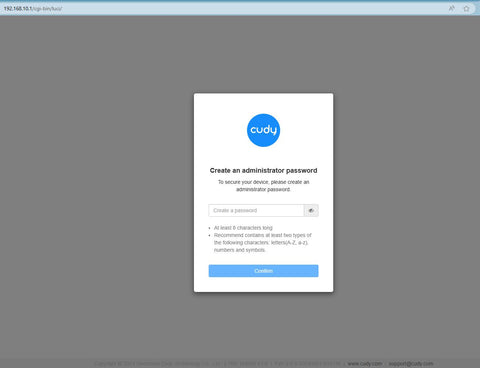
Passaggio 3: verrà visualizzata la pagina di accesso di seguito . Scegli la lingua di visualizzazione della pagina di gestione web e la password richiesta è "admin" oppure devi creare una password.

 < /p>
< /p>
Risoluzione dei problemi:
Se la pagina di accesso non viene visualizzata, prova i seguenti passaggi per la risoluzione dei problemi:
1. Assicurati che http://cudy.net o http://192.168.10.1 sta digitando nella barra degli indirizzi e non nella barra di ricerca.
2. Se il computer è impostato su un indirizzo IP statico, modifica le sue impostazioni per ottenere automaticamente un indirizzo IP e un indirizzo del server DNS.
3. Utilizza un altro browser web e riprova.
4. Cambia diversi dispositivi client.
5. Riavvia o reimposta il router e controlla di nuovo.
Come ripristinare: con l'alimentazione accesa, premere e forare il pulsante/foro Reset per 8 secondi.< /p>
6. Cancella i cookie del browser.
7. Disabilita e abilita l'adattatore di rete in uso.
288 commenti
How to change my router password
I can log into the app and my account but cant login to the device
I tried ‘admin’ and the password on the router also my account password, it doesnt work
I have also press the reset still nothing
I can access the wifi but it doesnt display SSD id, even after i have reset
Kindly advice
I can log into the app and my account but cant login to the device
I tried ‘admin’ and the password on the router also my account password, it doesnt work
I have also press the reset still nothing
I can access the wifi but it doesnt display SSD id, even after i have reset
Kindly advice
@Dear Prudence Mthabini,
What is the password for?
“I want to change password”
@Dear Michael baloyi,
I think you forget the administrator password. you can try to reset the router to factory default by long pressing the reset button for about 3 seconds. You can release the reset button when the LED flashes. You must create a new password when first login to the web page of the router.
“I’m trying to change the password to log in it says invalid password try again”