


Amazon A+ Content


Wired. Powered. Reliable.
Geschirmter 2,5-Gbit/s-Ethernet-Anschluss
Wired. Powered. Reliable.
Geschirmter 2,5-Gbit/s-Ethernet-Anschluss
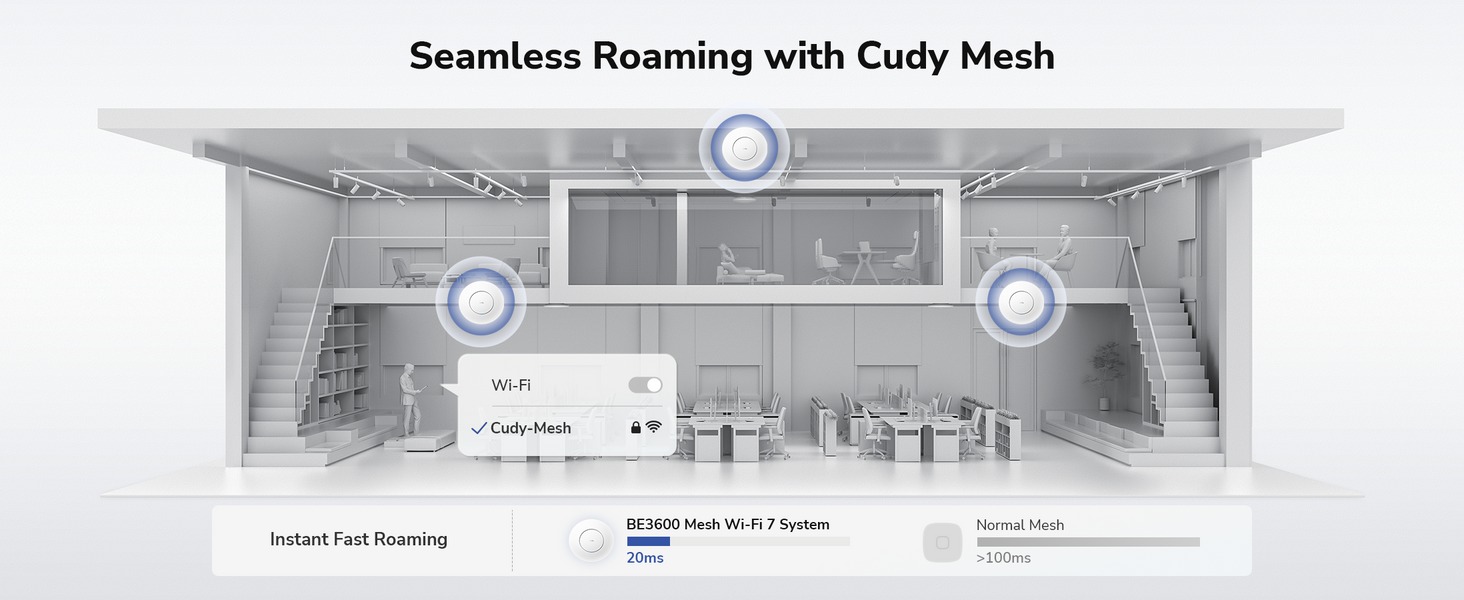

Nahtloses WLAN für überall

Campus

Gastfreundschaft

Konferenzzentrum

Einkaufszentrum
Erweiterte Geschäftsfunktionen

Bandsteuerung

Automatische Kanalauswahl

Automatische Netzoptimierung

OpenWiFi
Vielseitige Stromversorgung und Installation

Flexible PoE/DC-Stromversorgungsoptionen

Vielseitige Montage

Zentralisierte Kreditorenbuchhaltung
Zentralisierte Kreditorenbuchhaltung
| Modellversion | ||
|---|---|---|
| Modellversion | AP3600 1.0 | |
| CPU | ||
| CPU | CPU Details | 2.0 GHz Quad-Core, ARM Cortex-A7 |
| Memory/Storage | ||
| Memory/Storage | Flash/ROM | 128 MB (1 Gbit) NAND |
| DDR/RAM | 512 MB (4 Gbit) DDR3L | |
| Wireless | ||
| Wireless | MLO Speeds | 3570 Mbps |
| 5 GHz Wi-Fi Speed | 2882 Mbps | |
| 2.4 GHz Wi-Fi Speed | 688 Mbps | |
| 5 GHz Wi-Fi Streams | 2 Spatial Streams | |
| 2.4 GHz Wi-Fi Streams | 2 Spatial Streams | |
| Wi-Fi Antennas | 4× Internal | |
| FEM or PA/LNA | 5 GHz: 2× Internal, 2.4 GHz: 2× Internal | |
| Beamforming | ||
| Range Performance |
Max: 220 m (722 ft) Tested in open-space environments with minimal interference. Actual WiFi range may vary depending on layout and wall materials. Refer to the Wall Performance specifications for placement suggestions. |
|
| Wall Performance |
Two wooden walls with thickness < 10 cm (4'') One concrete wall with thickness < 20 cm (7'') or two concrete walls with thickness < 10 cm (4'') |
|
| Interfaces | ||
| Interfaces | 2.5G RJ45 Ports | 1 |
| Gigabit RJ45 Ports | 1 | |
| Ethernet Notes | ETH0: PoE In | |
| Buttons and LEDs | ||
| Buttons and LEDs | LED | System |
| Physical Buttons | Reset Button | |
| Power | ||
| Power | Power Input Type |
|
| Power Methods |
|
|
| Power Input |
|
|
| Max Power Consumption (W) | 10W | |
| Power Adapter In the Box |
AP3600 | No adapter in the box AP3600_P | PoE adapter in the box: Input: 100-240V~, 50/60Hz Output: 48V⎓ Passive PoE |
|
| Reliability | ||
| Reliability | Advanced | Hardware Watchdog |
| EMC | ESD: Contact: 4kV; Air: 8kV | |
| Environment |
|
|
| Certifications | ||
| Certifications | FCC, CE | |
| Mechanical | ||
| Mechanical | Installation |
|
| Dimension |
231.9×231.9×57.1 mm 9.13×9.13×2.25 inches |
|
| Product Weight |
|
|
| Package Content | ||
| Package Content |
|
|
| Ordering Information | ||
| Ordering Information | Retail Package Weight |
|
| Retail Package Dimension |
310×238×73 mm 12.2×9.37×2.87 inches |
|
| Units per Carton | 10 | |
| Carton Net Weight |
|
|
| Carton Gross Weight |
|
|
| Carton Dimension |
49.5×38.7×33.2 cm 19.49×15.24×13.07 inches |
|
| Kompatibilität | ||
| Kompatibilität | Kompatible Produkte | C200P 1.0, C500P 1.0 |
| Kompatibles Zubehör | POE200H 1.0, POE52-30W 1.0, POE48-18W 1.0 | |
| Note | Choose with caution: some suggested models may not deliver speeds that match the device’s maximum capability. | |
| Modellversion | ||
|---|---|---|
| Modellversion | AP3600 1.0 | |
| Wireless | ||
| Wireless | Wi-Fi Standards | Wi-Fi 7 |
| Max Wi-Fi Modulation | 4K-QAM | |
| Wi-Fi Efficiency |
|
|
| Max Capacity | 512 | |
| Recommended Client Upper Limit | 200 | |
| Wi-Fi Channel Width | Auto/20/40/80/160 MHz | |
| Wi-Fi Security | WPA/WPA2/WPA3 | |
| Multi-SSID (Max Number) | 8 SSIDs (Up to 4 SSIDs on each band), VLAN Support | |
| WPS | ||
| General | ||
| General | Operation Modes |
|
| Mesh | Cudy Mesh | |
| Mesh Backhaul |
|
|
| Multi-Band Backhaul | ||
| WAN Mode |
|
|
| Management | ||
| Management | Multi-AP Management | Via Cudy AP Controller |
| All Devices Management |
|
|
| Per-Devices Management |
|
|
| Content Management |
|
|
| Network | ||
| Network | QoS | Per-User Rate Limiting |
| DHCP |
|
|
| IP Versions | IPv4/IPv6 | |
| IPv6 Protocols |
|
|
| Multicast | ||
| IPTV/VLAN | Tag VLAN | |
| TTL Customization |
|
|
| IGMP |
|
|
| Forwarding |
|
|
| Firewall |
|
|
| Application Layer Gateway |
|
|
| Utilities | ||
| Utilities | Captive Portal | |
| Captive Portal Authentication | No Authentication, Local Password, External Portal Server | |
| VPN Server |
|
|
| VPN Client |
|
|
| DNS Options |
|
|
| DNS over TLS Providers |
|
|
| Wake on LAN | ||
| Online Detection | ||
| System | ||
| System | LED Control | |
| Local Control Method |
|
|
| Remote Control Method |
|
|
| Firmware Upgrade |
|
|
| Reliability |
|
|
| Diagnostic Tools |
|
|
| Languages |
|
|
| Dashboard | ||
| Dashboard | Panel |
|
| Charts |
|
|
- Die tatsächliche drahtlose Datenübertragungsrate kann aufgrund von Netzwerkbedingungen, Client-Beschränkungen und Umgebungsfaktoren wie Gebäudestruktur, Hindernissen und Client-Standort variieren.
- Für die Aktivierung dieser Funktion ist ein Cudy AP Controller erforderlich.
- Die tatsächliche Leistung mehrerer Geräte kann durch die verwendeten Anwendungen, die verfügbare Bandbreite und die Leistungsfähigkeit der Geräte beeinflusst werden. Die Verbindung älterer WLAN-Geräte (ältere Standards) kann die Gesamteffizienz verringern. Für die Nutzung von Effizienzfunktionen sind kompatible Client-Geräte erforderlich, die diese Funktionen unterstützen. Weitere Informationen zu den unterstützten Effizienzfunktionen finden Sie im Software-Abschnitt der Spezifikationstabelle.
- Die Angabe zur WLAN-Abdeckung dient lediglich als Richtwert. Die tatsächliche Abdeckung kann aufgrund von Umgebungsfaktoren wie Gebäudestruktur, Hindernissen, Verkehrsaufkommen und -dichte sowie dem Standort des Geräts variieren. Für eine optimale Abdeckung platzieren Sie das Gerät bitte zentral im gewünschten WLAN-Bereich.