第4 步: 選擇您想要的主機網路延長。點選"連接"。
 第5 步: 輸入主機網路的無線密碼。
 注意: 請確保您輸入的無線密碼正確,否則配置無法成功。
第6 步: 自訂Wi-Fi 名稱( SSID),密碼與您的主機網路相同。
 第7 步: 點擊"儲存並儲存"應用"完成配置。
 第8 步: 將您的無線設備重新連接到新的Wi-Fi 網路。
 注意:
注意:
1.如果您使用有線裝置設定無線擴展器模式,則該裝置在設定後可能無法上網。請拔下並插入乙太網路電纜或停用並啟用網路適配器以取得新連線。
2.在無線擴展器模式下設定 Cudy 路由器後,IP 位址將由主機路由器分配,預設 IP 位址 192.168.10.1 將無法登入。 /" data-mce-href="http://cudy.net/" data-mce-fragment="1">http://cudy.net'


 第3 步: 選擇您的"時區"。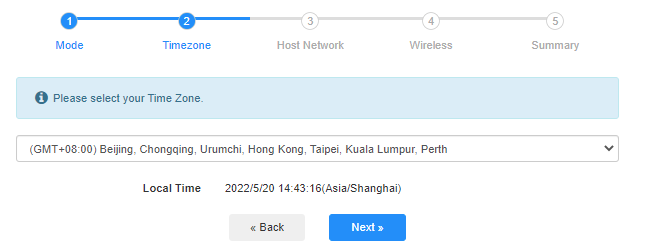


69 則留言
@Christos,
Dear Customer,
Thanks for contacting the Cudy support team.
Yes, but you need to update the latest firmware 2.3.0 of WR1500 first. Then the router will support the range extender mode and WISP mode to connect the main WiFi.
https://www.cudy.com/pages/download-center/wr1500-1-0
“Hello.
Cudy WR1500 Wireless Router Wi‑Fi 6 with 3 Gigabit Ethernet Ports support wireless connection with the home internet route and act as repeater?”
Hello.
Cudy WR1500 Wireless Router Wi‑Fi 6 with 3 Gigabit Ethernet Ports support wireless connection with the home internet route and act as repeater?
@Uschi,
You can enable the WISP function to connect the main WiFi and share the network to all the client on LT400. Please have a try.
“Can I use the Cudy N300 4G LTE in Wireless Extender Mode?
In the Cudy App is no option for Wireless extender.”
Can I use the Cudy N300 4G LTE in Wireless Extender Mode?
In the Cudy App is no option for Wireless extender.
@Widny,
Dear Widny,
Thank you for contacting Cudy support team.
Sorry to tell you that all Cudy 4G/5G routers don’t support Bridge mode. We will provide feedback to the R&D department for evaluation to add this function.
“Good afternoon, I’m looking for a 5G router with Bridge mode and was wondering if your Cudy New 5G NR SA NSA AX3000 supports that feature.”