
Routery Cudy posiadają wbudowany interfejs webowy, a ta wewnętrzna strona internetowa nie wymaga dostępu do internetu. Możesz połączyć urządzenie z routerem Cudy przez Wi-Fi lub Ethernet, aby zalogować się do strony zarządzania.
Krok 1:Podłącz komputer do routera Cudy za pomocąBezprzewodowyLubPrzewodowy.
JeśliBezprzewodowy:Domyślna nazwa i hasło sieci Wi-Fi są wydrukowane na etykiecie dolnej routera.
JeśliPrzewodowy: Podłącz komputer do jednego zPorty LANz tyłu routera za pomocą kabla Ethernet.
Krok 2: Otwórz przeglądarkę internetową (Google, Firefox, Edge itp.) i wprowadźhttp://cudy.netLubhttp://192.168.10.1w pasku adresu.
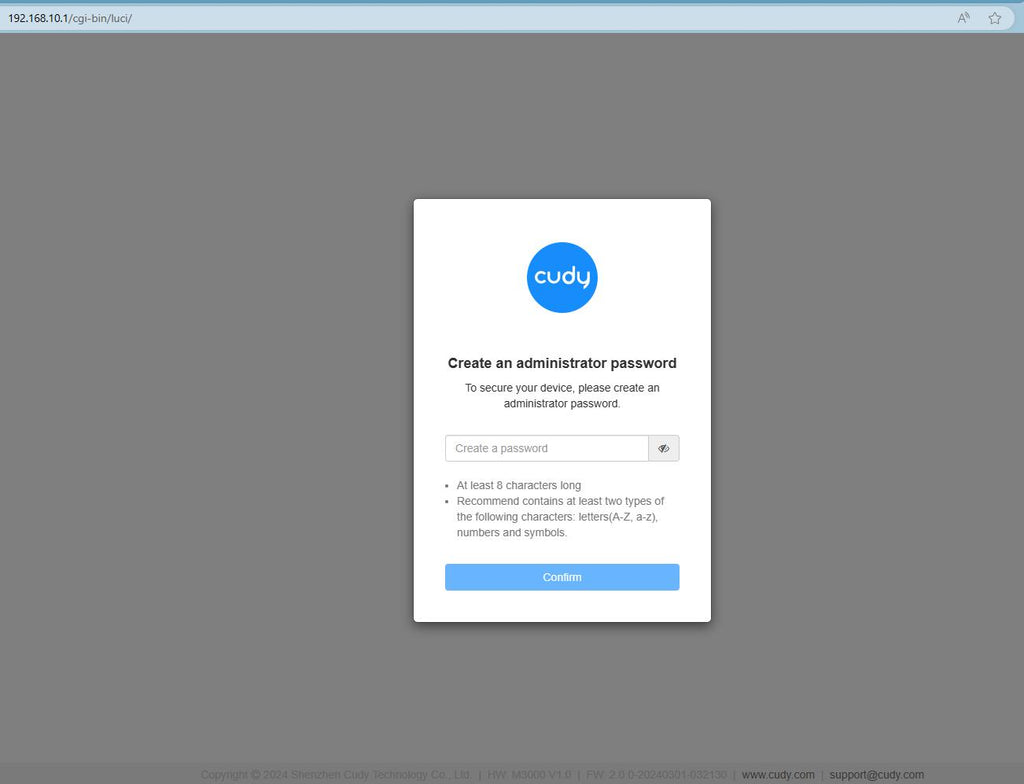
Krok 3:Poniżej pojawi się strona logowania. Wybierz język wyświetlania strony zarządzania witryną i wymagane hasło:administratorlub trzeba utworzyć jedno hasło.

Rozwiązywanie problemów:
Jeśli strona logowania się nie wyświetla, wypróbuj poniższe kroki rozwiązywania problemów na stronie internetowej:
Co mam zrobić, jeśli nie mogę uzyskać dostępu do interfejsu internetowego mojego routera Cudy?
346 komentarze(-y)
@Dear Juan,
Thanks for contacting the Cudy support team. You can try to reset the router to factory default by long pressing the reset button for about 3 seconds. You can release the reset button when the LED flashes.
The default password of the WEB panel will recover to default “admin”. If the firmware version is 2.×.x, you need to create a new password when first login to the web page of the router.
“I am trying to log into my cudy Cat.6 router. It does not accept admin or the password on the bottom of the router?”
@Tovio,
Dear Customer,
Thanks for contacting the Cudy support team. You can try to reset the router to factory default by long pressing the reset button for about 3 seconds. You can release the reset button when the LED flashes.
The default password of the WEB panel will recover to default “admin”. If the firmware version is 2.×.x, you need to create a new password when first login to the web page of the router.
“the link works but when I put in the password is doesn’t work”
I am trying to log into my cudy Cat.6 router. It does not accept admin or the password on the bottom of the router?
the link works but when I put in the password is doesn’t work
@Estimado Pedro,
1. Por favor, vaya a la página «Configuración General» para comprobar la función VPN.
2. Si aún así no la encuentras. Creo que el router no funciona en modo Router Inalámbrico o en modo WISP. No hay función VPN cuando lo configuras en modo Punto de Acceso, Extensor y Cliente.
“Tengo el router D84D-3600H configurado por PC y no hay manera de instalar una VPN. No sale el ícono de VPN.
Por favor indíquenme como lo debo hacer,pará ver el icono de la VPN.
Gracias 🫂🫂”