
ポート転送 (ポート フォワーディング) 機能を使用すると, インターネット上のリモート コンピューターがプライベート LAN 内の特定のコンピューターまたはサービスに接続できるようになります。
サービスごとに異なるサービス ポートが使用されるため, 構成前にサービス ポート番号を確認してください。
重要:
CudyルーターがインターネットサービスプロバイダーからパブリックIP(WAN IP)を取得していることを確認してください。プライベートIPアドレスの場合は, Cudyの前に別のNATデバイスがあることを意味します。そのデバイスのサービスポートも開く必要があります。
IP アドレスがパブリックかプライベートかを確認する方法については, 次のリンクを参照してください。
http://en.wikipedia.org/wiki/プライベートネットワーク
Cudy の WAN IP を確認するにはどうすればいいですか?
ワイヤレス ルーターとメッシュ (システム ステータス -> WAN -> ステータス)

4/5 ルーター (システム ステータス -> セルラー/4G -> ステータス)

注記:
1. 通常, パブリックIPとIPアドレスが同じ場合は, パブリックIPを取得していることを意味します。IPアドレスは, インターネットサービスプロバイダーから取得するWAN IPアドレスです。パブリックIPは, インターネット経由で他のデバイスがあなたのIPアドレスを見つけるためのIPアドレスです。そのため, CudyルーターがプライベートIPアドレスを取得している場合は, どのデバイスがこのパブリックIPを使用しているかを確認し, そのポートを開く必要があります。
2. ほとんどのセルラールーターでは, インターネットサービスプロバイダーがプライベートIPアドレスを付与します。そのため, ポートフォワーディングを行う場合は, インターネットサービスプロバイダーに連絡してパブリックIPアドレスの割り当てを依頼するか, プロバイダー側でポートフォワーディングを行ってください。
ステップ1: ウェブブラウザを開いてhttp://cudy.netまたはhttp://192.168.10.1。
詳細については, Cudy ルーターの Web インターフェースにログインするにはどうすればいいですか?
ステップ2: クリック詳細設定 -> ポート転送の中でネットワークセクション。

ステップ3:クリック追加リストに1つのエントリを追加します。以下のフィールドに必要なパラメータを入力してください。
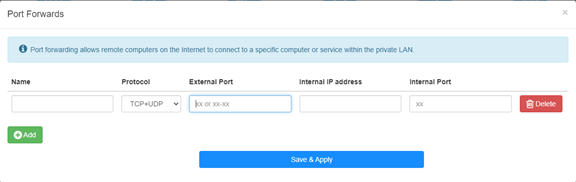
例えば:以下の設定によれば, ホスト 192.168.10.18 の TCP ポート 5000, UDP ポート 5001, および TCP/UDP ポート 6000 の両方がインターネットに開かれます。

名前:
記憶を容易にするために使用するエントリの名前
プロトコル:
TCP, UDP, またはTCP+UDP
外部ポート:
インターネットからアクセスできるWAN側のサービスポート
内部IPアドレス:
インターネットへのポートを開くホストのIPアドレス
内部ポート:
LAN内のホストのサービスポート
注記:
通常, 内部ポートは外部ポートと同じです。
ステップ4: クリック '保存して適用' をクリックして設定を保存します。
ステータスページに移動し, ルーターのWAN IPアドレスを確認します。これで, http:// WAN IP: ポート番号を使用して, 開いたサービスにアクセスできるようになります。
42件のコメント
@Dear Giulio,
If the device you want to access is a windows computer. Please try to disable the firewall of the cpmputer and try again.
In addition, the device you want to access must set the correct gateway IP address (which is the LAN IP address of R700).
“I’m setting up a Wireguard vpn server on R700. The connection is successful and I can access the R700 web interface but no other IP. It seems that the vpn is not routed correctly. But in the router interface there are no advanced commands to manage the nat and I can’t access via ssh. How can it be solved”
I’m setting up a Wireguard vpn server on R700. The connection is successful and I can access the R700 web interface but no other IP. It seems that the vpn is not routed correctly. But in the router interface there are no advanced commands to manage the nat and I can’t access via ssh. How can it be solved
@Dear David,
I think the WAN IP address is not the public IP address. So the Port Forwards function will not work if you want to access it from the internet.
Is it possible to use the VPN function to do this?
“Hi. I have public IP address, but it’s not the same addres which I get from ISP DHCP (probably CGNAT).
How can I enter my public address during port forwarding setting?”
Hi. I have public IP address, but it’s not the same addres which I get from ISP DHCP (probably CGNAT).
How can I enter my public address during port forwarding setting?
@David,
Dear Customer,
Thank you for contacting Cudy support team. Our technical support has contacted you via email. Please check.
Setup Cudy Mesh network.
WR1300 unit is primary and has firmware 2.3.9.
Setup port forwarding.
Setup DDNS with no-ip with address XXX.ddns.net.
Can connect when on Internet.
When on LAN using XXX.ddns.net won’t work. Ports are the same. IP address works.
How do I enable NAT loopback to get it to work?