
ポート転送 (ポート フォワーディング) 機能を使用すると, インターネット上のリモート コンピューターがプライベート LAN 内の特定のコンピューターまたはサービスに接続できるようになります。
サービスごとに異なるサービス ポートが使用されるため, 構成前にサービス ポート番号を確認してください。
重要:
CudyルーターがインターネットサービスプロバイダーからパブリックIP(WAN IP)を取得していることを確認してください。プライベートIPアドレスの場合は, Cudyの前に別のNATデバイスがあることを意味します。そのデバイスのサービスポートも開く必要があります。
IP アドレスがパブリックかプライベートかを確認する方法については, 次のリンクを参照してください。
http://en.wikipedia.org/wiki/プライベートネットワーク
Cudy の WAN IP を確認するにはどうすればいいですか?
ワイヤレス ルーターとメッシュ (システム ステータス -> WAN -> ステータス)

4/5 ルーター (システム ステータス -> セルラー/4G -> ステータス)

注記:
1. 通常, パブリックIPとIPアドレスが同じ場合は, パブリックIPを取得していることを意味します。IPアドレスは, インターネットサービスプロバイダーから取得するWAN IPアドレスです。パブリックIPは, インターネット経由で他のデバイスがあなたのIPアドレスを見つけるためのIPアドレスです。そのため, CudyルーターがプライベートIPアドレスを取得している場合は, どのデバイスがこのパブリックIPを使用しているかを確認し, そのポートを開く必要があります。
2. ほとんどのセルラールーターでは, インターネットサービスプロバイダーがプライベートIPアドレスを付与します。そのため, ポートフォワーディングを行う場合は, インターネットサービスプロバイダーに連絡してパブリックIPアドレスの割り当てを依頼するか, プロバイダー側でポートフォワーディングを行ってください。
ステップ1: ウェブブラウザを開いてhttp://cudy.netまたはhttp://192.168.10.1。
詳細については, Cudy ルーターの Web インターフェースにログインするにはどうすればいいですか?
ステップ2: クリック詳細設定 -> ポート転送の中でネットワークセクション。

ステップ3:クリック追加リストに1つのエントリを追加します。以下のフィールドに必要なパラメータを入力してください。
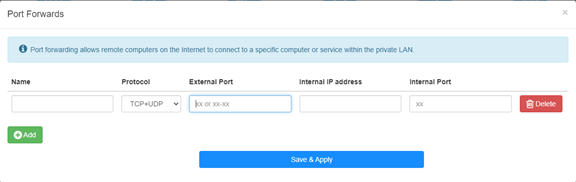
例えば:以下の設定によれば, ホスト 192.168.10.18 の TCP ポート 5000, UDP ポート 5001, および TCP/UDP ポート 6000 の両方がインターネットに開かれます。

名前:
記憶を容易にするために使用するエントリの名前
プロトコル:
TCP, UDP, またはTCP+UDP
外部ポート:
インターネットからアクセスできるWAN側のサービスポート
内部IPアドレス:
インターネットへのポートを開くホストのIPアドレス
内部ポート:
LAN内のホストのサービスポート
注記:
通常, 内部ポートは外部ポートと同じです。
ステップ4: クリック '保存して適用' をクリックして設定を保存します。
ステータスページに移動し, ルーターのWAN IPアドレスを確認します。これで, http:// WAN IP: ポート番号を使用して, 開いたサービスにアクセスできるようになります。
42件のコメント
@David,
Estimado cliente:
Gracias por contactar con el equipo de apoyo de cudy.
La dirección IPv4 de la interfaz de red de área extendida del enrutador no es una dirección IP pública. Por lo tanto, incluso si se establece ddns, no puede acceder a la interfaz Wan del enrutador. El nombre de dominio ddns estará relacionado con la dirección IP pública de la línea.
Compruebe si la dirección IP Wan del enrutador principal es la misma que la dirección IP pública que verificó en el enrutador. Si es así, primero debe configurar el reenvío del puerto en el enrutador principal y luego el reenvío del puerto en el enrutador cudy.
“Ccuando configuro mi DDNS en el router Cudy para configurar no-ip.com me arroja el siguiente alerta en color rojo: the current external network IP is not a public IP, and the DDNS service may not work properly.
la informacion detallada del router es la siguiente:
public ip: 38.51.156.145* (no se que significa el asterisco al lado de la ip)
direccion ip: 192.168.55.2
mascara: 255.255.255.0
pasarela: 192.168.55.1
dns: 192.168.55.1
En otra ventana me arroja esta informacion:
Wan
direccion ip: 192.168.55.2
Lan
direccion ip: 192.168.10.1
cabe destacar que tengo conectado el DVR a un mesh y a este dvr le coloque ip: 192.168.10.200"
Ccuando configuro mi DDNS en el router Cudy para configurar no-ip.com me arroja el siguiente alerta en color rojo: the current external network IP is not a public IP, and the DDNS service may not work properly.
la informacion detallada del router es la siguiente:
public ip: 38.51.156.145* (no se que significa el asterisco al lado de la ip)
direccion ip: 192.168.55.2
mascara: 255.255.255.0
pasarela: 192.168.55.1
dns: 192.168.55.1
En otra ventana me arroja esta informacion:
Wan
direccion ip: 192.168.55.2
Lan
direccion ip: 192.168.10.1
cabe destacar que tengo conectado el DVR a un mesh y a este dvr le coloque ip: 192.168.10.200
@david,
Our technical support has sent you the solutions via email. Please check.
“Hoello, I need to change external adress during port redirecting. Address is given by my intrnet provider but it is different then detected by router. Unfortunatelly, there is no such possibility in html interface (or I can’t find it?) Router model: NT12
Thank you”
Hoello, I need to change external adress during port redirecting. Address is given by my intrnet provider but it is different then detected by router. Unfortunatelly, there is no such possibility in html interface (or I can’t find it?) Router model: NT12
Thank you
@Tomas,
Dear Customer,
Our technical support has contacted you via email. Please check.
“Hello,
I have an issue with setting port forwarding on LT700e.
It is supposed to be able to forward ports on VPN interface as well, but it does not work, ports are not forwarded correctly (they do not seems to be opened at all)
The purpose is to allow connecting to local service from other client in same VPN network.
VPN network itself seems to work fine.
Could you please advice?”