
ポート転送 (ポート フォワーディング) 機能を使用すると, インターネット上のリモート コンピューターがプライベート LAN 内の特定のコンピューターまたはサービスに接続できるようになります。
サービスごとに異なるサービス ポートが使用されるため, 構成前にサービス ポート番号を確認してください。
重要:
CudyルーターがインターネットサービスプロバイダーからパブリックIP(WAN IP)を取得していることを確認してください。プライベートIPアドレスの場合は, Cudyの前に別のNATデバイスがあることを意味します。そのデバイスのサービスポートも開く必要があります。
IP アドレスがパブリックかプライベートかを確認する方法については, 次のリンクを参照してください。
http://en.wikipedia.org/wiki/プライベートネットワーク
Cudy の WAN IP を確認するにはどうすればいいですか?
ワイヤレス ルーターとメッシュ (システム ステータス -> WAN -> ステータス)

4/5 ルーター (システム ステータス -> セルラー/4G -> ステータス)

注記:
1. 通常, パブリックIPとIPアドレスが同じ場合は, パブリックIPを取得していることを意味します。IPアドレスは, インターネットサービスプロバイダーから取得するWAN IPアドレスです。パブリックIPは, インターネット経由で他のデバイスがあなたのIPアドレスを見つけるためのIPアドレスです。そのため, CudyルーターがプライベートIPアドレスを取得している場合は, どのデバイスがこのパブリックIPを使用しているかを確認し, そのポートを開く必要があります。
2. ほとんどのセルラールーターでは, インターネットサービスプロバイダーがプライベートIPアドレスを付与します。そのため, ポートフォワーディングを行う場合は, インターネットサービスプロバイダーに連絡してパブリックIPアドレスの割り当てを依頼するか, プロバイダー側でポートフォワーディングを行ってください。
ステップ1: ウェブブラウザを開いてhttp://cudy.netまたはhttp://192.168.10.1。
詳細については, Cudy ルーターの Web インターフェースにログインするにはどうすればいいですか?
ステップ2: クリック詳細設定 -> ポート転送の中でネットワークセクション。

ステップ3:クリック追加リストに1つのエントリを追加します。以下のフィールドに必要なパラメータを入力してください。
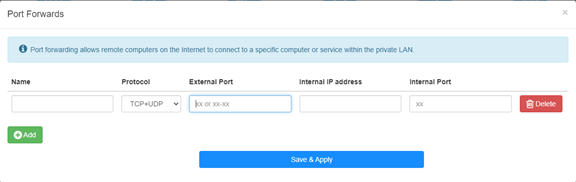
例えば:以下の設定によれば, ホスト 192.168.10.18 の TCP ポート 5000, UDP ポート 5001, および TCP/UDP ポート 6000 の両方がインターネットに開かれます。

名前:
記憶を容易にするために使用するエントリの名前
プロトコル:
TCP, UDP, またはTCP+UDP
外部ポート:
インターネットからアクセスできるWAN側のサービスポート
内部IPアドレス:
インターネットへのポートを開くホストのIPアドレス
内部ポート:
LAN内のホストのサービスポート
注記:
通常, 内部ポートは外部ポートと同じです。
ステップ4: クリック '保存して適用' をクリックして設定を保存します。
ステータスページに移動し, ルーターのWAN IPアドレスを確認します。これで, http:// WAN IP: ポート番号を使用して, 開いたサービスにアクセスできるようになります。
42件のコメント
博主,你好!
最近使用tr3000路由器使用ipv6时测试端口转发,发现无法映射到内网ipv4地址,请问有解决办法吗?
@Dear Yuri,
Our technical support has contacted you via email. Please check.
“I eagerly awaited a response from someone who could help me with the problem I described… I followed your instructions and set up the ZeroTier network. But it doesn’t solve my problem!
The host I want to connect to via RDP does not have the ZeroTier network client – Windows 8.1. I installed different versions from 1.6.6 to 1.8.8, but the network on the host did not start (the firewall is disabled).
Perhaps to connect from my host (with ZeroTier), I only need one rule in the routing on the cudy 3600 router located in ZeroTier, and/or to create a bridge?”
I eagerly awaited a response from someone who could help me with the problem I described… I followed your instructions and set up the ZeroTier network. But it doesn’t solve my problem!
The host I want to connect to via RDP does not have the ZeroTier network client – Windows 8.1. I installed different versions from 1.6.6 to 1.8.8, but the network on the host did not start (the firewall is disabled).
Perhaps to connect from my host (with ZeroTier), I only need one rule in the routing on the cudy 3600 router located in ZeroTier, and/or to create a bridge?
@Dear Yuri,
You can add Routing rules on the Zerotier Management console page to meet you requirement. Please refer to this article on the website.
http://cudy.com/blogs/faq/how-to-remote-connect-cudy-router-via-zerotier?pos=1&_sid=33968118a&ss=r
“There is a Zerotier network with one host and one router. Physically, they are located in different networks with different providers behind grey IPs. How can I redirect an RDP connection on the router to another host that does not have Zerotier and is located in the same local network as the router?”
There is a Zerotier network with one host and one router. Physically, they are located in different networks with different providers behind grey IPs. How can I redirect an RDP connection on the router to another host that does not have Zerotier and is located in the same local network as the router?