Cudy 路由器內建 Web 介面,此內部網頁不需要網路存取。您可以透過Wi-Fi或乙太網路將裝置連接到Cudy路由器以登入Web管理頁面。
第1 步: 將您的電腦連接到Cudy 路由器透過無線或有線。
如果無線:預設 Wi-Fi 名稱和密碼印在路由器底部標籤上。
如果有線:將您的電腦連接到< Strong data-mce-fragment="1">LAN 連接埠位於路由器背面,透過乙太網路線連接。
第2 步:開啟網頁瀏覽器(Google 、 Firefox 等)並輸入 http:// /cudy.net 或http網址列中的://192.168.10.1。
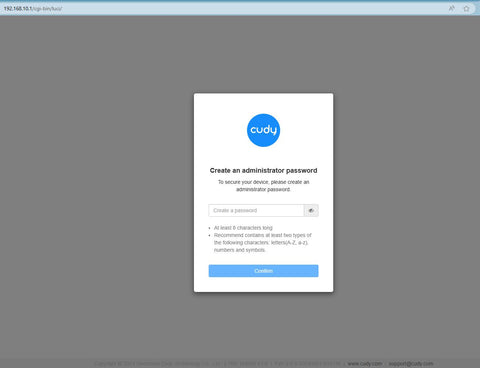
第3步:將彈出下列登入頁面。選擇網頁管理頁面的顯示語言,要求的密碼為"admin"或需要建立一個密碼。
問題排查: 如果登入頁面未顯示,請嘗試下列故障排除步驟: 1.確保 http://cudy.net 或http://192.168 .10.1 在網址列中輸入,而不是在搜尋欄中輸入。
2.如果電腦設定為靜態 IP 位址,請將其設定變更為自動取得 IP 位址和 DNS 伺服器位址。
3.使用其他網頁瀏覽器並重試。
4.更換不同的客戶端設備。
5.重新啟動或重設路由器並再次檢查。
如何重設:在電源開啟的情況下,按住重設按鈕/孔並保持8 秒鐘。 span>< /p>
6.清除瀏覽器的cookie。
7.停用並啟用正在使用的網路介面卡。


303 則留言
@Estimado Pedro,
No. Los routers Cudy no admiten ser usados de esa forma.
“Se puede instalar nordvpn en el router Cudy -D84D -3600H estando conectado por al router de la operadora por cable LAN?
Lo estoy intentando varias veces, siguiendo el tutorial de Cudy y no hay manera.
Me sale la nota de no conectado.
El usuario y contraseña son las credenciales ó son los que suministra la compañía para activar dispositivo a dispositivo.
Gracias”
Se puede instalar nordvpn en el router Cudy -D84D -3600H estando conectado por al router de la operadora por cable LAN?
Lo estoy intentando varias veces, siguiendo el tutorial de Cudy y no hay manera.
Me sale la nota de no conectado.
El usuario y contraseña son las credenciales ó son los que suministra la compañía para activar dispositivo a dispositivo.
Gracias
@Dear Juan,
Thanks for contacting the Cudy support team. You can try to reset the router to factory default by long pressing the reset button for about 3 seconds. You can release the reset button when the LED flashes.
The default password of the WEB panel will recover to default “admin”. If the firmware version is 2.×.x, you need to create a new password when first login to the web page of the router.
“I am trying to log into my cudy Cat.6 router. It does not accept admin or the password on the bottom of the router?”
@Tovio,
Dear Customer,
Thanks for contacting the Cudy support team. You can try to reset the router to factory default by long pressing the reset button for about 3 seconds. You can release the reset button when the LED flashes.
The default password of the WEB panel will recover to default “admin”. If the firmware version is 2.×.x, you need to create a new password when first login to the web page of the router.
“the link works but when I put in the password is doesn’t work”
I am trying to log into my cudy Cat.6 router. It does not accept admin or the password on the bottom of the router?