本文適用於以下情況:當您連接 4G 路由器的 Wi-Fi 時,您的任何裝置都無法取得網路接入。
可能性: 1. SIM卡不符或損壞。
2.路由器上SIM卡插槽的問題。
問題排查: 1.正確安裝SIM卡並確保其與SIM卡槽接觸良好。
2.試試另一張 SIM 卡。
3.關閉 Cudy 路由器電源,然後取出 SIM 卡並用軟布或橡膠清潔該卡。依正確方向插入 SIM 卡插槽。當SIM卡推到正確位置時,您會聽到"嘀嗒"的聲音。開啟 Cudy 路由器電源並重試。
<跨度資料-mce-fragment="1">Cudy LT500提示SIM Detached怎麼辦?
可能性: 1. 4G路由器預設APN設定檔與SIM卡不符。
2. IMEI 與特定裝置綁定。
3.網路訊號弱或LTE天線損壞。
4. SIM卡可能欠費或沒有資料。
5. SIM卡支援頻段與Cudy 4G路由器不符。
問題排查: 1.請聯絡您的電信業者確認 APN 設定或將同一張 SIM 卡插入手機並從手機中尋找 APN。
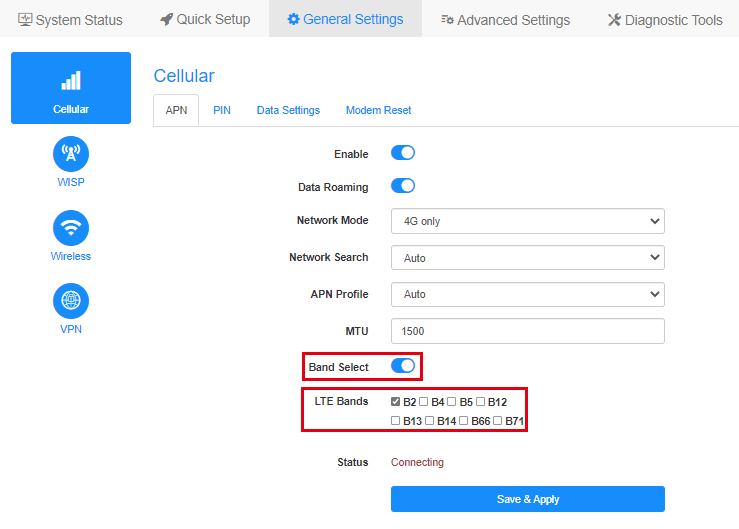
然後登入Cudy路由器的Web管理頁面並手動設定APN並更改網路模式改為僅限4G。 (常規設定 -> 蜂巢網路 -> APN ) 2.刪除與營運商的 IMEI 綁定。
3.將路由器重新放置在適當的位置以獲得更好的4G訊號。
如果您知道您的 SIM 卡可以使用的頻段,請啟用"頻段選擇"並選擇準確的頻段以獲得良好的連接。 注意:如果選擇了錯誤的頻段,4G 連線將會失敗。
4.將同一張SIM卡插入手機。
5.嘗試不同的 SIM 卡,尤其是來自不同電信商的 SIM 卡。
6.請諮詢您的電信業者您的SIM卡支援哪些網路類型和頻段,然後與Cudy設備支援的網路類型和頻段進行比較。您可以在我們的官網查看Cudy設備的規格,例如,以下是LT500支援的網路類型和頻段: 7.將韌體升級到最新版本。
升級地點:下載中心< /跨度> 如何升級:如何升級Cudy路由器的韌體? 如果 SIM 卡已啟用並且可以在其他裝置上使用。請聯絡 support@cudy.com您已完成哪些故障排除以及以下資訊。
a。 系統狀態頁面的螢幕截圖。
b.您的營運商名稱和資料計畫名稱。
c.前往診斷工具->診斷,點選開始並儲存垃圾箱。文件。
d.前往診斷工具->系統日誌->下載。
可能性: 4G 路由器的預設 APN 設定檔與 SIM 卡不符。
問題排查: 1.請聯絡您的電信業者確認 APN 設定或將同一張 SIM 卡插入手機並從手機中尋找 APN。
然後登入Cudy路由器的Web管理頁面並手動設定APN並更改網路模式改為僅限4G。
(常規設定 -> 蜂巢網路 -> APN ) 2.將韌體升級到最新版本。
升級地點:下載中心 如何升級:如何升級Cudy路由器的韌體?< /p >
如果 SIM 卡已啟用並且可以在其他裝置上使用。請聯絡 support@cudy.com您已完成哪些故障排除以及以下資訊。
a。 系統狀態頁面的螢幕截圖。
b.您的營運商名稱和資料計畫名稱。
c.前往診斷工具->診斷,點選開始並儲存垃圾箱。文件。
d.前往診斷工具->系統日誌->下載。
情況一:無法偵測到SIM卡

狀況2:網路狀態與蜂巢網路未連線



狀況3:網路狀態未連接,蜂巢網路已連接


40 則留言
@Dear Aleksey,
Our technical support has contacted you via email. Please check.
“The Cudy N-300 v 2.0 router lacks a cellular connection, displaying a message stating that 4G is not connected. The connection level indicators on the back of the router are unlit. SIM cards from any carriers do not work. None of the official firmware updates available for the router resolves the issue.”
The Cudy N-300 v 2.0 router lacks a cellular connection, displaying a message stating that 4G is not connected. The connection level indicators on the back of the router are unlit. SIM cards from any carriers do not work. None of the official firmware updates available for the router resolves the issue.
@Dear KELVIN,
Please try to reset the router to factory default by long pressing the reset button for about 3 seconds. You can release the reset button when the LED flashes. Then reinstall the router and check if the problem remains?
If the problem remains, you still can’t find the Cellular page. Then the router is faulty. You can contact the seller to requesta warranty.
“Cellular option is missing on cudy router and it says 4g is not connected”
Cellular option is missing on cudy router and it says 4g is not connected
@Lieber HW,
Entschuldigung für die späte Antwort aufgrund des chinesischen Frühlingsfestes! Funktioniert der LT300 wieder normal, wenn Sie das 12-V-Netzteil wieder verwenden?
“Keine Internetverbindung bei Verwendung des Cudy 4G-Routers mit eingelegter SIM-Karte
Ich habe einen LT300 der dieses Problem hatte und einen WR300 zum erweitern des wlan. Einmal hatte ich das Netzteil vom WR300 am LT300. Das passt, hat aber statt 12 V nur 5 V. Dann geht am LT300 das wlan , lan , webaccess alles, nur das 4G nicht …. Da muss man erst mal drauf kommen …"