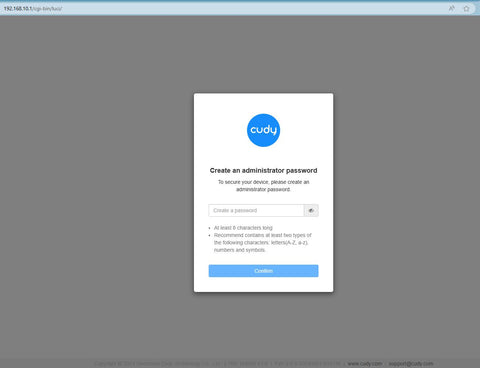
如何登入Cudy Router的Web介面?

Cudy 路由器內建 Web 介面,此內部網頁不需要網路存取。您可以透過Wi-Fi或乙太網路將裝置連接到Cudy路由器以登入Web管理頁面。


第1 步: 將您的電腦連接到Cudy 路由器透過無線有線

如果無線:預設 Wi-Fi 名稱和密碼印在路由器底部標籤上。

如果有線:將您的電腦連接到< Strong data-mce-fragment="1">LAN 連接埠位於路由器背面,透過乙太網路線連接。

第2 步:開啟網頁瀏覽器(Google 、 Firefox 等)並輸入 http:// /cudy.nethttp網址列中的://192.168.10.1

第3步:將彈出下列登入頁面。選擇網頁管理頁面的顯示語言,要求的密碼為"admin"或需要建立一個密碼。


問題排查:

如果登入頁面未顯示,請嘗試下列故障排除步驟:

1.確保 http://cudy.net http://192.168 .10.1  在網址列中輸入,而不是在搜尋欄中輸入。

2.如果電腦設定為靜態 IP 位址,請將其設定變更為自動取得 IP 位址和 DNS 伺服器位址。

3.使用其他網頁瀏覽器並重試。

4.更換不同的客戶端設備。

5.重新啟動或重設路由器並再次檢查。

如何重設:在電源開啟的情況下,按住重設按鈕/孔並保持8 秒鐘。 span>< /p>

6.清除瀏覽器的cookie。

7.停用並啟用正在使用的網路介面卡。

返回網誌

266 則留言

@Dear Cudy out door,
If you forget the password. you can reset the device to factory default by long pressing the reset button for about 3 seconds. You can release the reset button when the LED flashes.

“Forgot password”

Support

Forgot password

Cudy out door

@Dear Leta,
Please tell more details about the problem. Please describe the issue you encounterd in detail as below.
(1) Network topology diagram: Describes the topology when problems occur. Relatively complex networks are difficult to describe in words. It is recommended to draw pictures to display them.
(2) Problem phenomenon: Describe in detail the conditions under which the problem occurs and the phenomenon when the problem occurs.
(3) Comparative test: Describe phenomena with comparative significance, such as the performance of replacing new equipment, replacing other xxx brand models, replacing other mobile phones and other terminals.
(4) Problem Analysis: The customer’s analysis of this problem. If there is no obvious analysis result, you can leave it blank.
(5) Problematic product:
Model: The model of the product.
Firmware version:The firmware of the product.

“Like I Don’t know What Happen in with My Wi-Fi we havê the Like o havê network What When we conecte ignora no WhatsApp e you Can help as Please”

Support

Like I Don’t know What Happen in with My Wi-Fi we havê the Like o havê network What When we conecte ignora no WhatsApp e you Can help as Please

Leta

@Estimado SAUL:
Necesito más información para solucionar este problema.
1. ¿Cuál es el modelo y la versión del firmware de su router?
2. Puede intentar actualizar el firmware de su router y volver a intentarlo. Si el problema persiste, le sugiero que grabe un vídeo de la pantalla para mostrarnos el problema.

“No puedo introducir el administrador, sólo la contraseña y no puedo cambiar a otra contraseña nueva, solo tiene la contraseña que viene por defecto”

Support

發表留言