
如下文档以WR3000 V1.0为例介绍如何进行固件升级。
1. 下载您的Cudy路由器型号对应的升级软件并解压。
请打开Cudy官网下载中心,网址是:https://www.cudy.com/zh-cn/pages/download-center/search
产品线选择 “无线路由器”,型号选择 “WR3000 1.0”,如下图所示。请选择最新日期版本的固件,并点击“下载”,将固件下载到您的电脑上。

注意:如果您的路由器型号不是WR3000 V1.0,请选择对应的正确型号并下载正确的固件。
下载的升级固件文件一般是一个ZIP格式的压缩包,请解压成文件夹。如下图所示。

2. 将您的这台电脑使用网线连接到路由器的LAN口或者Wi-Fi连接路由器Wi-Fi无线网络。
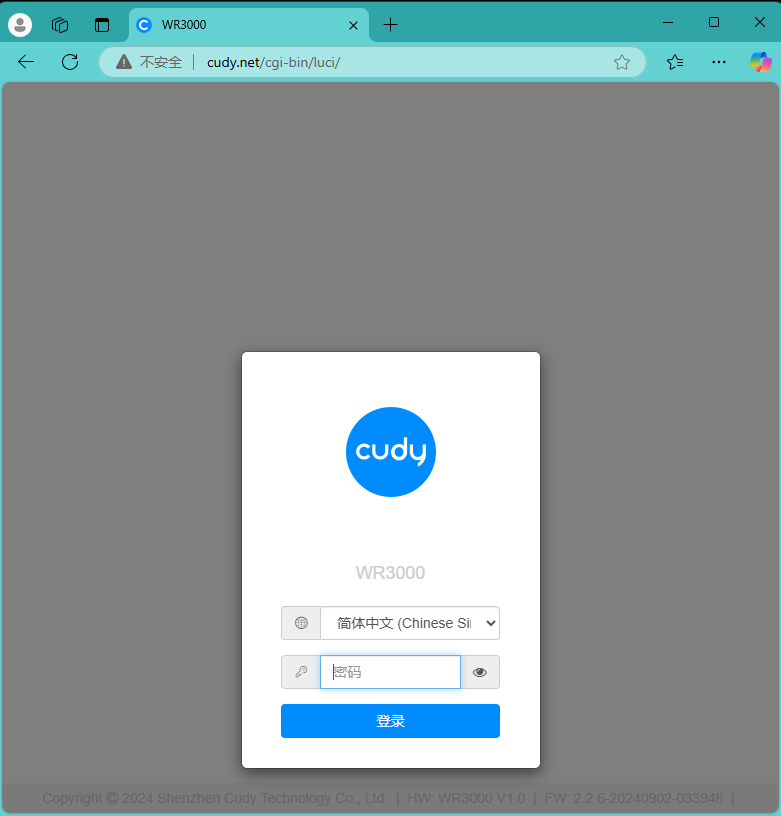
3. 电脑打开浏览器登录路由器的网页管理页面,默认网址是 http://cudy.net 或者 http://192.168.10.1。输入管理员密码登录。
4. 打开“高级设置”---“系统”---“固件升级”页面。

点击“浏览”,在计算机上找到刚刚下载并解压的升级固件。点击“打开”,进行上传。

上传之后,路由器会进行校验,如果没有告警信息,如下图所示。请点击“继续”开始升级。

等待大约3分钟左右,升级并重启完毕。
183 条评论
@Caro Stefano,
Mi dispiace, non conosco la data esatta. Abbiamo in programma di rilasciare i nuovi firmware uno dopo l’altro. Credo che per il P2 non ci vorrà molto.
“Quando arriva l’aggiornamento software del modello del router wifi SIM 5G CUDY P2 1.0 2026?? Fatemi sapere.”
Quando arriva l’aggiornamento software del modello del router wifi SIM 5G CUDY P2 1.0 2026?? Fatemi sapere.
@Dear Даниил,
Please try to change a web browser or computer to update the firmware again.
“Здравствуйте! Проблема с установкой обновлений на роутер cudy WR1500, я пытаюсь обновиться с версии WR1500-L101-1.0.4-20241017-804431-flash на версию intermediate-WR1500-L101-1.0.4-20241205-747393-mid-flash, но роутер бесконечно начинает мигать красной и синей лампой, помогает только выключение питания, что делать? Пробовал на двух разных компьютерах, разных браузерах, по проводу и wi-fi, но это не работает!
Eng version (my english bad, sorry):
Hello! I have a trouble with update cudy WR1500, i try update from version WR1500-L101-1.0.4-20241017-804431-flash to version intermediate-WR1500-L101-1.0.4-20241205-747393-mid-flash, but nothing to do. the led flashes once red and once blue. Helps only turn off the router, the old version remains. I try to update the router on the two other computers, any browsers (chrome, samsung internet, yandex browser, mozilla, opera, edge). I try it on ethernet and wi-fi, but this doesn’t work. Help me!”
Здравствуйте! Проблема с установкой обновлений на роутер cudy WR1500, я пытаюсь обновиться с версии WR1500-L101-1.0.4-20241017-804431-flash на версию intermediate-WR1500-L101-1.0.4-20241205-747393-mid-flash, но роутер бесконечно начинает мигать красной и синей лампой, помогает только выключение питания, что делать? Пробовал на двух разных компьютерах, разных браузерах, по проводу и wi-fi, но это не работает!
Eng version (my english bad, sorry):
Hello! I have a trouble with update cudy WR1500, i try update from version WR1500-L101-1.0.4-20241017-804431-flash to version intermediate-WR1500-L101-1.0.4-20241205-747393-mid-flash, but nothing to do. the led flashes once red and once blue. Helps only turn off the router, the old version remains. I try to update the router on the two other computers, any browsers (chrome, samsung internet, yandex browser, mozilla, opera, edge). I try it on ethernet and wi-fi, but this doesn’t work. Help me!
@Dear Steven,
Please try again. Please reset the router to factory default before updating the firmware. In addition, please connect the computer to the LAN port of the router and use the Chrome browser.
“I can’t install the intermediate update 1.0.4 20241205 for WR1500 1.0, after uploading the file, it gets stuck until I restart it. After restart it’s still the old firmware. I have tried using Chrome, on different devices, multiple times. Every time it ended the same. Current firmware is 1.0.4 20241017. Intermediate update fails, and final update is not recognized. I cannot update firmware.”