
端口转发(Port forwarding)功能允许互联网上的远程计算机连接到私有局域网内的特定计算机或服务。
不同的服务使用不同的服务端口,配置前请确认服务端口号。
重要的:
确保 Cudy 路由器从您的互联网服务提供商处获取公共 IP(WAN IP),如果它是私有 IP 地址,则意味着 Cudy 前面有另一个 NAT 设备。您还需要在该设备上打开服务端口。
如何验证IP地址是公网IP还是私网IP,请参考以下链接:
http://en.wikipedia.org/wiki/Private_network
如何查看 Cudy 的 WAN IP?
无线路由器和网状网络(系统状态->WAN->状态)

4/5 路由器(系统状态->蜂窝/4G->状态)

笔记:
1. 通常,如果公用 IP 和 IP 地址相同,则表示您拥有公用 IP。IP 地址是您从 Internet 服务提供商处获得的 WAN IP 地址。上面的公用 IP 是其他设备可以通过 Internet 找到您的 IP 地址。因此,如果 Cudy 路由器获得私有 IP 地址,您需要找出哪个设备使用此公用 IP 并在其上打开端口。
2. 对于大多数蜂窝路由器,互联网服务提供商通常会提供私有 IP 地址。因此,如果您想进行端口转发,请联系您的互联网服务提供商为您分配一个公共 IP 地址或由他们进行端口转发。
步骤 1 :打开网络浏览器并转到http://cudy.net或http://192.168.10.1 。
详细信息请参阅如何登录Cudy路由器的Web界面?
第 2 步:单击网络部分中的高级设置 -> 端口转发。

步骤 3:单击“添加”将一个条目添加到列表中。在以下字段中输入所需的参数。
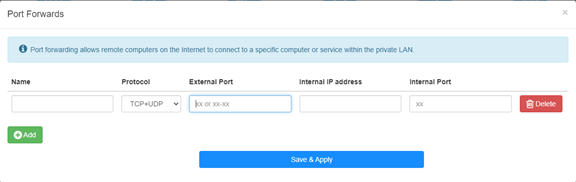
例如:根据以下配置,主机 192.168.10.18 的 TCP 端口 5000、UDP 端口 5001 和 TCP/UDP 端口 6000 将向 Internet 开放。

姓名:
条目名称,用于方便记忆
协议:
TCP、UDP 或 TCP+UDP
外部端口:
WAN 侧可从互联网访问的服务端口
内部 IP 地址:
主机的 IP 地址,将向互联网开放端口
内部端口:
局域网内主机的服务端口
笔记:
一般情况下,内部端口与外部端口相同。
步骤 4 :单击“保存并应用”以保存设置。
进入状态页面,查看路由器的WAN口IP地址,此时可以尝试使用http://WAN口IP:端口号来访问已开通的服务。
42 条评论
博主,你好!
最近使用tr3000路由器使用ipv6时测试端口转发,发现无法映射到内网ipv4地址,请问有解决办法吗?
@Dear Yuri,
Our technical support has contacted you via email. Please check.
“I eagerly awaited a response from someone who could help me with the problem I described… I followed your instructions and set up the ZeroTier network. But it doesn’t solve my problem!
The host I want to connect to via RDP does not have the ZeroTier network client – Windows 8.1. I installed different versions from 1.6.6 to 1.8.8, but the network on the host did not start (the firewall is disabled).
Perhaps to connect from my host (with ZeroTier), I only need one rule in the routing on the cudy 3600 router located in ZeroTier, and/or to create a bridge?”
I eagerly awaited a response from someone who could help me with the problem I described… I followed your instructions and set up the ZeroTier network. But it doesn’t solve my problem!
The host I want to connect to via RDP does not have the ZeroTier network client – Windows 8.1. I installed different versions from 1.6.6 to 1.8.8, but the network on the host did not start (the firewall is disabled).
Perhaps to connect from my host (with ZeroTier), I only need one rule in the routing on the cudy 3600 router located in ZeroTier, and/or to create a bridge?
@Dear Yuri,
You can add Routing rules on the Zerotier Management console page to meet you requirement. Please refer to this article on the website.
http://cudy.com/blogs/faq/how-to-remote-connect-cudy-router-via-zerotier?pos=1&_sid=33968118a&ss=r
“There is a Zerotier network with one host and one router. Physically, they are located in different networks with different providers behind grey IPs. How can I redirect an RDP connection on the router to another host that does not have Zerotier and is located in the same local network as the router?”
There is a Zerotier network with one host and one router. Physically, they are located in different networks with different providers behind grey IPs. How can I redirect an RDP connection on the router to another host that does not have Zerotier and is located in the same local network as the router?