
端口转发(Port forwarding)功能允许互联网上的远程计算机连接到私有局域网内的特定计算机或服务。
不同的服务使用不同的服务端口,配置前请确认服务端口号。
重要的:
确保 Cudy 路由器从您的互联网服务提供商处获取公共 IP(WAN IP),如果它是私有 IP 地址,则意味着 Cudy 前面有另一个 NAT 设备。您还需要在该设备上打开服务端口。
如何验证IP地址是公网IP还是私网IP,请参考以下链接:
http://en.wikipedia.org/wiki/Private_network
如何查看 Cudy 的 WAN IP?
无线路由器和网状网络(系统状态->WAN->状态)

4/5 路由器(系统状态->蜂窝/4G->状态)

笔记:
1. 通常,如果公用 IP 和 IP 地址相同,则表示您拥有公用 IP。IP 地址是您从 Internet 服务提供商处获得的 WAN IP 地址。上面的公用 IP 是其他设备可以通过 Internet 找到您的 IP 地址。因此,如果 Cudy 路由器获得私有 IP 地址,您需要找出哪个设备使用此公用 IP 并在其上打开端口。
2. 对于大多数蜂窝路由器,互联网服务提供商通常会提供私有 IP 地址。因此,如果您想进行端口转发,请联系您的互联网服务提供商为您分配一个公共 IP 地址或由他们进行端口转发。
步骤 1 :打开网络浏览器并转到http://cudy.net或http://192.168.10.1 。
详细信息请参阅如何登录Cudy路由器的Web界面?
第 2 步:单击网络部分中的高级设置 -> 端口转发。

步骤 3:单击“添加”将一个条目添加到列表中。在以下字段中输入所需的参数。
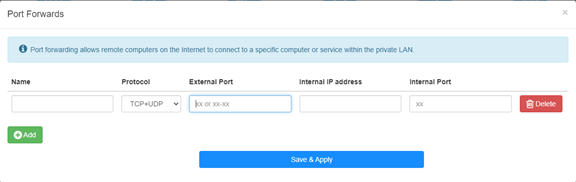
例如:根据以下配置,主机 192.168.10.18 的 TCP 端口 5000、UDP 端口 5001 和 TCP/UDP 端口 6000 将向 Internet 开放。

姓名:
条目名称,用于方便记忆
协议:
TCP、UDP 或 TCP+UDP
外部端口:
WAN 侧可从互联网访问的服务端口
内部 IP 地址:
主机的 IP 地址,将向互联网开放端口
内部端口:
局域网内主机的服务端口
笔记:
一般情况下,内部端口与外部端口相同。
步骤 4 :单击“保存并应用”以保存设置。
进入状态页面,查看路由器的WAN口IP地址,此时可以尝试使用http://WAN口IP:端口号来访问已开通的服务。
42 条评论
@Dear Giulio,
If the device you want to access is a windows computer. Please try to disable the firewall of the cpmputer and try again.
In addition, the device you want to access must set the correct gateway IP address (which is the LAN IP address of R700).
“I’m setting up a Wireguard vpn server on R700. The connection is successful and I can access the R700 web interface but no other IP. It seems that the vpn is not routed correctly. But in the router interface there are no advanced commands to manage the nat and I can’t access via ssh. How can it be solved”
I’m setting up a Wireguard vpn server on R700. The connection is successful and I can access the R700 web interface but no other IP. It seems that the vpn is not routed correctly. But in the router interface there are no advanced commands to manage the nat and I can’t access via ssh. How can it be solved
@Dear David,
I think the WAN IP address is not the public IP address. So the Port Forwards function will not work if you want to access it from the internet.
Is it possible to use the VPN function to do this?
“Hi. I have public IP address, but it’s not the same addres which I get from ISP DHCP (probably CGNAT).
How can I enter my public address during port forwarding setting?”
Hi. I have public IP address, but it’s not the same addres which I get from ISP DHCP (probably CGNAT).
How can I enter my public address during port forwarding setting?
@David,
Dear Customer,
Thank you for contacting Cudy support team. Our technical support has contacted you via email. Please check.
Setup Cudy Mesh network.
WR1300 unit is primary and has firmware 2.3.9.
Setup port forwarding.
Setup DDNS with no-ip with address XXX.ddns.net.
Can connect when on Internet.
When on LAN using XXX.ddns.net won’t work. Ports are the same. IP address works.
How do I enable NAT loopback to get it to work?