
เราเตอร์ Cudy LTE มีพอร์ต LAN/WAN ดังนั้นเราจึงสามารถเปลี่ยนโหมดการทำงานของพอร์ตและใช้เครือข่าย 4G/5G เป็นโซลูชันสำรองสำหรับการเข้าถึงอินเทอร์เน็ต เมื่อพอร์ต LAN/WAN ทำงานเป็นโหมด WAN เราเตอร์จะเชื่อมต่อกับเครือข่าย 4/5G หากบริการเครือข่ายเดิมล้มเหลว
โทโพโลยีเครือข่ายทั่วไป:

ขั้นตอนที่ 1: ตรวจสอบให้แน่ใจว่าเครือข่าย 4/5G ตั้งค่าเรียบร้อยแล้ว
ขั้นตอนที่ 2: เชื่อมต่อพอร์ต LAN/WAN ของเราเตอร์ของคุณเข้ากับโมเด็มหรือพอร์ตเครือข่าย
หมายเหตุ: โปรดตรวจสอบให้แน่ใจว่าคุณมีโมเด็มอยู่แล้ว หรืออินเทอร์เน็ตของคุณมาจากเต้ารับอีเธอร์เน็ตที่ให้บริการอินเทอร์เน็ตสำหรับคุณ
ขั้นตอนที่ 3: เปิดเว็บเบราว์เซอร์แล้วไปที่ http://cudy.net หรือ http://192.168.10.1
สำหรับรายละเอียด โปรดดูที่ วิธีลงชื่อเข้าใช้เว็บอินเทอร์เฟซของ Cudy Router
ขั้นตอนที่ 4: ไปที่การตั้งค่าขั้นสูง->สวิตช์ LAN/WAN

ขั้นตอนที่ 5: คลิก 'สลับเป็น WAN' จากนั้นเราเตอร์จะรีบูตและใช้การตั้งค่า
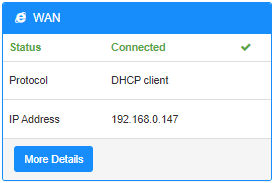
ขั้นตอนที่ 6: เมื่อการกำหนดค่าเสร็จสิ้น คุณจะเห็นสถานะด้านล่างในหน้าสถานะระบบ
18 ความคิดเห็น
The WAN feature is not functioning, diagnostic tool says the IP address must be provided, but the router is not automatically detecting the IP address and I do not have the IP address from the ISP. Please help.
@EZEQUIEL
Our technical support has contact you via email.
“Is not working, I made this, then disconnect the internet cable of my router but cudy backup do not give 4g/5g backup to the people connected to the LAN… is very important for us to make this work, is there more information?”
Is not working, I made this, then disconnect the internet cable of my router but cudy backup do not give 4g/5g backup to the people connected to the LAN… is very important for us to make this work, is there more information?