
เราเตอร์ Cudy LTE มีพอร์ต LAN/WAN ดังนั้นเราจึงสามารถเปลี่ยนโหมดการทำงานของพอร์ตและใช้เครือข่าย 4G/5G เป็นโซลูชันสำรองสำหรับการเข้าถึงอินเทอร์เน็ต เมื่อพอร์ต LAN/WAN ทำงานเป็นโหมด WAN เราเตอร์จะเชื่อมต่อกับเครือข่าย 4/5G หากบริการเครือข่ายเดิมล้มเหลว
โทโพโลยีเครือข่ายทั่วไป:

ขั้นตอนที่ 1: ตรวจสอบให้แน่ใจว่าเครือข่าย 4/5G ตั้งค่าเรียบร้อยแล้ว
ขั้นตอนที่ 2: เชื่อมต่อพอร์ต LAN/WAN ของเราเตอร์ของคุณเข้ากับโมเด็มหรือพอร์ตเครือข่าย
หมายเหตุ: โปรดตรวจสอบให้แน่ใจว่าคุณมีโมเด็มอยู่แล้ว หรืออินเทอร์เน็ตของคุณมาจากเต้ารับอีเธอร์เน็ตที่ให้บริการอินเทอร์เน็ตสำหรับคุณ
ขั้นตอนที่ 3: เปิดเว็บเบราว์เซอร์แล้วไปที่ http://cudy.net หรือ http://192.168.10.1
สำหรับรายละเอียด โปรดดูที่ วิธีลงชื่อเข้าใช้เว็บอินเทอร์เฟซของ Cudy Router
ขั้นตอนที่ 4: ไปที่การตั้งค่าขั้นสูง->สวิตช์ LAN/WAN

ขั้นตอนที่ 5: คลิก 'สลับเป็น WAN' จากนั้นเราเตอร์จะรีบูตและใช้การตั้งค่า
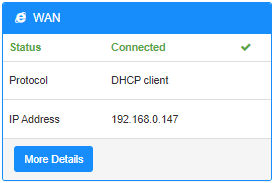
ขั้นตอนที่ 6: เมื่อการกำหนดค่าเสร็จสิ้น คุณจะเห็นสถานะด้านล่างในหน้าสถานะระบบ
18 ความคิดเห็น
Hallo,
ich habe das gleiche Problem wie hier am 02.08.2025 geschildert:
“Hello I have internet being fed from another router (“Network A”) to my Cudy LTE Modem/Router (“Network B”). If Network A loses internet but is still working as a network (just no internet). The Cudy LTE failover does not kick in because it does not realize the internet is down. I tried changing the online detection settings but that did not work.”
@Dear H,
Our technical support has contacted you via email. Please check.
“Hello I have internet being fed from another router (“Network A”) to my Cudy LTE Modem/Router (“Network B”). If Network A loses internet but is still working as a network (just no internet). The Cudy LTE failover does not kick in because it does not realize the internet is down. I tried changing the online detection settings but that did not work.”
Hello I have internet being fed from another router (“Network A”) to my Cudy LTE Modem/Router (“Network B”). If Network A loses internet but is still working as a network (just no internet). The Cudy LTE failover does not kick in because it does not realize the internet is down. I tried changing the online detection settings but that did not work.
@Dear Molon,
The function depends on the “Advanced Setting” —“Online Check” function. Did you disable it. If yes, please enable it.
“Hello, first my cuddy Lte n300 working well on 4g. My point is I configure WAN, and when I put my câble, the router switch on WAN/4G. Until now everything is working as expected but if my main router has a connectivity issue, the cuddy router still continu to work on WAN whereas there is no more connectivity. So I don’t see the automatic switch on 4G”
Hello, first my cuddy Lte n300 working well on 4g. My point is I configure WAN, and when I put my câble, the router switch on WAN/4G. Until now everything is working as expected but if my main router has a connectivity issue, the cuddy router still continu to work on WAN whereas there is no more connectivity. So I don’t see the automatic switch on 4G