
ตัวกรอง MAC เป็นเทคโนโลยีที่ใช้ในเราเตอร์ไร้สายเพื่อป้องกันการเข้าถึงเครือข่ายโดยไม่ได้รับอนุญาต ที่อยู่ MAC คือตัวระบุเฉพาะที่กำหนดให้กับแต่ละอุปกรณ์บนเครือข่าย เราเตอร์ไร้สายใช้ที่อยู่ MAC เพื่อระบุอุปกรณ์และพิจารณาว่าเครือข่ายใดที่อุปกรณ์ควรเชื่อมต่อ
ขั้นตอนที่ 1: เปิดเว็บเบราว์เซอร์แล้วไปที่ http://cudy.net หรือ http://192.168.10.1
สำหรับรายละเอียด โปรดดูที่จะลงชื่อเข้าใช้เว็บอินเทอร์เฟซของ Cudy Router ได้อย่างไร
ขั้นตอนที่ 2: คลิก การตั้งค่าขั้นสูง -> ตัวกรอง MAC ในส่วน ความปลอดภัย ส่วน

ขั้นตอนที่ 3: ตรวจสอบการตั้งค่าในหน้าตัวกรอง MAC

1. เลือก 'อนุญาตทั้งหมดยกเว้นรายการ'
2. เลือกอุปกรณ์ที่จะบล็อกในรายการอุปกรณ์ออนไลน์ที่เกี่ยวข้องกับที่อยู่ MAC และที่อยู่ IP


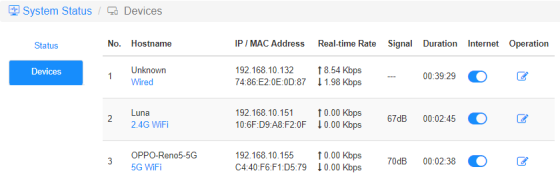
หากไม่มีอุปกรณ์ออนไลน์ที่คุณต้องการบล็อก ให้ไปเพื่อสถานะระบบ->อุปกรณ์->คัดลอก MAC ที่อยู่->กลับไปที่ ตัวกรอง MAC->กำหนดเอง และวางที่อยู่ MAC
3. บันทึก & ใช้ และอุปกรณ์ที่เลือกจะไม่สามารถรับอินเทอร์เน็ตจากเราเตอร์ได้อีกต่อไป
1. เลือก 'อนุญาตรายการบนy'
2. เลือกอุปกรณ์ที่คุณอนุญาตให้รับอินเทอร์เน็ต

3. บันทึก & ใช้ และเฉพาะอุปกรณ์ที่เลือกเท่านั้นที่จะเข้าถึงอินเทอร์เน็ตได้
ต่อไปนี้เป็นวิธีง่ายๆ ที่สามารถทำได้เหมือนกับตัวกรอง MAC
อินเทอร์เน็ต
เปิดใช้งานและปิดใช้งานไอคอนอินเทอร์เน็ตเพื่อควบคุมการเข้าถึงอินเทอร์เน็ตของแต่ละอุปกรณ์
'OPPO-Reno5-5G' ไม่สามารถรับอินเทอร์เน็ตผ่านเราเตอร์ด้านล่างได้

การทำงาน
คลิกที่ไอคอน การทำงาน เพื่อระบุชื่อใหม่ให้กับอุปกรณ์

การจำกัดเวลาของอินเทอร์เน็ตและccess
ช่วงเวลาที่อุปกรณ์ได้รับอนุญาตให้เข้าถึงอินเทอร์เน็ต
ตัวอย่าง: อุปกรณ์ 'คอมพิวเตอร์' ได้รับอนุญาตให้เพลิดเพลินกับอินเทอร์เน็ตในวันจันทร์เท่านั้น ตั้งแต่เวลา 10.00 น. ถึง 20.00 น.


12 ความคิดเห็น
@Dear tonalt,
Our technical support has sent you the solutions via email. Please check.
“it seems that an activated mac-filter also has an effect on the guest-network in the sense that the router doesn’t connect a guest to the internet! LT700E.
i think most people don’t like this and even worse: the activated mac filter on the guest network is not editable and it even worser it doesn’t use the mac table that is defined for the main wifi network.
so the mac filter is completely useless if one allows a guest-network.
probably i am wrong and the guest network can connect a guest to the internet with an activated mac-filter. but if so, please tell what i can do, to achieve this.”
it seems that an activated mac-filter also has an effect on the guest-network in the sense that the router doesn’t connect a guest to the internet! LT700E.
i think most people don’t like this and even worse: the activated mac filter on the guest network is not editable and it even worser it doesn’t use the mac table that is defined for the main wifi network.
so the mac filter is completely useless if one allows a guest-network.
probably i am wrong and the guest network can connect a guest to the internet with an activated mac-filter. but if so, please tell what i can do, to achieve this.
@Dear William and Dragan,
Thank you for your kindly advice! We will provide your feedback to the product department for evaluation. In fact, we already have this plan to develop this feature.
“I completely agree with William. I just can’t believe this kind of oversight was made. MAC filtering still hasn’t been added to the latest firmware 2.3.12. Please update the firmware and give us that function.”
“I just bought the Cudy WR11000 WiFi 7 Router and want to use it as an Access Point with MAC Filtering. But I just found out that there is no way to enable MAC Filtering when it is in Access Point mode. Why? You need to allow MAC Filtering in Access Point mode Not just only in Router mode! Please update the firmware and give us that function. I am on the latest firmware version 2.2.19.”
mine is WR3600
I completely agree with William. I just can’t believe this kind of oversight was made. MAC filtering still hasn’t been added to the latest firmware 2.3.12. Please update the firmware and give us that function.