
บทช่วยสอนนี้จะแสดงวิธีการตั้งค่าอุโมงค์ VPN ระหว่างเครื่อง Cudy ของคุณกับคอมพิวเตอร์เครื่องอื่น ZeroTier เป็นหนึ่งในบริการ VPN ที่ง่ายที่สุดในการกำหนดค่า และฟรีสำหรับอุปกรณ์สูงสุด 50 เครื่อง กระบวนการทั้งหมดตั้งแต่ต้นจนจบควรใช้เวลาเพียงไม่กี่นาที
1. สร้างบัญชี ZeroTier บัญชี
2. สร้างเครือข่าย
- หลังจากที่คุณเข้าสู่ระบบ ZeroTier แล้ว ให้ไปที่ แท็บเครือข่าย
- คลิกสร้างเครือข่ายใหม่ จากนั้นรหัสเครือข่ายของคุณจะมองเห็นได้ในอินเทอร์เฟซ

3. เลือกการเข้าถึงสาธารณะหรือส่วนตัว
การจัดการการเข้าถึงมีสองวิธี: สาธารณะหรือส่วนตัว
เครือข่ายสาธารณะ: ทุกคนที่มีรหัสเครือข่ายสามารถเชื่อมต่อได้ นี่เป็นตัวเลือกที่ง่ายที่สุดแต่มีความปลอดภัยน้อยกว่าเล็กน้อย
- คลิกที่เครือข่ายในอินเทอร์เฟซ ZeroTier
- ภายใต้การควบคุมการเข้าถึง ให้เลือกตัวเลือกเครือข่ายสาธารณะ:

เครือข่ายส่วนตัว: เครื่องทั้งหมดต้องได้รับการอนุมัติผ่านอินเทอร์เฟซ ZeroTier ก่อนจึงจะสามารถเชื่อมต่อได้ นี่คือตัวเลือกเริ่มต้นและปลอดภัยยิ่งขึ้น
- เมื่อเครื่องจักรเข้าร่วมเครือข่าย (ดูขั้นตอนที่ 4) พวกเขาจะต้องได้รับการอนุมัติภายใต้ส่วนสมาชิก เพียงทำเครื่องหมายที่ช่องใต้ Auth? คอลัมน์เพื่ออนุมัติแต่ละเครื่อง:
4. ตั้งค่าเราเตอร์ Cudy
- ก. เปิดเว็บเบราว์เซอร์และเข้าสู่ระบบ http://cudy.net/ หรือ http://192.168.10.1/
- ข. ไปที่การตั้งค่าทั่วไป -> VPN เพื่อตั้งค่า Zerotier เลือก Zerotier master และป้อนรหัสเครือข่าย Zerotier จากนั้นคลิกบันทึกและนำไปใช้

- ค. หากคุณกำหนดค่าเครือข่ายของคุณเป็นเครือข่ายส่วนตัว จำเป็นต้องทำเครื่องหมายในช่องใต้ Auth? คอลัมน์เพื่ออนุมัติ Cudy Router อีกครั้ง
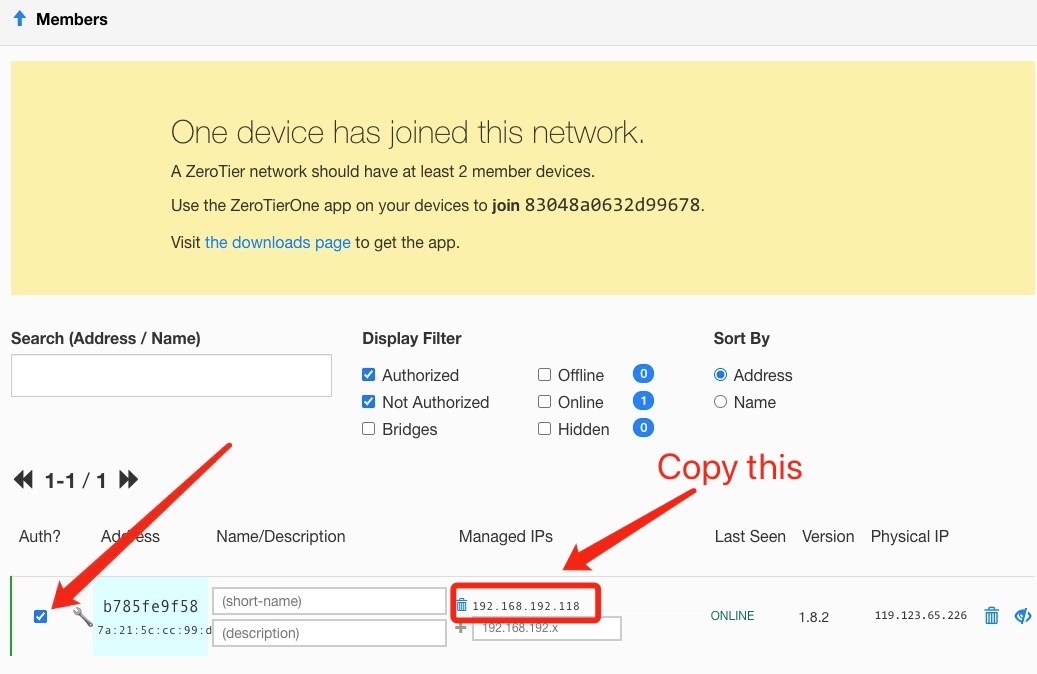
- ง. เพิ่มเส้นทางสำหรับเราเตอร์ Cudy

5. ติดตั้งแอป ZeroTier
ดาวน์โหลดและติดตั้งแอป ZeroTier บนเครื่องทั้งหมดที่คุณต้องการเชื่อมต่อ
6. เข้าร่วมเครื่องเข้ากับเครือข่าย
เมื่อแอป ZeroTier กำลังทำงาน ให้คลิกเข้าร่วมเครือข่าย
ป้อนรหัสเครือข่ายจากขั้นตอนที่ 2 แล้วคลิกเข้าร่วม หากคุณสร้างเครือข่ายสาธารณะ ตอนนี้คุณควรจะเชื่อมต่อแล้ว หากคุณสร้างเครือข่ายส่วนตัว คุณจะต้องอนุมัติแต่ละเครื่องในอินเทอร์เฟซ ZeroTier (ดูขั้นตอนที่ 2)
7. ตรวจสอบการเชื่อมต่อ
คุณสามารถตรวจสอบได้ว่าคุณเชื่อมต่อสำเร็จหรือไม่โดยคลิกแสดงเครือข่ายในแอป ZeroTier สถานะควรแสดงเป็นตกลงและควรเลือกช่องเชื่อมต่อแล้ว คุณยังสามารถลองส่ง Ping ไปยังที่อยู่ IP ส่วนตัวของเครื่องอื่นเพื่อตรวจสอบการเชื่อมต่อได้
8. การเข้าถึงระยะไกล
จากนั้นคุณจึงสามารถเข้าถึงเราเตอร์ cudy จากระยะไกลได้โดยใช้ 192.168.10.1 (192.168.192.118) หรือซับเน็ต 192.168.10.xxx
129 ความคิดเห็น
@Dear David Esteban,
Our technical support has sent you the new beta firmware via email. Please update and
check.
“Subject: LT500 V3.0 – Static routing over VPN (ZeroTier) interface
Hello Cudy Support,
I have an LT500 with the following details:
- Hardware: LT500 V3.0
- Firmware: 2.4.16-20250804-150319
I use it as a ZeroTier master in a site-to-site setup with two Cudy X6 routers. On the X6 and on the LT500 V2.0 emulator (FW 2.1.1-20240419), the Static Routing page lets me choose the “VPN” interface, so I can route remote subnets through the ZeroTier tunnel.
On my LT500 V3.0, the Static Routing interface list only shows WAN, LAN, WISP, GUEST and 4G. Without the VPN option I cannot route traffic to the remote networks through ZeroTier, which also breaks access when the router fails over to 4G.
Could you please tell me if there is a firmware for LT500 V3.0 (official or beta) that allows selecting the VPN/ZeroTier interface in Static Routing? If so, I would appreciate it if you could send it to me.
Thank you very much.
Best regards,
David"
@Dear Bolesław,
Our technical support has contacted you via email. Please check.
“Hi, could you share the firmware for my router (WR3000 V1.0 router currently running firmware:
2.4.19-20250828-192837), which support ZeroTier?
Best regards!”
@Dear Fajar,
Our technical support has sent you the firmware via email. Please check.
““Hi,
Please can you send me the firmware for WR3000 V1.0 with ZeroTier?
Regards””
Subject: LT500 V3.0 – Static routing over VPN (ZeroTier) interface
Hello Cudy Support,
I have an LT500 with the following details:
- Hardware: LT500 V3.0
- Firmware: 2.4.16-20250804-150319
I use it as a ZeroTier master in a site-to-site setup with two Cudy X6 routers. On the X6 and on the LT500 V2.0 emulator (FW 2.1.1-20240419), the Static Routing page lets me choose the “VPN” interface, so I can route remote subnets through the ZeroTier tunnel.
On my LT500 V3.0, the Static Routing interface list only shows WAN, LAN, WISP, GUEST and 4G. Without the VPN option I cannot route traffic to the remote networks through ZeroTier, which also breaks access when the router fails over to 4G.
Could you please tell me if there is a firmware for LT500 V3.0 (official or beta) that allows selecting the VPN/ZeroTier interface in Static Routing? If so, I would appreciate it if you could send it to me.
Thank you very much.
Best regards,
David
Hi, could you share the firmware for my router (WR3000 V1.0 router currently running firmware:
2.4.19-20250828-192837), which support ZeroTier?
Best regards!