
คุณสมบัติการส่งต่อพอร์ต (การส่งต่อพอร์ต) ช่วยให้คอมพิวเตอร์ระยะไกลบนอินเทอร์เน็ตเชื่อมต่อกับคอมพิวเตอร์เฉพาะหรือบริการภายใน LAN ส่วนตัว
บริการที่แตกต่างกันใช้พอร์ตบริการที่แตกต่างกัน โปรดตรวจสอบหมายเลขพอร์ตบริการก่อนการกำหนดค่า
ข้อสำคัญ:
ตรวจสอบให้แน่ใจว่าเราเตอร์ Cudy ได้รับ IP สาธารณะ (WAN IP) จากผู้ให้บริการอินเทอร์เน็ตของคุณ หากเป็นที่อยู่ IP ส่วนตัว นั่นหมายความว่ามีอุปกรณ์ NAT อื่นอยู่ข้างหน้า Cudy คุณต้องเปิดพอร์ตบริการบนอุปกรณ์นั้นด้วย
สำหรับวิธีการตรวจสอบที่อยู่ IP ว่าเป็นที่อยู่สาธารณะหรือส่วนตัว โปรดดูที่ลิงก์นี้:
http://en.wikipedia.org/wiki/Private_network
จะตรวจสอบ WAN IP ของ Cudy ได้อย่างไร
เราเตอร์ไร้สาย & เมช (สถานะระบบ->WAN->สถานะ)

เราเตอร์ 4/5 (สถานะระบบ->เซลลูลาร์/4G->สถานะ)

หมายเหตุ:
1. โดยปกติ หาก IP สาธารณะและที่อยู่ IP เหมือนกัน แสดงว่าคุณมี IP สาธารณะ ที่อยู่ IP คือที่อยู่ IP ของ WAN ที่คุณได้รับจากผู้ให้บริการอินเทอร์เน็ตของคุณ IP สาธารณะด้านบนคือที่อยู่ IP ที่อุปกรณ์อื่นสามารถค้นหาคุณได้ทางอินเทอร์เน็ต ดังนั้น หากเราเตอร์ Cudy ได้รับที่อยู่ IP ส่วนตัว คุณจะต้องพิจารณาว่าอุปกรณ์ใดใช้ IP สาธารณะนี้และเปิดพอร์ตบนอุปกรณ์นั้น
2. สำหรับเราเตอร์เซลลูลาร์ส่วนใหญ่ ผู้ให้บริการอินเทอร์เน็ตมักจะให้ที่อยู่ IP ส่วนตัว ดังนั้น หากคุณต้องการส่งต่อพอร์ต โปรดติดต่อผู้ให้บริการอินเทอร์เน็ตของคุณเพื่อกำหนดที่อยู่ IP สาธารณะให้กับคุณ หรือทำการส่งต่อพอร์ตในส่วนของพวกเขา
ขั้นตอนที่ 1: เปิดเว็บเบราว์เซอร์แล้วไปที่ http://cudy.net หรือ http://192.168.10.1.
สำหรับรายละเอียด โปรดดูที่ จะลงชื่อเข้าใช้เว็บอินเทอร์เฟซของ Cudy Router ได้อย่างไร
ขั้นตอนที่ 2: คลิก การตั้งค่าขั้นสูง -> การส่งต่อพอร์ต ในส่วน เครือข่าย

ขั้นตอนที่ 3: คลิก เพิ่ม เพื่อเพิ่มหนึ่งรายการต่อท้ายรายการ ป้อนพารามิเตอร์ตามที่คุณต้องการลงในช่องด้านล่าง
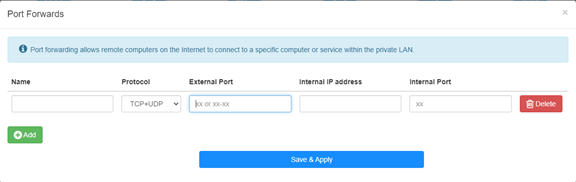
ตัวอย่าง: ตามการกำหนดค่าต่อไปนี้ พอร์ต TCP 5000, พอร์ต UDP 5001 และทั้งพอร์ต TCP/UDP 6000 ของโฮสต์ 192.168.10.18 จะถูกเปิดสู่อินเทอร์เน็ต

ชื่อ:
ชื่อของรายการที่ใช้เพื่ออำนวยความสะดวกในหน่วยความจำ
โปรโตคอล:
TCP, UDP หรือ TCP+UDP
พอร์ตภายนอก:
พอร์ตบริการบนฝั่ง WAN ซึ่งสามารถเข้าถึงได้จากอินเทอร์เน็ต
ที่อยู่ IP ภายใน:
ที่อยู่ IP ของโฮสต์ ซึ่งจะเปิดพอร์ตไปยังอินเทอร์เน็ต
ภายใน พอร์ต:
พอร์ตบริการของโฮสต์ใน LAN
หมายเหตุ:
โดยทั่วไป พอร์ตภายในจะเหมือนกับพอร์ตภายนอก
ขั้นตอนที่ 4: คลิก 'บันทึก & ใช้' เพื่อบันทึกการตั้งค่า
ไปที่หน้าสถานะและตรวจสอบที่อยู่ IP WAN ของเราเตอร์ ตอนนี้คุณสามารถลองใช้ http:// WAN IP: หมายเลขพอร์ตเพื่อเยี่ยมชมบริการที่คุณเปิดได้
42 ความคิดเห็น
@Dear Giulio,
If the device you want to access is a windows computer. Please try to disable the firewall of the cpmputer and try again.
In addition, the device you want to access must set the correct gateway IP address (which is the LAN IP address of R700).
“I’m setting up a Wireguard vpn server on R700. The connection is successful and I can access the R700 web interface but no other IP. It seems that the vpn is not routed correctly. But in the router interface there are no advanced commands to manage the nat and I can’t access via ssh. How can it be solved”
I’m setting up a Wireguard vpn server on R700. The connection is successful and I can access the R700 web interface but no other IP. It seems that the vpn is not routed correctly. But in the router interface there are no advanced commands to manage the nat and I can’t access via ssh. How can it be solved
@Dear David,
I think the WAN IP address is not the public IP address. So the Port Forwards function will not work if you want to access it from the internet.
Is it possible to use the VPN function to do this?
“Hi. I have public IP address, but it’s not the same addres which I get from ISP DHCP (probably CGNAT).
How can I enter my public address during port forwarding setting?”
Hi. I have public IP address, but it’s not the same addres which I get from ISP DHCP (probably CGNAT).
How can I enter my public address during port forwarding setting?
@David,
Dear Customer,
Thank you for contacting Cudy support team. Our technical support has contacted you via email. Please check.
Setup Cudy Mesh network.
WR1300 unit is primary and has firmware 2.3.9.
Setup port forwarding.
Setup DDNS with no-ip with address XXX.ddns.net.
Can connect when on Internet.
When on LAN using XXX.ddns.net won’t work. Ports are the same. IP address works.
How do I enable NAT loopback to get it to work?