
คุณสมบัติการส่งต่อพอร์ต (การส่งต่อพอร์ต) ช่วยให้คอมพิวเตอร์ระยะไกลบนอินเทอร์เน็ตเชื่อมต่อกับคอมพิวเตอร์เฉพาะหรือบริการภายใน LAN ส่วนตัว
บริการที่แตกต่างกันใช้พอร์ตบริการที่แตกต่างกัน โปรดตรวจสอบหมายเลขพอร์ตบริการก่อนการกำหนดค่า
ข้อสำคัญ:
ตรวจสอบให้แน่ใจว่าเราเตอร์ Cudy ได้รับ IP สาธารณะ (WAN IP) จากผู้ให้บริการอินเทอร์เน็ตของคุณ หากเป็นที่อยู่ IP ส่วนตัว นั่นหมายความว่ามีอุปกรณ์ NAT อื่นอยู่ข้างหน้า Cudy คุณต้องเปิดพอร์ตบริการบนอุปกรณ์นั้นด้วย
สำหรับวิธีการตรวจสอบที่อยู่ IP ว่าเป็นที่อยู่สาธารณะหรือส่วนตัว โปรดดูที่ลิงก์นี้:
http://en.wikipedia.org/wiki/Private_network
จะตรวจสอบ WAN IP ของ Cudy ได้อย่างไร
เราเตอร์ไร้สาย & เมช (สถานะระบบ->WAN->สถานะ)

เราเตอร์ 4/5 (สถานะระบบ->เซลลูลาร์/4G->สถานะ)

หมายเหตุ:
1. โดยปกติ หาก IP สาธารณะและที่อยู่ IP เหมือนกัน แสดงว่าคุณมี IP สาธารณะ ที่อยู่ IP คือที่อยู่ IP ของ WAN ที่คุณได้รับจากผู้ให้บริการอินเทอร์เน็ตของคุณ IP สาธารณะด้านบนคือที่อยู่ IP ที่อุปกรณ์อื่นสามารถค้นหาคุณได้ทางอินเทอร์เน็ต ดังนั้น หากเราเตอร์ Cudy ได้รับที่อยู่ IP ส่วนตัว คุณจะต้องพิจารณาว่าอุปกรณ์ใดใช้ IP สาธารณะนี้และเปิดพอร์ตบนอุปกรณ์นั้น
2. สำหรับเราเตอร์เซลลูลาร์ส่วนใหญ่ ผู้ให้บริการอินเทอร์เน็ตมักจะให้ที่อยู่ IP ส่วนตัว ดังนั้น หากคุณต้องการส่งต่อพอร์ต โปรดติดต่อผู้ให้บริการอินเทอร์เน็ตของคุณเพื่อกำหนดที่อยู่ IP สาธารณะให้กับคุณ หรือทำการส่งต่อพอร์ตในส่วนของพวกเขา
ขั้นตอนที่ 1: เปิดเว็บเบราว์เซอร์แล้วไปที่ http://cudy.net หรือ http://192.168.10.1.
สำหรับรายละเอียด โปรดดูที่ จะลงชื่อเข้าใช้เว็บอินเทอร์เฟซของ Cudy Router ได้อย่างไร
ขั้นตอนที่ 2: คลิก การตั้งค่าขั้นสูง -> การส่งต่อพอร์ต ในส่วน เครือข่าย

ขั้นตอนที่ 3: คลิก เพิ่ม เพื่อเพิ่มหนึ่งรายการต่อท้ายรายการ ป้อนพารามิเตอร์ตามที่คุณต้องการลงในช่องด้านล่าง
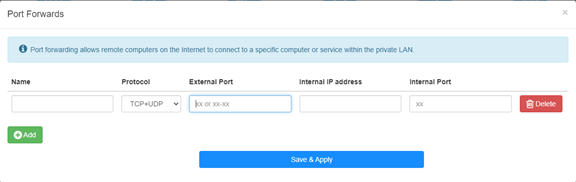
ตัวอย่าง: ตามการกำหนดค่าต่อไปนี้ พอร์ต TCP 5000, พอร์ต UDP 5001 และทั้งพอร์ต TCP/UDP 6000 ของโฮสต์ 192.168.10.18 จะถูกเปิดสู่อินเทอร์เน็ต

ชื่อ:
ชื่อของรายการที่ใช้เพื่ออำนวยความสะดวกในหน่วยความจำ
โปรโตคอล:
TCP, UDP หรือ TCP+UDP
พอร์ตภายนอก:
พอร์ตบริการบนฝั่ง WAN ซึ่งสามารถเข้าถึงได้จากอินเทอร์เน็ต
ที่อยู่ IP ภายใน:
ที่อยู่ IP ของโฮสต์ ซึ่งจะเปิดพอร์ตไปยังอินเทอร์เน็ต
ภายใน พอร์ต:
พอร์ตบริการของโฮสต์ใน LAN
หมายเหตุ:
โดยทั่วไป พอร์ตภายในจะเหมือนกับพอร์ตภายนอก
ขั้นตอนที่ 4: คลิก 'บันทึก & ใช้' เพื่อบันทึกการตั้งค่า
ไปที่หน้าสถานะและตรวจสอบที่อยู่ IP WAN ของเราเตอร์ ตอนนี้คุณสามารถลองใช้ http:// WAN IP: หมายเลขพอร์ตเพื่อเยี่ยมชมบริการที่คุณเปิดได้
42 ความคิดเห็น
博主,你好!
最近使用tr3000路由器使用ipv6时测试端口转发,发现无法映射到内网ipv4地址,请问有解决办法吗?
@Dear Yuri,
Our technical support has contacted you via email. Please check.
“I eagerly awaited a response from someone who could help me with the problem I described… I followed your instructions and set up the ZeroTier network. But it doesn’t solve my problem!
The host I want to connect to via RDP does not have the ZeroTier network client – Windows 8.1. I installed different versions from 1.6.6 to 1.8.8, but the network on the host did not start (the firewall is disabled).
Perhaps to connect from my host (with ZeroTier), I only need one rule in the routing on the cudy 3600 router located in ZeroTier, and/or to create a bridge?”
I eagerly awaited a response from someone who could help me with the problem I described… I followed your instructions and set up the ZeroTier network. But it doesn’t solve my problem!
The host I want to connect to via RDP does not have the ZeroTier network client – Windows 8.1. I installed different versions from 1.6.6 to 1.8.8, but the network on the host did not start (the firewall is disabled).
Perhaps to connect from my host (with ZeroTier), I only need one rule in the routing on the cudy 3600 router located in ZeroTier, and/or to create a bridge?
@Dear Yuri,
You can add Routing rules on the Zerotier Management console page to meet you requirement. Please refer to this article on the website.
http://cudy.com/blogs/faq/how-to-remote-connect-cudy-router-via-zerotier?pos=1&_sid=33968118a&ss=r
“There is a Zerotier network with one host and one router. Physically, they are located in different networks with different providers behind grey IPs. How can I redirect an RDP connection on the router to another host that does not have Zerotier and is located in the same local network as the router?”
There is a Zerotier network with one host and one router. Physically, they are located in different networks with different providers behind grey IPs. How can I redirect an RDP connection on the router to another host that does not have Zerotier and is located in the same local network as the router?