
โทโพโลยีเครือข่ายทั่วไป:

ขั้นตอนที่ 1: เปิดเว็บเบราว์เซอร์แล้วไปที่ http://cudy.net หรือ http://192.168.10.1
สำหรับรายละเอียด โปรดดูที่วิธีลงชื่อเข้าใช้เว็บอินเทอร์เฟซของ Cudy เราเตอร์?
ขั้นตอนที่ 2: หน้าต่างการตั้งค่าด่วนจะปรากฏขึ้น เลือก 'Wireless Extender' จากนั้นไปที่ 'ถัดไป'

 ขั้นตอนที่ 3: เลือก 'เขตเวลา' ของคุณ
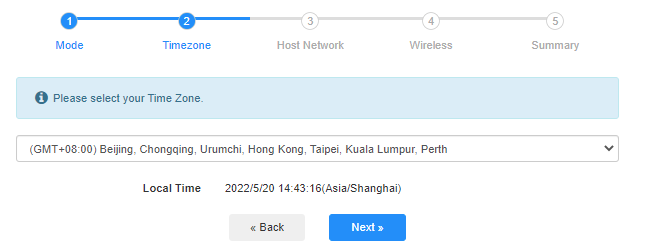
ขั้นตอนที่ 4: เลือกเครือข่ายโฮสต์ที่คุณต้องการขยาย คลิกที่ 'เชื่อมต่อ'

 ขั้นตอนที่ 5: ป้อนรหัสผ่านไร้สายของเครือข่ายโฮสต์

 หมายเหตุ: ตรวจสอบให้แน่ใจว่ารหัสผ่านไร้สายที่คุณพิมพ์นั้นถูกต้อง ไม่เช่นนั้นการกำหนดค่าจะไม่สำเร็จ
ขั้นตอนที่ 6: ปรับแต่งชื่อ Wi-Fi (SSID) และรหัสผ่านให้เหมือนกับเครือข่ายโฮสต์ของคุณ

 ขั้นตอนที่ 7: คลิก 'บันทึก & ใช้' เพื่อกำหนดค่าให้เสร็จสมบูรณ์

 ขั้นตอนที่ 8: เชื่อมต่ออุปกรณ์ไร้สายของคุณกับเครือข่าย Wi-Fi ใหม่อีกครั้ง

 หมายเหตุ:
1. หากคุณตั้งค่าโหมด Wireless Extender โดยใช้อุปกรณ์แบบมีสาย อุปกรณ์นี้อาจไม่มีอินเทอร์เน็ตหลังจากการตั้งค่า โปรดถอดปลั๊กและเสียบสายอีเทอร์เน็ตหรือปิดใช้งานและเปิดใช้งานอะแดปเตอร์เครือข่ายเพื่อรับการเชื่อมต่อใหม่
2. หลังจากตั้งค่าเราเตอร์ Cudy ในโหมด Wireless Extender แล้ว ที่อยู่ IP จะถูกกำหนดโดยเราเตอร์โฮสต์ และที่อยู่ IP เริ่มต้น 192.168.10.1 จะไม่สามารถเข้าสู่ระบบได้ หากคุณต้องการเข้าสู่ระบบเราเตอร์ Cudy อีกครั้ง ให้พิมพ์ 'http://cudy.net' ลงในเบราว์เซอร์ของคุณหรือ ค้นหาที่อยู่ IP ของเราเตอร์ Cudy ในรายการไคลเอนต์ของเราเตอร์โฮสต์ของคุณ
69 ความคิดเห็น
@Christos,
Dear Customer,
Thanks for contacting the Cudy support team.
Yes, but you need to update the latest firmware 2.3.0 of WR1500 first. Then the router will support the range extender mode and WISP mode to connect the main WiFi.
https://www.cudy.com/pages/download-center/wr1500-1-0
“Hello.
Cudy WR1500 Wireless Router Wi‑Fi 6 with 3 Gigabit Ethernet Ports support wireless connection with the home internet route and act as repeater?”
Hello.
Cudy WR1500 Wireless Router Wi‑Fi 6 with 3 Gigabit Ethernet Ports support wireless connection with the home internet route and act as repeater?
@Uschi,
You can enable the WISP function to connect the main WiFi and share the network to all the client on LT400. Please have a try.
“Can I use the Cudy N300 4G LTE in Wireless Extender Mode?
In the Cudy App is no option for Wireless extender.”
Can I use the Cudy N300 4G LTE in Wireless Extender Mode?
In the Cudy App is no option for Wireless extender.
@Widny,
Dear Widny,
Thank you for contacting Cudy support team.
Sorry to tell you that all Cudy 4G/5G routers don’t support Bridge mode. We will provide feedback to the R&D department for evaluation to add this function.
“Good afternoon, I’m looking for a 5G router with Bridge mode and was wondering if your Cudy New 5G NR SA NSA AX3000 supports that feature.”