
WR300
1.0
- BE21000 10G
- BE11000 4× 2.5G
- BE6500 2.5G
- BE6500 Czarny
- BE5000 2.5G
- BE3600 2.5G
- BE3600 Czarny
- BE3600 Biały
- BE3600 Mini
- AX3000 2.5G PoE
- AX3000 2.5G
- AX3000 5-GbE
- AX3000 4-GbE
- AX3000 Mini
- AX1500
- AC1200 5-GbE USB
- AC1200 5-GbE
- AC1200 3-GbE
- AC1200 Mini
- AC1200 5-FE
- AC1200 4-FE
- N300 dużej mocy
- 300 N
- AX3000 5-GbE
EOL
Amazon A+ Content

Idealny do łącza szerokopasmowego 100 Mb/s
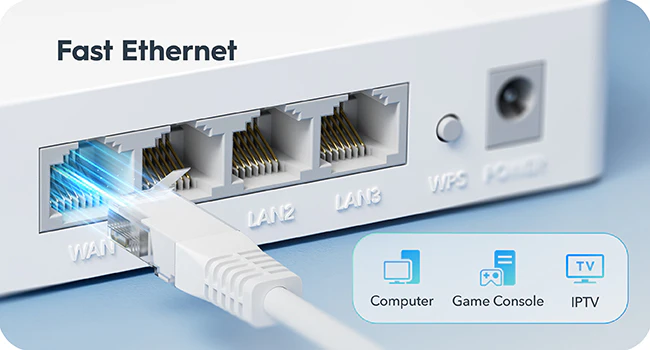
Bezproblemowe udostępnianie urządzeniom przewodowym
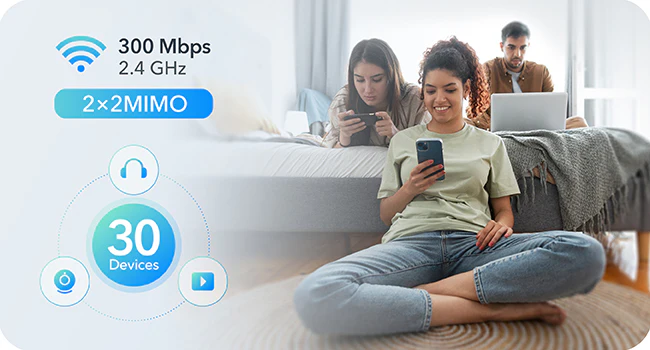
Łączy bezprzewodowo 30 urządzeń

Łatwa konfiguracja i wszechstronne zarządzanie
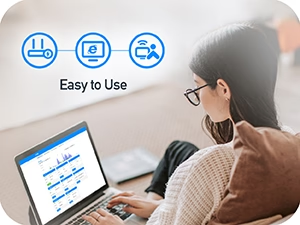
Łatwy w użyciu

Harmonogram Wi-Fi

Klient VPN WireGuard
Satelita Cudy Mesh


| Wersja modelu | ||
|---|---|---|
| Wersja modelu | WR300 1.0 | |
| CPU | ||
| CPU | CPU Details | 580 MHz Single-Core, MIPS24KEC |
| Memory/Storage | ||
| Memory/Storage | Flash/ROM | 8 MB (64 Mbit ) NOR |
| DDR/RAM | 64 MB (512 Mbit) DDR2 | |
| Wireless | ||
| Wireless | 2.4 GHz Wi-Fi Speed | 300 Mbps |
| 2.4 GHz Wi-Fi Streams | 2 Spatial Streams | |
| Wi-Fi Antennas | 2× Fixed | |
| FEM or PA/LNA | 2.4 GHz: 2× Internal | |
| Range Performance |
Max: 130 m (427 ft) Tested in open-space environments with minimal interference. Actual WiFi range may vary depending on layout and wall materials. Refer to the Wall Performance specifications for placement suggestions. |
|
| Wall Performance |
One wooden walls with thickness < 10 cm (4'') One concrete wall with thickness < 10 cm (4'') |
|
| Interfaces | ||
| Interfaces | 10/100 Mbps RJ45 Ports | 4 |
| Ethernet Notes | 1× WAN port, the rest are LAN ports | |
| LED | System | |
| Physical Buttons | WPS Button, Reset Button | |
| Power | ||
| Power | Power Input Type | DC Jack |
| Power Methods | DC | |
| Power Input | 5V⎓1A | |
| Power Adapter In the Box |
Input: 100-240V~, 50/60Hz Output: 5V⎓1A |
|
| Reliability | ||
| Reliability | Environment |
|
| Certifications | ||
| Certifications | FCC, CE | |
| Mechanical | ||
| Mechanical | Installation | Desktop |
| Dimension |
Main Part: 118×80×27.5 mm 4.65×3.15×1.08 inches |
|
| Product Weight | 120 g (4.23 oz.) | |
| Package Content | ||
| Package Content |
|
|
| Ordering Information | ||
| Ordering Information | Retail Package Weight | EU: 336 g (11.85 oz.) |
| Retail Package Dimension |
176×140.5×56 mm 6.93×5.53×2.2 inches |
|
| Units per Carton | 40 | |
| Carton Dimension |
60×30×37.5 cm 23.62×11.81×14.76 inches |
|
| Carton Gross Weight | EU: 14.4 kg (31.75 lbs) | |
| Carton Net Weight | EU: 13.4 kg (29.54 lbs) | |
| Wersja modelu | ||
|---|---|---|
| Wersja modelu | WR300 1.0 | |
| Wireless | ||
| Wireless | Wi-Fi Standards | Wi-Fi 4 |
| Max Wi-Fi Modulation | 64-QAM | |
| Max Capacity | 64 | |
| Recommended Client Upper Limit | 30 | |
| Wi-Fi Channel Width | Auto/20/40 MHz | |
| Wi-Fi Security | WPA/WPA2/WPA3 | |
| Guest Network | 2.4 GHz | |
| WPS | ||
| General | ||
| General | Operation Modes |
|
| Mesh | Cudy Mesh | |
| Mesh Backhaul |
|
|
| WAN Mode |
|
|
| Network | ||
| Network | QoS | Per-User Rate Limiting |
| DHCP |
|
|
| IP Versions | IPv4/IPv6 | |
| IPv6 Protocols |
|
|
| Multicast | ||
| IPTV/VLAN |
|
|
| TTL Customization |
|
|
| IGMP |
|
|
| Forwarding |
|
|
| Firewall |
|
|
| Application Layer Gateway |
|
|
| Utilities | ||
| Utilities | VPN Client |
|
| DNS Options |
|
|
| DNS over TLS Providers |
|
|
| Wake on LAN | ||
| Online Detection | ||
| Management | ||
| Management | Parental Controls |
|
| All Devices Management |
|
|
| Per-Devices Management |
|
|
| Content Management |
|
|
| System | ||
| System | LED Control | |
| Local Control Method |
|
|
| Remote Control Method |
|
|
| Firmware Upgrade | Local Update | |
| Reliability |
|
|
| Diagnostic Tools |
|
|
| Languages |
|
|
| Dashboard | ||
| Dashboard | Panel |
|
| Charts |
|
|
- Rzeczywista przepustowość danych bezprzewodowych może się różnić w zależności od stanu sieci, ograniczeń klienta oraz czynników środowiskowych, w tym układu budynku, przeszkód i lokalizacji klienta.
- Deklarowany zasięg sieci bezprzewodowej ma charakter wyłącznie orientacyjny. Wydajność zasięgu może się różnić w zależności od czynników środowiskowych, takich jak układ budynku, przeszkody, natężenie i gęstość ruchu oraz lokalizacja urządzenia. Aby uzyskać optymalny zasięg, należy umieścić urządzenie w centralnym miejscu w obszarze wymagającym dostępu do sieci Wi-Fi.