
Funkcja przekierowania portów (Port Forwarding) umożliwia komputerom zdalnym w Internecie łączenie się z konkretnym komputerem lub usługą w ramach prywatnej sieci LAN.
Różne usługi korzystają z różnych portów usług. Przed konfiguracją należy sprawdzić numer portu usługi.
Ważny:
Upewnij się, że router Cudy otrzymał publiczny adres IP (WAN IP) od swojego dostawcy usług internetowych. Jeśli jest to prywatny adres IP, oznacza to, że przed Cudy znajduje się inne urządzenie NAT. Musisz również otworzyć porty serwisowe na tym urządzeniu.
Aby sprawdzić, czy adres IP jest publiczny czy prywatny, zapoznaj się z tym linkiem:
http://en.wikipedia.org/wiki/Private_network
Jak sprawdzić adres WAN IP urządzenia Cudy?
Router bezprzewodowy i sieć kratowa (Status systemu->WAN->Status)

Router 4/5 (Status systemu->Sieć komórkowa/4G->Status)

Notatka:
1. Zazwyczaj, jeśli publiczny adres IP i adres IP są takie same, oznacza to, że masz publiczny adres IP. Adres IP to adres IP sieci WAN otrzymany od dostawcy usług internetowych. Publiczny adres IP powyżej to adres IP, pod którym inne urządzenia mogą Cię znaleźć w internecie. Jeśli więc router Cudy ma prywatny adres IP, musisz ustalić, które urządzenia korzystają z tego publicznego adresu IP i otworzyć na nim porty.
2. W przypadku większości routerów komórkowych, dostawca internetu zazwyczaj podaje prywatny adres IP. Jeśli więc chcesz przekierować porty, skontaktuj się z dostawcą internetu, aby przypisał Ci publiczny adres IP lub przekieruj porty w jego imieniu.
Krok 1:Otwórz przeglądarkę internetową i przejdź dohttp://cudy.netLubhttp://192.168.10.1.
Aby uzyskać szczegółowe informacje, zapoznaj się zJak zalogować się do interfejsu internetowego routera Cudy?
Krok 2: KliknijUstawienia zaawansowane -> Przekierowania portówwSiećsekcja.

Krok 3:TrzaskDodaćAby dodać jeden wpis do listy. Wprowadź żądane parametry w polu, jak pokazano poniżej.
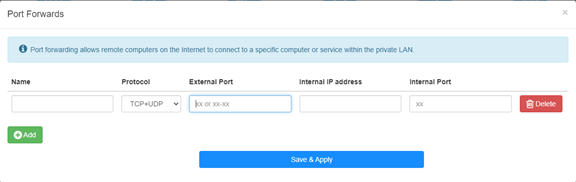
Na przykład:Zgodnie z następującą konfiguracją port TCP 5000, port UDP 5001 i oba porty TCP/UDP 6000 hosta 192.168.10.18 zostaną otwarte dla Internetu.

Nazwa:
Nazwa wpisu, służąca ułatwieniu zapamiętywania
Protokół:
TCP, UDP lub TCP+UDP
Port zewnętrzny:
Port serwisowy po stronie sieci WAN, do którego można uzyskać dostęp z Internetu
Wewnętrzny adres IP:
Adres IP hosta, który otworzy port do internetu
Port wewnętrzny:
Port serwisowy hosta w sieci LAN
Notatka:
Zasadniczo port wewnętrzny jest taki sam jak port zewnętrzny.
Krok 4: Kliknij 'Zapisz i zastosuj' aby zapisać ustawienia.
Przejdź do strony Status i sprawdź adres IP WAN routera. Teraz możesz spróbować użyć numeru portu http:// WAN IP:, aby odwiedzić otwartą usługę.
42 komentarze(-y)
@David,
Estimado cliente:
Gracias por contactar con el equipo de apoyo de cudy.
La dirección IPv4 de la interfaz de red de área extendida del enrutador no es una dirección IP pública. Por lo tanto, incluso si se establece ddns, no puede acceder a la interfaz Wan del enrutador. El nombre de dominio ddns estará relacionado con la dirección IP pública de la línea.
Compruebe si la dirección IP Wan del enrutador principal es la misma que la dirección IP pública que verificó en el enrutador. Si es así, primero debe configurar el reenvío del puerto en el enrutador principal y luego el reenvío del puerto en el enrutador cudy.
“Ccuando configuro mi DDNS en el router Cudy para configurar no-ip.com me arroja el siguiente alerta en color rojo: the current external network IP is not a public IP, and the DDNS service may not work properly.
la informacion detallada del router es la siguiente:
public ip: 38.51.156.145* (no se que significa el asterisco al lado de la ip)
direccion ip: 192.168.55.2
mascara: 255.255.255.0
pasarela: 192.168.55.1
dns: 192.168.55.1
En otra ventana me arroja esta informacion:
Wan
direccion ip: 192.168.55.2
Lan
direccion ip: 192.168.10.1
cabe destacar que tengo conectado el DVR a un mesh y a este dvr le coloque ip: 192.168.10.200"
Ccuando configuro mi DDNS en el router Cudy para configurar no-ip.com me arroja el siguiente alerta en color rojo: the current external network IP is not a public IP, and the DDNS service may not work properly.
la informacion detallada del router es la siguiente:
public ip: 38.51.156.145* (no se que significa el asterisco al lado de la ip)
direccion ip: 192.168.55.2
mascara: 255.255.255.0
pasarela: 192.168.55.1
dns: 192.168.55.1
En otra ventana me arroja esta informacion:
Wan
direccion ip: 192.168.55.2
Lan
direccion ip: 192.168.10.1
cabe destacar que tengo conectado el DVR a un mesh y a este dvr le coloque ip: 192.168.10.200
@david,
Our technical support has sent you the solutions via email. Please check.
“Hoello, I need to change external adress during port redirecting. Address is given by my intrnet provider but it is different then detected by router. Unfortunatelly, there is no such possibility in html interface (or I can’t find it?) Router model: NT12
Thank you”
Hoello, I need to change external adress during port redirecting. Address is given by my intrnet provider but it is different then detected by router. Unfortunatelly, there is no such possibility in html interface (or I can’t find it?) Router model: NT12
Thank you
@Tomas,
Dear Customer,
Our technical support has contacted you via email. Please check.
“Hello,
I have an issue with setting port forwarding on LT700e.
It is supposed to be able to forward ports on VPN interface as well, but it does not work, ports are not forwarded correctly (they do not seems to be opened at all)
The purpose is to allow connecting to local service from other client in same VPN network.
VPN network itself seems to work fine.
Could you please advice?”