
Funkcja przekierowania portów (Port Forwarding) umożliwia komputerom zdalnym w Internecie łączenie się z konkretnym komputerem lub usługą w ramach prywatnej sieci LAN.
Różne usługi korzystają z różnych portów usług. Przed konfiguracją należy sprawdzić numer portu usługi.
Ważny:
Upewnij się, że router Cudy otrzymał publiczny adres IP (WAN IP) od swojego dostawcy usług internetowych. Jeśli jest to prywatny adres IP, oznacza to, że przed Cudy znajduje się inne urządzenie NAT. Musisz również otworzyć porty serwisowe na tym urządzeniu.
Aby sprawdzić, czy adres IP jest publiczny czy prywatny, zapoznaj się z tym linkiem:
http://en.wikipedia.org/wiki/Private_network
Jak sprawdzić adres WAN IP urządzenia Cudy?
Router bezprzewodowy i sieć kratowa (Status systemu->WAN->Status)

Router 4/5 (Status systemu->Sieć komórkowa/4G->Status)

Notatka:
1. Zazwyczaj, jeśli publiczny adres IP i adres IP są takie same, oznacza to, że masz publiczny adres IP. Adres IP to adres IP sieci WAN otrzymany od dostawcy usług internetowych. Publiczny adres IP powyżej to adres IP, pod którym inne urządzenia mogą Cię znaleźć w internecie. Jeśli więc router Cudy ma prywatny adres IP, musisz ustalić, które urządzenia korzystają z tego publicznego adresu IP i otworzyć na nim porty.
2. W przypadku większości routerów komórkowych, dostawca internetu zazwyczaj podaje prywatny adres IP. Jeśli więc chcesz przekierować porty, skontaktuj się z dostawcą internetu, aby przypisał Ci publiczny adres IP lub przekieruj porty w jego imieniu.
Krok 1:Otwórz przeglądarkę internetową i przejdź dohttp://cudy.netLubhttp://192.168.10.1.
Aby uzyskać szczegółowe informacje, zapoznaj się zJak zalogować się do interfejsu internetowego routera Cudy?
Krok 2: KliknijUstawienia zaawansowane -> Przekierowania portówwSiećsekcja.

Krok 3:TrzaskDodaćAby dodać jeden wpis do listy. Wprowadź żądane parametry w polu, jak pokazano poniżej.
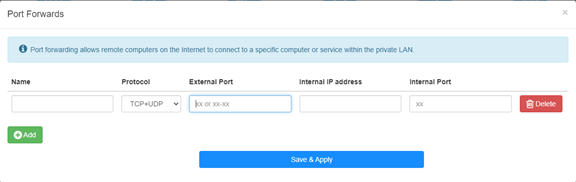
Na przykład:Zgodnie z następującą konfiguracją port TCP 5000, port UDP 5001 i oba porty TCP/UDP 6000 hosta 192.168.10.18 zostaną otwarte dla Internetu.

Nazwa:
Nazwa wpisu, służąca ułatwieniu zapamiętywania
Protokół:
TCP, UDP lub TCP+UDP
Port zewnętrzny:
Port serwisowy po stronie sieci WAN, do którego można uzyskać dostęp z Internetu
Wewnętrzny adres IP:
Adres IP hosta, który otworzy port do internetu
Port wewnętrzny:
Port serwisowy hosta w sieci LAN
Notatka:
Zasadniczo port wewnętrzny jest taki sam jak port zewnętrzny.
Krok 4: Kliknij 'Zapisz i zastosuj' aby zapisać ustawienia.
Przejdź do strony Status i sprawdź adres IP WAN routera. Teraz możesz spróbować użyć numeru portu http:// WAN IP:, aby odwiedzić otwartą usługę.
42 komentarze(-y)
@Dear FRANCISCO,
Yes, port forwarding is limited to a single internal IP address. You can’t set like this.
“I have a question: Is port forwarding limited to a single internal IP address, or can the same port be opened for multiple internal IP addresses? For example, if I need to open port 443 for the internal address 192.168.10.5, and also for 192.168.10.8, how would I do that?”
I have a question: Is port forwarding limited to a single internal IP address, or can the same port be opened for multiple internal IP addresses? For example, if I need to open port 443 for the internal address 192.168.10.5, and also for 192.168.10.8, how would I do that?
@Dear Elshad,
Please enable the Remote Management function on the “Advanced Settings” -“System” -“Administrator” function page. Then you can try to login to the web page of the router from internet via the HTTPS protocol. You must use https://WAN IP address to access the management page. Not the HTTP.
“Dear support team.
I have 4G LTE N300 WiFi Routur
I get Public Static IP from Mobil operator but I can not reach from outside to my Cudy device 80 port.
I opened WEB 80 port
I tried from Port Forwarding side to add IP address of the Cudy 4G Routur IP address but can not reach outside internet to the Cudy modem.
Please support to solve this issue."
Dear support team.
I have 4G LTE N300 WiFi Routur
I get Public Static IP from Mobil operator but I can not reach from outside to my Cudy device 80 port.
I opened WEB 80 port
I tried from Port Forwarding side to add IP address of the Cudy 4G Routur IP address but can not reach outside internet to the Cudy modem.
Please support to solve this issue.
@Estimado Fran:
La dirección IPv4 celular es privada. Por lo tanto, no se puede acceder desde internet. Te sugiero usar la VPN Zerotier, que permite pasar la NAT. Aquí tienes las instrucciones.
https://www.cudy.com/blogs/faq/how-to-remote-connect-cudy-router-via-zerotier?pos=1&_sid=5ecdb2fb9&ss=r
Tengo un LT 500, la interfaces no es como esta , me dice wan / vpn y también tengo cliente wireguard ,como pudiera hacer, porque la ip addres y la publica son diferentes