
この記事では, Cudy ルーターを段階的に設定する方法を説明します。
一般的なネットワークトポロジ:

準備:
1. モデムのプラグを抜き, バックアップ バッテリーがある場合はそれを移動します。
2. ルーターのインターネット ポート (青) を, イーサネット ケーブルを使用して電源がオフになっているモデムに接続します。
3. モデムの電源を入れ, 再起動するまで約 2 分間待ちます。
4. 電源アダプターをルーターに接続し, システム LED が点灯 (赤または青) するまで待ちます。
5. Wi-Fi またはイーサネット経由でコンピューターをルーターに接続します。
6. LED をチェックして, ハードウェアの接続が正しいことを確認します。
注記:コンピュータをモデムに直接接続し, インターネットにアクセスできることを確認してください。インターネットに接続できない場合は, インターネットサービスプロバイダーにお問い合わせください。
ステップ1:ウェブブラウザを開いてhttp://cudy.netまたはhttp://192.168.10.1。
詳細については, Cudy ルーターの Web インターフェイスにログインするにはどうすればいいですか?
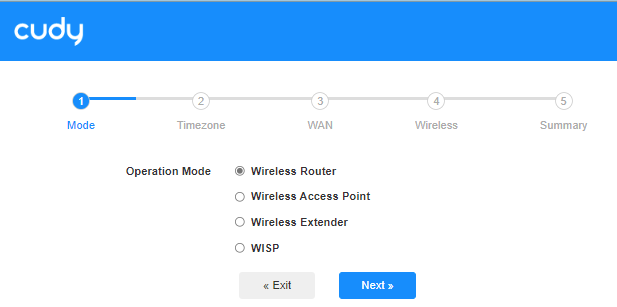
ステップ2:クイックセットアップウィンドウがポップアップ表示されるので, 「ワイヤレスルーター', それから'次'。
ステップ3:'を選択してくださいタイムゾーン。

ステップ4:ここでは, 「DHCP'WANインターネット接続タイプとして。システムはインターネット接続タイプを自動検出しますので, 試してみることができますが, 失敗した場合でもDHCP, インターネット サービス プロバイダーに構成の詳細を確認してください。

または「一般設定「->'」WANモード, 選ぶ 'DHCP'インターネット接続タイプとして選択し, 設定を適用します。

 ステップ5:ワイヤレス ネットワークの名前とパスワードを変更するか, デフォルトのままにしておきます。

 ステップ6:クリック '保存して適用設定を完了します。

 ステップ7:数秒待ってください。「接続で 'システムステータスページが表示されたら, インターネットは正常にセットアップされています。

95件のコメント
@Dear Ashraf RAhman,
We will add this function in next firmware 2.5.×. You can check the connection speed of the ethernet ports via Cudy APP.
“i cant see the wan status on my cudy wr3600e , latest firmware updated . is it running 100mbps or 1000mbps , how do i check it ? in tplink software the ethernet status is shown nicely , why not on cudy?”
i cant see the wan status on my cudy wr3600e , latest firmware updated . is it running 100mbps or 1000mbps , how do i check it ? in tplink software the ethernet status is shown nicely , why not on cudy?
@Dear Lazarus twala,
1. What is the model of your Cudy product? You can check the model on the label.
2. What is the password for? Wi-Fi password? or other?
“How can I change password into my cudy wifi”
How can I change password into my cudy wifi
@Estimado Víctor Ostos,
Necesito un poco más de información.
1. ¿Cuál es el modelo de tu producto Cudy? Puedes comprobar el modelo en la etiqueta. AX3000 no es el modelo, sino solo la especificación Wi-Fi.
2. ¿Puedes buscar y conectarte a la red Wi-Fi del router desde tu teléfono o ordenador? Si es así, conéctate a ella e intenta acceder a la página web del router.
3. ¿Qué configuración has establecido en el router? ¿Cómo conectas el router a tu red?
“Tengo un rauters Ax 3000. No sincroniza se queda el led en rojo. Lo he reiniciado y sigue igual . Que debo hacer.”