
טופולוגיית רשת נפוצה:

שלב 1:פתח דפדפן אינטרנט ועבור אלhttp://cudy.netאוֹhttp://192.168.10.1.
לפרטים, אנא עיינו באיך להתחבר לממשק האינטרנט של הנתב Cudy?
שלב 2:חלון ההתקנה המהירה יופיע, בחר 'מאריך אלחוטי, אז לך'הַבָּא'.

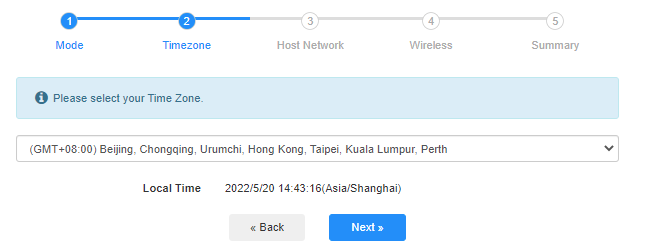
 שלב 3:בחר את שלך 'אזור זמן.
שלב 4:בחר את רשת המארח שברצונך להרחיב. לחץ על 'לְחַבֵּר'.

 שלב 5:הזן את סיסמת הרשת האלחוטית של הרשת המארחת.

 פֶּתֶק:ודא שסיסמת הרשת האלחוטית שאתה מקליד נכונה, אחרת, התצורה לא תצליח.
שלב 6:התאם אישית את שם ה-Wi-Fi (SSID) והסיסמה כך שתהיה זהה לאלו של הרשת המארחת שלך.

 שלב 7:לחץ על 'שמור והחלכדי להשלים את התצורה.

 שלב 8:חבר מחדש את המכשירים האלחוטיים שלך לרשת ה-Wi-Fi החדשה.

 פֶּתֶק:
1. אם תגדירו את מצב מאריך הרשת באמצעות מכשיר קווי, ייתכן שלמכשיר זה לא יהיה חיבור לאינטרנט לאחר ההתקנה. אנא נתק וחבר את כבל ה-Ethernet או השבת והפעל את מתאם הרשת כדי שיקבל את החיבור החדש.
2. לאחר הגדרת הנתב Cudy במצב מרחיב אלחוטי, כתובת ה-IP תוקצה על ידי הנתב המארח וכתובת ה-IP המוגדרת כברירת מחדל 192.168.10.1 לא תוכל להתחבר. אם עליך להתחבר שוב לנתב Cudy, הקלד 'http://cudy.netלתוך הדפדפן שלך או חפש את כתובת ה-IP של הנתב Cudy ברשימת הלקוחות של הנתב המארח שלך.
69 comments
@Dear Milt,
If you can connect the Cudy AP3000 to your network via wired cable. Please use the Access Point mode. If you can’t, you can use the wireless extender mode to connect the A3000 to the network wia Wi-Fi. Generally, if you connect the AP3000 to the network via wired cable, it will have better performance than connect the AP3000 via Wi-Fi.
“I had two Ubiquiti ap’s and I use the unifi web portal to manage the two ap’s. One died and I purchase cudy ap3000 to replace. I cannot manage the cudy ap3000 in the unifi software. I configure the cudy ap3000 with same “ssid” and “password” as the Ubiquiti ap. Work mode is “wireless access point”, should I instead set the cudy ap3000 to “wireless extender mode” to join my network? It seems to be working in access mode? Does it make a difference? If so, why?”
I had two Ubiquiti ap’s and I use the unifi web portal to manage the two ap’s. One died and I purchase cudy ap3000 to replace. I cannot manage the cudy ap3000 in the unifi software. I configure the cudy ap3000 with same “ssid” and “password” as the Ubiquiti ap. Work mode is “wireless access point”, should I instead set the cudy ap3000 to “wireless extender mode” to join my network? It seems to be working in access mode? Does it make a difference? If so, why?
@Estimado Walberto:
Intente configurar su router para que funcione en modo WISP. A continuación, compruébelo de nuevo.
“Después de que configuro mi router como extensor inalambrico, no se conecta a la red, que tengo que hacer?”
Después de que configuro mi router como extensor inalambrico, no se conecta a la red, que tengo que hacer?
@Estimada Joan:
Instala la aplicación Cudy en tu teléfono. Luego, conéctalo a la red wifi de tu extensor Cudy. Usa la aplicación para administrarlo. Configurar la contraseña es muy fácil. Inténtalo.
“No sé cómo ponerle contraseña a mi cudi extender”