Robust EMC design protects itself and clients from power surges and ESD.
ESD: Contact 6kV; Air 8kV
Surge: Power DM 2kV, CM 2kV; RJ45 CM 4kV
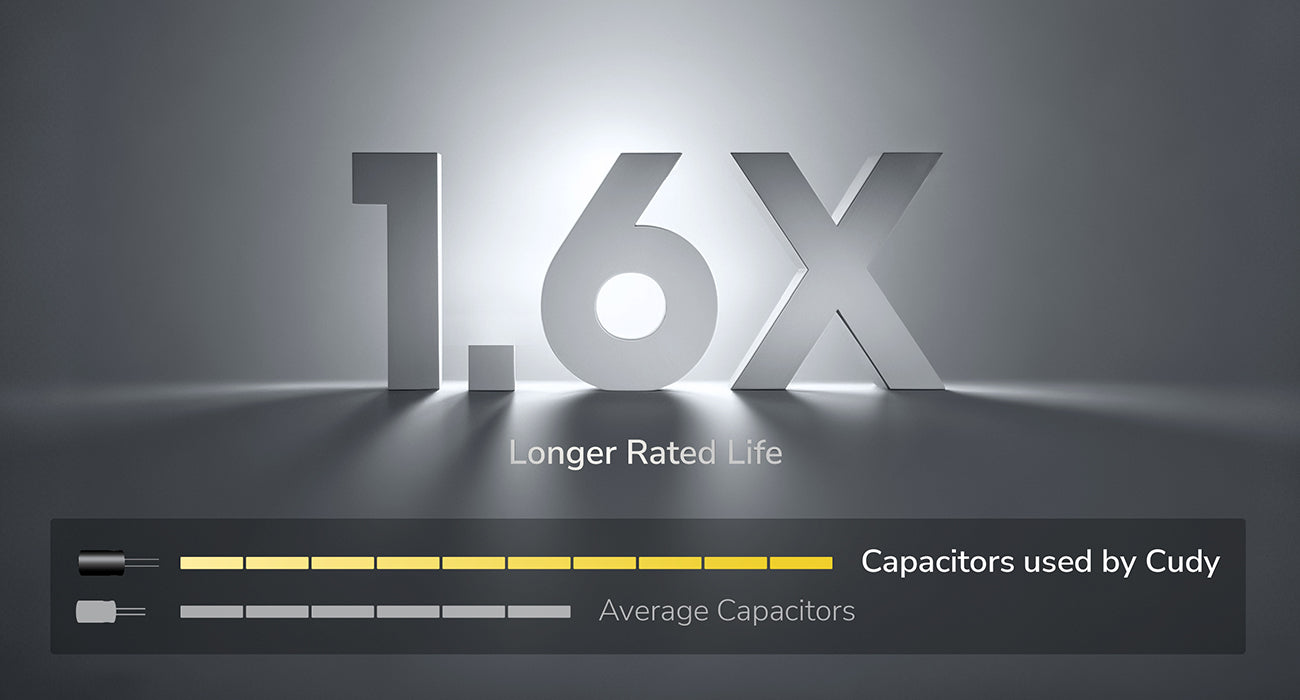
Built to Last Longer with High-Quality Capacitors
Equipped with high-quality capacitors rated for 1.6× longer lifespan than the industry average, making the PoE adapter more resistant to aging and wear.
Three-Prong Plug for Reliable Grounding
Unlike many products that use only a two-prong plug, Cudy PoE adapter uses three-prong plug for proper grounding and reliable operation.
Wallmount Ready
Features two mounting holders, allowing you to firmly mount it on the walls.
A wall-mounted passive 52V PoE adapter with 30W power supply for powering up the PoE device. It is designed to provide power for 48-52V client devices. Higher output voltage of 52V allows for long-distance transmission.
千兆以太网输入/输出
100m传输距离
1
52V Passive PoE, Max 30W, Mode B
电源指示灯
浪涌保护
三重输出保护
分享
InfoCard Size: 10 × 15cm
What to do next?
Edit: Right click the content you want to edit and click "Inspect" to edit it.
Print/Save: Right click in the browser and click "Print", save it as PDF or print it directly. Check print settings below if it's your first-time printing.
Print Settings:
Check the option "Background graphics" to enable gray background.
Uncheck the option "Headers and footers" to remove page information.
Cut:
Refer to the gray border line to cut out the finished InfoCard.
It's recommended to use third-party tools to merge the files before printing to save paper when printing multiple InfoCards.