
MAC Filtresi, yetkisiz ağ erişimini önlemek için kablosuz yönlendiricilerde kullanılan bir teknolojidir. MAC Adresi, bir ağdaki her cihaza atanan benzersiz bir tanımlayıcıdır. Kablosuz yönlendirici, cihazı tanımlamak ve ağlara erişimi belirlemek için MAC Adresini kullanır.Hangi ağa bağlanması gerekiyor?
Adım 1: Bir web tarayıcısı açın ve şu adrese gidin:http://cudy.netveyahttp://192.168.10.1.
Ayrıntılar için lütfen bakınız.Cudy Router'ın web arayüzüne nasıl giriş yapabilirim?
Adım 2:TıklamakGelişmiş Ayarlar>MAC FiltresiiçindeGüvenlikbölüm.

3. Adım: MAC Filtresi sayfasındaki ayarları kontrol edin.

• Belirli cihaz(lar)ı engellemek için
1. ' seçeneğini seçinListe hariç tümüne izin ver.'.
2. MAC Adresi ve IP Adresi ile ilgili olarak çevrimiçi cihaz listesinden engellenecek cihaz(lar)ı seçin.


Engellemek istediğiniz çevrimiçi cihaz listede yoksa, gidin.ileSistem Durumu > Cihazlar>MAC adresini kopyala > geri dönMAC Filtresi>Gelenekve MAC adresini yapıştırın.
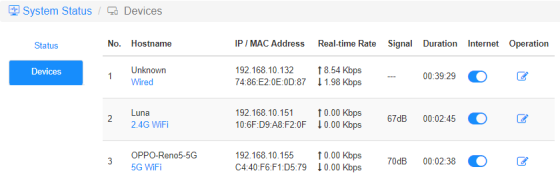
3.Kaydet ve UygulaSeçilen cihaz artık yönlendiriciden internet bağlantısı alamayacak.
• Belirli cihazların çalışmasına izin vermek için
1. ' seçeneğini seçinYalnızca izin verilenler listesiy'.
2. İnternete erişmesine izin verdiğiniz cihaz(lar)ı seçin.

3.Kaydet ve Uygulave yalnızca seçilen cihazlar internet erişimine sahip olabilir.
İşte MAC Filtresi ile aynı işlemi yapmanın basit bir yolu.
İnternet
Her cihazın internet erişimini kontrol etmek için İnternet simgesini etkinleştirin ve devre dışı bırakın.
'OPPO-Reno5-5G' aşağıdaki yönlendirici üzerinden internete bağlanamıyor.

Operasyon
Üzerine tıklayınOperasyonIcon, cihaz için yeni bir ad belirtebilir.

İnternet zaman kısıtlamasıerişim
Cihazların internete erişmesine izin verilen zaman dilimi.
Örnek: 'Bilgisayar' cihazının internete yalnızca Pazartesi günleri saat 10:00 ile 20:00 arasında erişmesine izin verilir.


12 yorum
@Dear tonalt,
Our technical support has sent you the solutions via email. Please check.
“it seems that an activated mac-filter also has an effect on the guest-network in the sense that the router doesn’t connect a guest to the internet! LT700E.
i think most people don’t like this and even worse: the activated mac filter on the guest network is not editable and it even worser it doesn’t use the mac table that is defined for the main wifi network.
so the mac filter is completely useless if one allows a guest-network.
probably i am wrong and the guest network can connect a guest to the internet with an activated mac-filter. but if so, please tell what i can do, to achieve this.”
it seems that an activated mac-filter also has an effect on the guest-network in the sense that the router doesn’t connect a guest to the internet! LT700E.
i think most people don’t like this and even worse: the activated mac filter on the guest network is not editable and it even worser it doesn’t use the mac table that is defined for the main wifi network.
so the mac filter is completely useless if one allows a guest-network.
probably i am wrong and the guest network can connect a guest to the internet with an activated mac-filter. but if so, please tell what i can do, to achieve this.
@Dear William and Dragan,
Thank you for your kindly advice! We will provide your feedback to the product department for evaluation. In fact, we already have this plan to develop this feature.
“I completely agree with William. I just can’t believe this kind of oversight was made. MAC filtering still hasn’t been added to the latest firmware 2.3.12. Please update the firmware and give us that function.”
“I just bought the Cudy WR11000 WiFi 7 Router and want to use it as an Access Point with MAC Filtering. But I just found out that there is no way to enable MAC Filtering when it is in Access Point mode. Why? You need to allow MAC Filtering in Access Point mode Not just only in Router mode! Please update the firmware and give us that function. I am on the latest firmware version 2.2.19.”
mine is WR3600
I completely agree with William. I just can’t believe this kind of oversight was made. MAC filtering still hasn’t been added to the latest firmware 2.3.12. Please update the firmware and give us that function.