
Genel ağ topolojisi:

Adım 1:Bir web tarayıcısı açın ve şu adrese gidin:http://cudy.netveyahttp://192.168.10.1.
Ayrıntılı bilgi için lütfen bakınız.Cudy yönlendiricisinin web arayüzüne nasıl giriş yapılır?
Adım 2:Hızlı Kurulum penceresi açılacak, ' seçeneğini seçin.Kablosuz Genişleticio zaman git 'Sonraki'.

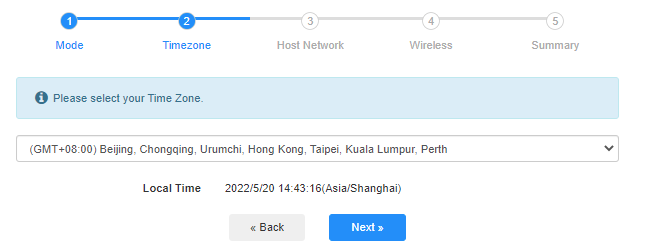
 3. Adım:'Seçiminizi yapın'Saat Dilimi.
Adım 4:Genişletmek istediğiniz ana ağı seçin. 'Bağlamak'.

 Adım 5:Ana ağın kablosuz ağ şifresini girin.

 Not:Girdiğiniz kablosuz ağ şifresinin doğru olduğundan emin olun, aksi takdirde yapılandırma başarılı olamaz.
Adım 6:Wi-Fi adını (SSID) özelleştirin ve şifre, ana ağınızla aynı olsun.

 Adım 7:Tıklamak 'Kaydet ve UygulaYapılandırmayı tamamlamak için.

 Adım 8:Kablosuz cihazlarınızı yeni Wi-Fi ağına yeniden bağlayın.

 Not:
Not:
1. Kablosuz Genişletici modunu kablolu bir cihaz kullanarak kurarsanız, kurulumdan sonra bu cihaz internete bağlanamayabilir. Yeni bağlantıyı kurmak için lütfen Ethernet kablosunu çıkarıp tekrar takın veya ağ bağdaştırıcısını devre dışı bırakıp tekrar etkinleştirin.
2. Cudy yönlendiricisini Kablosuz Genişletici modunda kurduktan sonra, IP adresi ana yönlendirici tarafından atanacak ve varsayılan IP adresi olan 192.168.10.1'e giriş yapılamayacaktır. Cudy yönlendiricisine tekrar giriş yapmanız gerekiyorsa, 'http://cudy.netTarayıcınıza girin veya ana yönlendiricinizin istemci listesinden Cudy yönlendiricisinin IP adresini arayın.
71 yorum
@Dear Chosen,
Please login to the web page of your Cudy router. Go to “General Settings” —“Wireless” function page. You will see the Wi-Fi name. You can change it here.
“I don’t know how to change my Wi-Fi nickname because I rebooted the Wi-Fi box by, mistake”
I don’t know how to change my Wi-Fi nickname because I rebooted the Wi-Fi box by, mistake
@Dear Artyom,
Thank you for contacting Cudy support team. IOur technical support has contacted you via email. Please check.
“I set up my cudy re 300 WiFi amplifier, but the program doesn’t see it, why is that?”
I set up my cudy re 300 WiFi amplifier, but the program doesn’t see it, why is that?
@ping不通连入无线扩展的TR3000的LAN口的电脑, 你好
你可以尝试用无线中继模式,中继模式完成之后,无线接口会获取一个IP地址(假设为192.168.1.200,当然你也可以设置静态IP自己指定IP地址)作为路由器的WAN口。LAN网段假设还是保持默认的192.168.10.1 255.255.255.0。连接完毕之后,你可以先关闭路由器的防火墙。然后到主的路由器里面增加一条局域网的静态路由条目。目的 192.168.10.0 255.255.255.0,出口LAN, 下一跳: 192.168.1.200 或者你指定的IP地址。
然后你再试试两个局域网互访是不是正常了。注意WAN ping LAN 的时候,被PING的主机的防火墙需要关闭。或者放行外网发送的ICMP 报文,不然被系统防火墙拦截也是ping不通的。
“用TR3000无线扩展连入无线网络后,将电脑A通过网线插入TR3000的LAN口,电脑A能够获取IP,也能访问网络,也能ping通局域网内其他电脑,但是局域网内的其他电脑ping不通电脑A。”