
Genel ağ topolojisi:

Adım 1:Bir web tarayıcısı açın ve şu adrese gidin:http://cudy.netveyahttp://192.168.10.1.
Ayrıntılı bilgi için lütfen bakınız.Cudy yönlendiricisinin web arayüzüne nasıl giriş yapılır?
Adım 2:Hızlı Kurulum penceresi açılacak, ' seçeneğini seçin.Kablosuz Genişleticio zaman git 'Sonraki'.

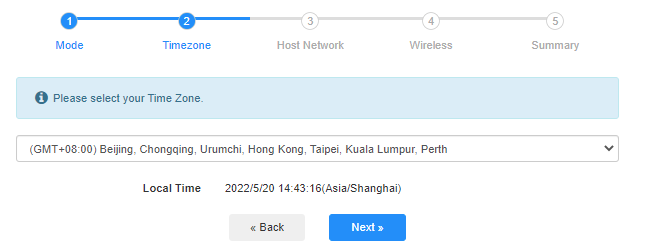
 3. Adım:'Seçiminizi yapın'Saat Dilimi.
Adım 4:Genişletmek istediğiniz ana ağı seçin. 'Bağlamak'.

 Adım 5:Ana ağın kablosuz ağ şifresini girin.

 Not:Girdiğiniz kablosuz ağ şifresinin doğru olduğundan emin olun, aksi takdirde yapılandırma başarılı olamaz.
Adım 6:Wi-Fi adını (SSID) özelleştirin ve şifre, ana ağınızla aynı olsun.

 Adım 7:Tıklamak 'Kaydet ve UygulaYapılandırmayı tamamlamak için.

 Adım 8:Kablosuz cihazlarınızı yeni Wi-Fi ağına yeniden bağlayın.

 Not:
Not:
1. Kablosuz Genişletici modunu kablolu bir cihaz kullanarak kurarsanız, kurulumdan sonra bu cihaz internete bağlanamayabilir. Yeni bağlantıyı kurmak için lütfen Ethernet kablosunu çıkarıp tekrar takın veya ağ bağdaştırıcısını devre dışı bırakıp tekrar etkinleştirin.
2. Cudy yönlendiricisini Kablosuz Genişletici modunda kurduktan sonra, IP adresi ana yönlendirici tarafından atanacak ve varsayılan IP adresi olan 192.168.10.1'e giriş yapılamayacaktır. Cudy yönlendiricisine tekrar giriş yapmanız gerekiyorsa, 'http://cudy.netTarayıcınıza girin veya ana yönlendiricinizin istemci listesinden Cudy yönlendiricisinin IP adresini arayın.
71 yorum
У меня аналогичная проблема с предыдущим комментарием.
Приобрел роутер cudy AP1200 v1.0 (RE1200 Outdoor V1.0), прошивка 2.4.30-20260603-132148, подключаю его по инструкции в режиме усилитель сигнала , ввожу пароль от основной сети, далее роутер создает две сети с приставкой EXT, пароль как у основной сети оставляю, подключаюсь к новой сети интернета нет. Захожу настройки Cudy вижу: Интернет: НЕТ подключения, Режим работы: Усилитель Wi-Fi. При этом на основном роутере (Keenetic Start) интернет естественно есть. В интернете советуют настроить режим WISP, но в настройках моего роутера Cudy есть только Wireless Access Point, Extender или Client. Что делать?
@Уважаемый Андрей,
Наша служба технической поддержки отправила вам прошивку по электронной почте. Пожалуйста, проверьте.
“приобрел роутер cudy BE 3600 WR 3600E v1.0, прошивка 2.3.15, подключаю его по инструкции в режиме усилитель сигнала , ввожу все как полагается пароль от основной сети , далее роутер создает две сети с приставкой EXT, пароль как у основной сети оставляю, прохожу все пути мне пишет подключитесь к новой сети , я подключаюсь интернета нет. Захожу в приложение связи Cudy с основным роутером нет, делаю повторно процедуру все так же новая сеть появляется интрнета нет. Что делать ??? До этого был роутер тоже Cudy wr3000 там был режим WISP с этим режимом мне удавалось расширить сеть. В WR3600E такого режима нет, токлько усилитель сигнала.”
приобрел роутер cudy BE 3600 WR 3600E v1.0, прошивка 2.3.15, подключаю его по инструкции в режиме усилитель сигнала , ввожу все как полагается пароль от основной сети , далее роутер создает две сети с приставкой EXT, пароль как у основной сети оставляю, прохожу все пути мне пишет подключитесь к новой сети , я подключаюсь интернета нет. Захожу в приложение связи Cudy с основным роутером нет, делаю повторно процедуру все так же новая сеть появляется интрнета нет. Что делать ??? До этого был роутер тоже Cudy wr3000 там был режим WISP с этим режимом мне удавалось расширить сеть. В WR3600E такого режима нет, токлько усилитель сигнала.
@Dear Teresa,
1. Please update the latest firmware for your RE1200 and check again.
2. If the problem remains, Has RE1200 been connected to the WiFi signal of the main router? If the RE1200 has been connected to the WiFi signal of the main router, are you connected to the 5GHz WiFi signal of the main router or the 2.4GHz WiFi signal? Generally speaking, 5GHz has higher performance, so it is recommended that you connect to a 5GHz signal.
3. If RE1200 has successfully connected to the WiFi signal of the main router, please describe the specific problems currently encountered. For example, mobile phones and other terminals cannot search for RE1200’s WiFi signal? Mobile phones and other terminals search for RE1200’s WiFi signal but cannot connect? Mobile phones and other terminals can search for RE1200’s WiFi signal and connect, but cannot access the Internet?
In addition, please adjust the placement to the appropriate place according to the color of the RE indicator light. Solid blue light indicates that the WiFi signal connection between the RE1200 and the main router is good.
“I have the Cudy RE1200 and I’m having endless problems, keeps disconnecting, I’m at my wits end!”
I have the Cudy RE1200 and I’m having endless problems, keeps disconnecting, I’m at my wits end!