
Genel ağ topolojisi:

Adım 1:Bir web tarayıcısı açın ve şu adrese gidin:http://cudy.netveyahttp://192.168.10.1.
Ayrıntılı bilgi için lütfen bakınız.Cudy yönlendiricisinin web arayüzüne nasıl giriş yapılır?
Adım 2:Hızlı Kurulum penceresi açılacak, ' seçeneğini seçin.Kablosuz Genişleticio zaman git 'Sonraki'.

 3. Adım:'Seçiminizi yapın'Saat Dilimi.
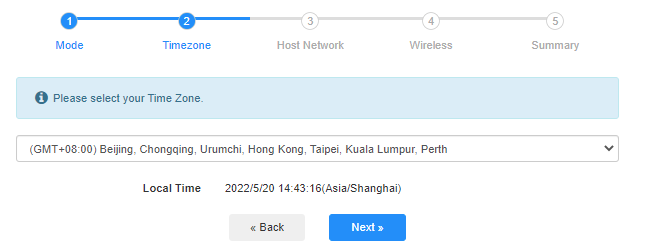
Adım 4:Genişletmek istediğiniz ana ağı seçin. 'Bağlamak'.

 Adım 5:Ana ağın kablosuz ağ şifresini girin.

 Not:Girdiğiniz kablosuz ağ şifresinin doğru olduğundan emin olun, aksi takdirde yapılandırma başarılı olamaz.
Adım 6:Wi-Fi adını (SSID) özelleştirin ve şifre, ana ağınızla aynı olsun.

 Adım 7:Tıklamak 'Kaydet ve UygulaYapılandırmayı tamamlamak için.

 Adım 8:Kablosuz cihazlarınızı yeni Wi-Fi ağına yeniden bağlayın.

 Not:
Not:
1. Kablosuz Genişletici modunu kablolu bir cihaz kullanarak kurarsanız, kurulumdan sonra bu cihaz internete bağlanamayabilir. Yeni bağlantıyı kurmak için lütfen Ethernet kablosunu çıkarıp tekrar takın veya ağ bağdaştırıcısını devre dışı bırakıp tekrar etkinleştirin.
2. Cudy yönlendiricisini Kablosuz Genişletici modunda kurduktan sonra, IP adresi ana yönlendirici tarafından atanacak ve varsayılan IP adresi olan 192.168.10.1'e giriş yapılamayacaktır. Cudy yönlendiricisine tekrar giriş yapmanız gerekiyorsa, 'http://cudy.netTarayıcınıza girin veya ana yönlendiricinizin istemci listesinden Cudy yönlendiricisinin IP adresini arayın.
71 yorum
@Dear James,
Generally, it is strange. Please check if the client is connected to the Cudy router and try again. If the problem remains, please try to login to the web page via LAN IP address ( by default is 192.168.10.1).
“Hello, after setting up the WISP mode I cannot connect to cudy.net anymore. How to access the web interface?”
Hello, after setting up the WISP mode I cannot connect to cudy.net anymore. How to access the web interface?
@Prag
Dear Customer,
Thank you for contacting Cudy support team.
Generally, we suggest you to set the router to WISP mode to repeater the public wifi hotspots.
But you can also have a try.
“Hi, is it possible to pass thru the captive portal login to allow wifi extender mode to work with public wifi hotspots?”
Hi, is it possible to pass thru the captive portal login to allow wifi extender mode to work with public wifi hotspots?
@Wireless Extender mode,
Dear Customer,
Thanks for contacting the Cudy support team.
Yes, we have plan to add this mode on next firmware update. But I can’t for sure about the time. It will need about 1~2 months.
“Hi, are there any plans to add Wireless Extender mode to the wr6500 router in the next software update? And if, do you have any plans when this update will be released”