
เราเตอร์ Cudy มีเว็บอินเทอร์เฟซในตัว และหน้าเว็บภายในนี้ไม่จำเป็นต้องเชื่อมต่ออินเทอร์เน็ต คุณสามารถเชื่อมต่ออุปกรณ์ของคุณกับเราเตอร์ Cudy ผ่าน Wi-Fi หรืออีเทอร์เน็ตเพื่อเข้าสู่ระบบหน้าการจัดการเว็บ
ขั้นตอนที่ 1: เชื่อมต่อคอมพิวเตอร์กับเราเตอร์ Cudy ผ่าน ไร้สาย หรือ แบบมีสาย
หาก ไร้สาย: ชื่อ Wi-Fi และรหัสผ่านเริ่มต้นจะพิมพ์อยู่ที่ป้ายกำกับด้านล่างของเราเตอร์
หาก แบบมีสาย: เชื่อมต่อคอมพิวเตอร์ของคุณกับ พอร์ต LAN ที่ด้านหลังของเราเตอร์ผ่านสายอีเทอร์เน็ต
ขั้นตอนที่ 2: เปิดเว็บเบราว์เซอร์ (Google, Firefox ฯลฯ) แล้วป้อน http://cudy.net หรือ http://192.168.10.1 ในแถบที่อยู่
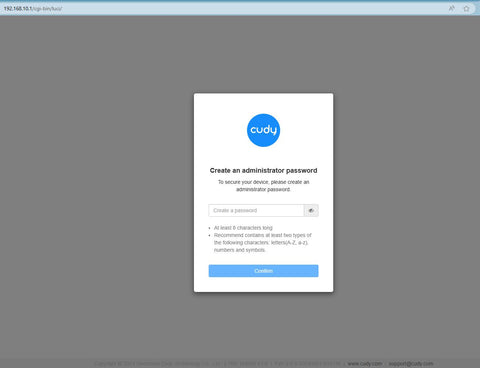
ขั้นตอนที่ 3: หน้าเข้าสู่ระบบด้านล่างจะปรากฏขึ้น เลือกภาษาที่แสดงของหน้าการจัดการเว็บและรหัสผ่านที่ร้องขอคือ 'admin' หรือจำเป็นต้องสร้างรหัสผ่านเดียว

การแก้ไขปัญหา:
หากหน้าเข้าสู่ระบบไม่ปรากฏขึ้น ให้ลองทำตามขั้นตอนการแก้ปัญหาต่อไปนี้:
1. ตรวจสอบให้แน่ใจว่า http://cudy.net หรือ http://192.168.10.1 กำลังพิมพ์ในแถบที่อยู่ ไม่ใช่แถบค้นหา
2. หากคอมพิวเตอร์ถูกตั้งค่าเป็นที่อยู่ IP แบบคงที่ ให้เปลี่ยนการตั้งค่าเพื่อรับที่อยู่ IP และที่อยู่เซิร์ฟเวอร์ DNS โดยอัตโนมัติ
3. ใช้เว็บเบราว์เซอร์อื่นแล้วลองอีกครั้ง
4. เปลี่ยนอุปกรณ์ไคลเอ็นต์อื่น
5. รีบูตหรือรีเซ็ตเราเตอร์แล้วตรวจสอบอีกครั้ง
วิธีรีเซ็ต: ขณะที่เปิดเครื่องอยู่ ให้กดปุ่ม/รูรีเซ็ตเป็นเวลา 8 วินาที
6. ล้างคุกกี้ของเบราว์เซอร์ของคุณ
7. ปิดการใช้งานและเปิดใช้งานอะแดปเตอร์เครือข่ายที่ใช้งานอยู่
332 ความคิดเห็น
@Dear VICTORIA,
What do you mean about the “password”? Is it WiFi password or admin password or other?
“What to do to unhiden my password”
@Cher Jouy,
Le mot de passe par défaut est imprimé sur l’étiquette. S’il a été modifié, vous pouvez essayer de réinitialiser le routeur aux paramètres d’usine en appuyant longuement sur le bouton de réinitialisation pendant environ 3 secondes. Vous pouvez relâcher le bouton de réinitialisation lorsque la LED clignote.
Le mot de passe par défaut du panneau WEB reviendra à la valeur par défaut « admin ». Si la version du micrologiciel est 2.×.x, vous devez créer un nouveau mot de passe lors de la première connexion à la page web du routeur.
“Bonjour,
pourriez vous me donner l’identifiant et mots de passe svp
cordialement”
What to do to unhiden my password
Bonjour,
pourriez vous me donner l’identifiant et mots de passe svp
cordialement
@Estimada Gabriela,
¿Cual es el modo de trabajo de tu router? ¿Es el modo Access Point? Por favor, compruébalo primero. Necesitas configurarlo en modo Router Inalámbrico para bloquear los dispositivos específicos.
¿Puede configurar el router usted misma?
“Hola tengo cudy wr 3000 pero un técnico me lo configuro y ahora al ingresar a mi router solo veo la lista de dispositivos conectados y no me permite bloquear como podre nuevamente tener la opción de bloquear a los dispositivos conectados porque son muchos y mi internet esta muy lento porfa ayúdeme con eso….”