
เราเตอร์ Cudy มีเว็บอินเทอร์เฟซในตัว และหน้าเว็บภายในนี้ไม่จำเป็นต้องเชื่อมต่ออินเทอร์เน็ต คุณสามารถเชื่อมต่ออุปกรณ์ของคุณกับเราเตอร์ Cudy ผ่าน Wi-Fi หรืออีเทอร์เน็ตเพื่อเข้าสู่ระบบหน้าการจัดการเว็บ
ขั้นตอนที่ 1: เชื่อมต่อคอมพิวเตอร์กับเราเตอร์ Cudy ผ่าน ไร้สาย หรือ แบบมีสาย
หาก ไร้สาย: ชื่อ Wi-Fi และรหัสผ่านเริ่มต้นจะพิมพ์อยู่ที่ป้ายกำกับด้านล่างของเราเตอร์
หาก แบบมีสาย: เชื่อมต่อคอมพิวเตอร์ของคุณกับ พอร์ต LAN ที่ด้านหลังของเราเตอร์ผ่านสายอีเทอร์เน็ต
ขั้นตอนที่ 2: เปิดเว็บเบราว์เซอร์ (Google, Firefox ฯลฯ) แล้วป้อน http://cudy.net หรือ http://192.168.10.1 ในแถบที่อยู่
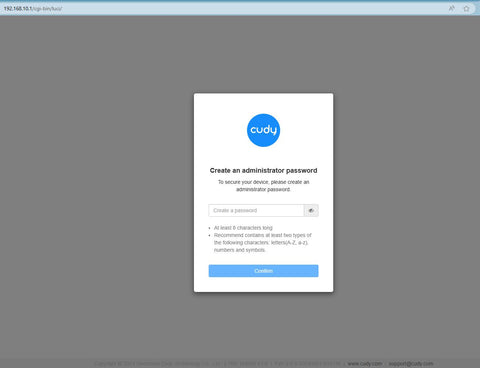
ขั้นตอนที่ 3: หน้าเข้าสู่ระบบด้านล่างจะปรากฏขึ้น เลือกภาษาที่แสดงของหน้าการจัดการเว็บและรหัสผ่านที่ร้องขอคือ 'admin' หรือจำเป็นต้องสร้างรหัสผ่านเดียว

การแก้ไขปัญหา:
หากหน้าเข้าสู่ระบบไม่ปรากฏขึ้น ให้ลองทำตามขั้นตอนการแก้ปัญหาต่อไปนี้:
1. ตรวจสอบให้แน่ใจว่า http://cudy.net หรือ http://192.168.10.1 กำลังพิมพ์ในแถบที่อยู่ ไม่ใช่แถบค้นหา
2. หากคอมพิวเตอร์ถูกตั้งค่าเป็นที่อยู่ IP แบบคงที่ ให้เปลี่ยนการตั้งค่าเพื่อรับที่อยู่ IP และที่อยู่เซิร์ฟเวอร์ DNS โดยอัตโนมัติ
3. ใช้เว็บเบราว์เซอร์อื่นแล้วลองอีกครั้ง
4. เปลี่ยนอุปกรณ์ไคลเอ็นต์อื่น
5. รีบูตหรือรีเซ็ตเราเตอร์แล้วตรวจสอบอีกครั้ง
วิธีรีเซ็ต: ขณะที่เปิดเครื่องอยู่ ให้กดปุ่ม/รูรีเซ็ตเป็นเวลา 8 วินาที
6. ล้างคุกกี้ของเบราว์เซอร์ของคุณ
7. ปิดการใช้งานและเปิดใช้งานอะแดปเตอร์เครือข่ายที่ใช้งานอยู่
320 ความคิดเห็น
@Dear Hani,
You can go to “General Settings”—-“Wireless” page to change the Wi-Fi password. You can also do it via Cudy APP. It will be easier to do it on your phone.
“I want to change password and name of wifi”
I want to change password and name of wifi
@Dear Sewela,
Please login to the WEB management page of the router. go to “General Settings”—-“Wireless” page to change the Wi-Fi password. You can also do it via Cudy APP. It will be easier to do it on your phone.
“I want to change password and name of the Wi-Fi”
I want to change password and name of the Wi-Fi
I want to block all hackers