
O Filtro MAC é uma tecnologia usada em roteadores sem fio para impedir acesso não autorizado a redes. O Endereço MAC é um identificador exclusivo atribuído a cada dispositivo em uma rede. Um roteador sem fio usa um Endereço MAC para identificar o dispositivo e determinar o quea qual rede ele deve se conectar.
Passo 1: Abra um navegador da web e vá parahttp://cudy.netouhttp://192.168.10.1.
Para obter detalhes, consulteComo fazer login na interface web do roteador Cudy?
Passo 2:CliqueConfigurações avançadas->Filtro MACnoSegurançaseção.

Etapa 3: Verifique as configurações na página Filtro MAC.

• Para bloquear o(s) dispositivo(s) específico(s)
1. Selecione 'Permitir tudo, exceto lista'.
2. Selecione o(s) dispositivo(s) a serem bloqueados na lista de dispositivos on-line em relação ao endereço MAC e endereço IP.


Se o dispositivo online que você deseja bloquear não estiver lá, váparaStatus do sistema->Dispositivos->copiar o endereço MAC->voltar paraFiltro MAC->Personalizadoe cole o endereço MAC.
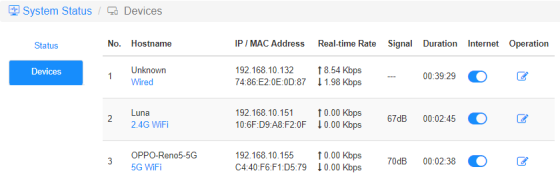
3.Salvar e aplicare o dispositivo selecionado não poderá mais obter internet do roteador.
• Para permitir que o(s) dispositivo(s) específico(s)
1. Selecione 'Lista de permissões apenase'.
2. Selecione o(s) dispositivo(s) que você permite acessar a internet.

3.Salvar e aplicare somente os dispositivos selecionados poderão ter acesso à internet.
Aqui está uma maneira simples de fazer o mesmo que o Filtro MAC.
Status do sistema-> Dispositivos
Internet
Habilite e desabilite o ícone da Internet para controlar o acesso à Internet de cada dispositivo.
'OPPO-Reno5-5G' não consegue acessar a internet pelo roteador abaixo.

Operação
Clique noOperaçãoícone pode especificar um novo nome para o dispositivo.

Restrição de tempo da internet aacesso
O período de tempo em que os dispositivos têm permissão para acessar a Internet.
Exemplo: O dispositivo 'Computador' só pode acessar a internet na segunda-feira, das 10h às 20h.


12 comentários
@Dear tonalt,
Our technical support has sent you the solutions via email. Please check.
“it seems that an activated mac-filter also has an effect on the guest-network in the sense that the router doesn’t connect a guest to the internet! LT700E.
i think most people don’t like this and even worse: the activated mac filter on the guest network is not editable and it even worser it doesn’t use the mac table that is defined for the main wifi network.
so the mac filter is completely useless if one allows a guest-network.
probably i am wrong and the guest network can connect a guest to the internet with an activated mac-filter. but if so, please tell what i can do, to achieve this.”
it seems that an activated mac-filter also has an effect on the guest-network in the sense that the router doesn’t connect a guest to the internet! LT700E.
i think most people don’t like this and even worse: the activated mac filter on the guest network is not editable and it even worser it doesn’t use the mac table that is defined for the main wifi network.
so the mac filter is completely useless if one allows a guest-network.
probably i am wrong and the guest network can connect a guest to the internet with an activated mac-filter. but if so, please tell what i can do, to achieve this.
@Dear William and Dragan,
Thank you for your kindly advice! We will provide your feedback to the product department for evaluation. In fact, we already have this plan to develop this feature.
“I completely agree with William. I just can’t believe this kind of oversight was made. MAC filtering still hasn’t been added to the latest firmware 2.3.12. Please update the firmware and give us that function.”
“I just bought the Cudy WR11000 WiFi 7 Router and want to use it as an Access Point with MAC Filtering. But I just found out that there is no way to enable MAC Filtering when it is in Access Point mode. Why? You need to allow MAC Filtering in Access Point mode Not just only in Router mode! Please update the firmware and give us that function. I am on the latest firmware version 2.2.19.”
mine is WR3600
I completely agree with William. I just can’t believe this kind of oversight was made. MAC filtering still hasn’t been added to the latest firmware 2.3.12. Please update the firmware and give us that function.