
Topologia de rede comum:

Passo 1:Abra um navegador da web e vá parahttp://cudy.netouhttp://192.168.10.1.
Para mais detalhes, consulteComo fazer login na interface web do Cudy Router?
Passo 2:A janela Configuração rápida será exibida, escolha 'Extensor sem fio, então vá 'Próximo'.

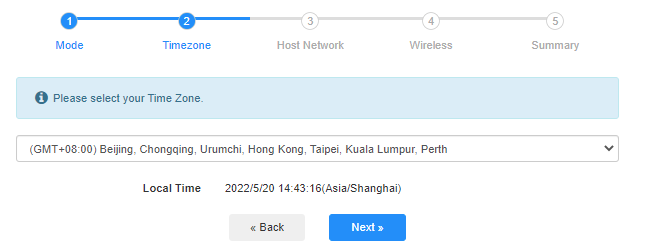
 Etapa 3:Escolha o seu 'Fuso horário'.
Passo 4:Selecione a rede host que deseja estender. Clique em 'Conectar'.

 Etapa 5:Digite a senha sem fio da rede host.

 Observação:Certifique-se de que a senha da rede sem fio digitada esteja correta, caso contrário, a configuração não será bem-sucedida.
Etapa 6:Personalize o nome do Wi-Fi (SSID) e a senha para que seja a mesma da sua rede host.

 Passo 7:Clique em 'Salvar e aplicar'para concluir a configuração.

 Passo 8:Reconecte seus dispositivos sem fio à nova rede Wi-Fi.

 Observação:
1. Se você configurar o modo Extensor Sem Fio usando um dispositivo com fio, este dispositivo pode não ter acesso à internet após a configuração. Desconecte e conecte o cabo Ethernet ou desative e ative o adaptador de rede para obter a nova conexão.
2. Após configurar o roteador Cudy no modo Extensor Sem Fio, o endereço IP será atribuído pelo roteador host e o endereço IP padrão 192.168.10.1 não permitirá o login. Se precisar fazer login no roteador Cudy novamente, digite 'http://cudy.net'no seu navegador ou procure o endereço IP do roteador Cudy na lista de clientes do seu roteador host.
69 comentários
@Christos,
Dear Customer,
Thanks for contacting the Cudy support team.
Yes, but you need to update the latest firmware 2.3.0 of WR1500 first. Then the router will support the range extender mode and WISP mode to connect the main WiFi.
https://www.cudy.com/pages/download-center/wr1500-1-0
“Hello.
Cudy WR1500 Wireless Router Wi‑Fi 6 with 3 Gigabit Ethernet Ports support wireless connection with the home internet route and act as repeater?”
Hello.
Cudy WR1500 Wireless Router Wi‑Fi 6 with 3 Gigabit Ethernet Ports support wireless connection with the home internet route and act as repeater?
@Uschi,
You can enable the WISP function to connect the main WiFi and share the network to all the client on LT400. Please have a try.
“Can I use the Cudy N300 4G LTE in Wireless Extender Mode?
In the Cudy App is no option for Wireless extender.”
Can I use the Cudy N300 4G LTE in Wireless Extender Mode?
In the Cudy App is no option for Wireless extender.
@Widny,
Dear Widny,
Thank you for contacting Cudy support team.
Sorry to tell you that all Cudy 4G/5G routers don’t support Bridge mode. We will provide feedback to the R&D department for evaluation to add this function.
“Good afternoon, I’m looking for a 5G router with Bridge mode and was wondering if your Cudy New 5G NR SA NSA AX3000 supports that feature.”