
Este tutorial mostrará como configurar um túnel VPN entre sua máquina Cudy e qualquer outro computador. O ZeroTier é um dos serviços de VPN mais fáceis de configurar e é totalmente gratuito para até 50 dispositivos. Todo o processo, do início ao fim, deve levar apenas alguns minutos.
1. CriarNível ZeroContas
2. Crie uma rede
- Depois de fazer login no ZeroTier, navegue até oRedesaba
- Clique em Criar nova rede e sua ID de rede ficará visível na interface

3. Escolha acesso público ou privado
Existem duas maneiras de gerenciar o acesso: público ou privado
Rede PúblicaQualquer pessoa com o ID de rede pode se conectar. Esta é a opção mais fácil, mas um pouco menos segura.
- Clique em Rede na interface do ZeroTier
- Em Controle de acesso, selecione a opção Rede pública:

Rede privada: todas as máquinas devem ser aprovadas pela interface ZeroTier antes de poderem se conectar. Esta é a opção padrão e é mais segura.
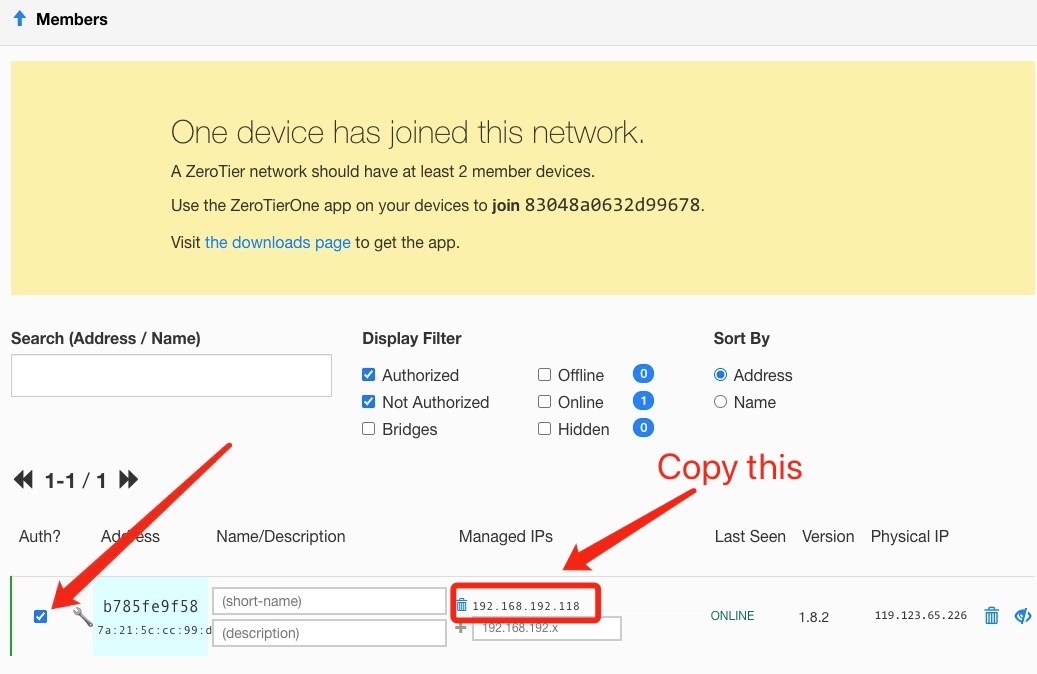
- Quando as máquinas se juntam à rede (veja a Etapa 4), elas precisarão ser aprovadas na seção Membros. Basta marcar a caixa na coluna Aut? para aprovar cada máquina:
4. Configurar o roteador Cudy
- A. Abra um navegador da web e faça login emhttp://cudy.net/ouhttp://192.168.10.1/
- B. Acesse Configurações Gerais -> VPN para definir o Zerotier, escolha o Zerotier Master e insira o ID da Rede Zerotier. Em seguida, clique em Salvar e Aplicar.

- C. Se você configurar sua rede como rede privada, precisará marcar a caixa na coluna Aut. para aprovar o roteador Cudy novamente.
- D. Adicionar rotas para o roteador Cudy.

5. Instale o aplicativo ZeroTier
Baixe e instale oAplicativo ZeroTierem todas as máquinas que você gostaria de conectar.
6. Juntar máquinas à rede
Quando o aplicativo ZeroTier estiver em execução, clique em Ingressar na rede
Insira o ID da rede da Etapa 2 e clique em Ingressar. Se você criou uma rede pública, agora você deve estar conectado. Se você criou uma rede privada, precisará aprovar cada máquina na interface ZeroTier (consulte a Etapa 2).
7. Verifique a conectividade
Você pode verificar se a conexão foi bem-sucedida clicando em Mostrar Rede no aplicativo ZeroTier. O status deve ser OK e a caixa Conectado deve estar marcada. Você também pode tentar executar um ping em um endereço IP privado de outra máquina para verificar a conexão.
8. Acesso remoto
Então você pode acessar remotamente o roteador cudy usando 192.168.10.1 (192.168.192.118) ou a sub-rede 192.168.10.xxx.
129 comentários
@Dear David Esteban,
Our technical support has sent you the new beta firmware via email. Please update and
check.
“Subject: LT500 V3.0 – Static routing over VPN (ZeroTier) interface
Hello Cudy Support,
I have an LT500 with the following details:
- Hardware: LT500 V3.0
- Firmware: 2.4.16-20250804-150319
I use it as a ZeroTier master in a site-to-site setup with two Cudy X6 routers. On the X6 and on the LT500 V2.0 emulator (FW 2.1.1-20240419), the Static Routing page lets me choose the “VPN” interface, so I can route remote subnets through the ZeroTier tunnel.
On my LT500 V3.0, the Static Routing interface list only shows WAN, LAN, WISP, GUEST and 4G. Without the VPN option I cannot route traffic to the remote networks through ZeroTier, which also breaks access when the router fails over to 4G.
Could you please tell me if there is a firmware for LT500 V3.0 (official or beta) that allows selecting the VPN/ZeroTier interface in Static Routing? If so, I would appreciate it if you could send it to me.
Thank you very much.
Best regards,
David"
@Dear Bolesław,
Our technical support has contacted you via email. Please check.
“Hi, could you share the firmware for my router (WR3000 V1.0 router currently running firmware:
2.4.19-20250828-192837), which support ZeroTier?
Best regards!”
@Dear Fajar,
Our technical support has sent you the firmware via email. Please check.
““Hi,
Please can you send me the firmware for WR3000 V1.0 with ZeroTier?
Regards””
Subject: LT500 V3.0 – Static routing over VPN (ZeroTier) interface
Hello Cudy Support,
I have an LT500 with the following details:
- Hardware: LT500 V3.0
- Firmware: 2.4.16-20250804-150319
I use it as a ZeroTier master in a site-to-site setup with two Cudy X6 routers. On the X6 and on the LT500 V2.0 emulator (FW 2.1.1-20240419), the Static Routing page lets me choose the “VPN” interface, so I can route remote subnets through the ZeroTier tunnel.
On my LT500 V3.0, the Static Routing interface list only shows WAN, LAN, WISP, GUEST and 4G. Without the VPN option I cannot route traffic to the remote networks through ZeroTier, which also breaks access when the router fails over to 4G.
Could you please tell me if there is a firmware for LT500 V3.0 (official or beta) that allows selecting the VPN/ZeroTier interface in Static Routing? If so, I would appreciate it if you could send it to me.
Thank you very much.
Best regards,
David
Hi, could you share the firmware for my router (WR3000 V1.0 router currently running firmware:
2.4.19-20250828-192837), which support ZeroTier?
Best regards!