
Dėl skirtingų paslaugų naudojami skirtingi paslaugų prievadai, todėl prieš konfigūruodami patikrinkite paslaugos prievado numerį.
Patikrinkite, ar Cudy maršrutizatorius gauna viešąjį IP (WAN IP) iš interneto paslaugų teikėjo, jei tai privatus IP adresas, vadinasi, prieš Cudy yra kitas NAT įrenginys. Tame įrenginyje taip pat reikia atidaryti tarnybinius prievadus.
Kaip patikrinti, ar IP adresas yra viešasis, ar privatusis, rasite šioje nuorodoje:
http://en.wikipedia.org/wiki/Private_network
Kaip patikrinti Cudy WAN IP?
Bezlaidis maršrutizatorius & amp; tinklelis (sistemos būsena->WAN->būsena)

4/5 Maršrutizatorius (sistemos būsena->Cellular/4G->būsena)

Pastaba:
1. Paprastai, jei viešasis IP ir IP adresas sutampa, tai reiškia, kad turite viešąjį IP. IP adresas yra WAN IP adresas, kurį gaunate iš interneto paslaugų teikėjo. Aukščiau nurodytas Viešasis IP yra IP adresas, kuriuo kitas įrenginys gali jus rasti internete. Taigi, jei Cudy maršrutizatorius gauna privatų IP adresą, reikia išsiaiškinti, kuris įrenginys naudoja šį viešąjį IP, ir atidaryti jo prievadus.
2. Daugumai mobiliųjų maršrutizatorių interneto paslaugų teikėjas paprastai suteikia privatųjį IP adresą. Taigi, jei norite atlikti prievadų peradresavimą, kreipkitės į interneto paslaugų teikėją, kad jums suteiktų viešąjį IP adresą arba atliktų prievadų peradresavimą iš savo pusės.
1 žingsnis: Atidarykite interneto naršyklę ir eikite į http://cudy.net arba http://192.168.10.1.
Išsamesnės informacijos rasite Kaip prisijungti prie "Cudy Router" žiniatinklio sąsajos?
2 žingsnis: Sekcijoje Tinklas paspauskite Išplėstiniai nustatymai -> Prievadų persiuntimas .

Trečias žingsnis: Spustelėkite Pridėti , kad prie sąrašo pridėtumėte vieną įrašą. Įveskite norimus parametrus į lauką, kaip nurodyta toliau.
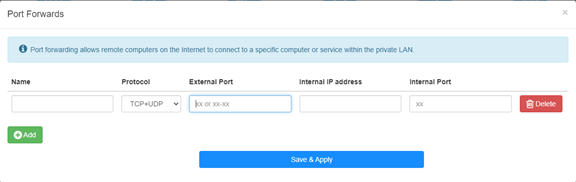
Pavyzdžiui: Pagal toliau pateiktą konfigūraciją prievado 192.168.10.18 TCP prievadas 5000, UDP prievadas 5001 ir abu TCP/UDP prievadai 6000 bus atverti į internetą.

Vardas:
Įrašo pavadinimas, naudojamas atminčiai palengvinti
Protokolas:
TCP, UDP arba TCP+UDP
Išorinis prievadas:
Paslaugos prievadas WAN pusėje, prie kurio galima prisijungti iš interneto
Vidinis IP adresas:Tinklo prievadas:
Priimtuvo, per kurį prievadas bus atidarytas į internetą, IP adresas
Vidinis prievadas:
Priimtuvo paslaugų prievadas LAN pusėje
Pastaba:
Save & amp; Apply", kad išsaugotumėte nustatymus.
Pereikite į būsenos puslapį ir patikrinkite maršrutizatoriaus WAN IP adresą. Dabar galite pabandyti naudoti http:// WAN IP: prievado numerį, kad apsilankytumėte atidarytoje paslaugoje.
42 comments
@T.K
Dear Customer,
Our technical support has sent you the solutions via email. Please check.
“I have WR3000 and I tried to open FTP (active) ports to my NAS. My ISP blocks ports 20-21 so I defined in port forward extrenal ports as 2020-2021 and internal ports as 20-21, but I can’t connect to my NAS! Whats wrong? Same kind of configuration worked fine with my previous mesh network (Netgear Orbi).
NAS does not allow changing ftp ports, so router must do port forward (both directions)
NAS is connected to agent, but this can’t be issue?
I have tried with enabled & disables ALG ftp, but it doesn’t help.”
Hello,
I have an issue with setting port forwarding on LT700e.
It is supposed to be able to forward ports on VPN interface as well, but it does not work, ports are not forwarded correctly (they do not seems to be opened at all)
The purpose is to allow connecting to local service from other client in same VPN network.
VPN network itself seems to work fine.
Could you please advice?
I have WR3000 and I tried to open FTP (active) ports to my NAS. My ISP blocks ports 20-21 so I defined in port forward extrenal ports as 2020-2021 and internal ports as 20-21, but I can’t connect to my NAS! Whats wrong? Same kind of configuration worked fine with my previous mesh network (Netgear Orbi).
NAS does not allow changing ftp ports, so router must do port forward (both directions)
NAS is connected to agent, but this can’t be issue?
I have tried with enabled & disables ALG ftp, but it doesn’t help.
@stephen,
Our technical support has sent you the solutions via email. Please check. You can try to set the IP address of the XBOX to be the DMZ IP address and check if the problem fixed?
“Just setting up Cudy router for home but when I connect the Xbox it says double nat detected. How do I configure the router to stop that please ? Thank you”
Just setting up Cudy router for home but when I connect the Xbox it says double nat detected. How do I configure the router to stop that please ? Thank you