
Dėl skirtingų paslaugų naudojami skirtingi paslaugų prievadai, todėl prieš konfigūruodami patikrinkite paslaugos prievado numerį.
Patikrinkite, ar Cudy maršrutizatorius gauna viešąjį IP (WAN IP) iš interneto paslaugų teikėjo, jei tai privatus IP adresas, vadinasi, prieš Cudy yra kitas NAT įrenginys. Tame įrenginyje taip pat reikia atidaryti tarnybinius prievadus.
Kaip patikrinti, ar IP adresas yra viešasis, ar privatusis, rasite šioje nuorodoje:
http://en.wikipedia.org/wiki/Private_network
Kaip patikrinti Cudy WAN IP?
Bezlaidis maršrutizatorius & amp; tinklelis (sistemos būsena->WAN->būsena)

4/5 Maršrutizatorius (sistemos būsena->Cellular/4G->būsena)

Pastaba:
1. Paprastai, jei viešasis IP ir IP adresas sutampa, tai reiškia, kad turite viešąjį IP. IP adresas yra WAN IP adresas, kurį gaunate iš interneto paslaugų teikėjo. Aukščiau nurodytas Viešasis IP yra IP adresas, kuriuo kitas įrenginys gali jus rasti internete. Taigi, jei Cudy maršrutizatorius gauna privatų IP adresą, reikia išsiaiškinti, kuris įrenginys naudoja šį viešąjį IP, ir atidaryti jo prievadus.
2. Daugumai mobiliųjų maršrutizatorių interneto paslaugų teikėjas paprastai suteikia privatųjį IP adresą. Taigi, jei norite atlikti prievadų peradresavimą, kreipkitės į interneto paslaugų teikėją, kad jums suteiktų viešąjį IP adresą arba atliktų prievadų peradresavimą iš savo pusės.
1 žingsnis: Atidarykite interneto naršyklę ir eikite į http://cudy.net arba http://192.168.10.1.
Išsamesnės informacijos rasite Kaip prisijungti prie "Cudy Router" žiniatinklio sąsajos?
2 žingsnis: Sekcijoje Tinklas paspauskite Išplėstiniai nustatymai -> Prievadų persiuntimas .

Trečias žingsnis: Spustelėkite Pridėti , kad prie sąrašo pridėtumėte vieną įrašą. Įveskite norimus parametrus į lauką, kaip nurodyta toliau.
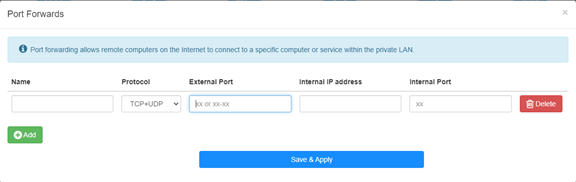
Pavyzdžiui: Pagal toliau pateiktą konfigūraciją prievado 192.168.10.18 TCP prievadas 5000, UDP prievadas 5001 ir abu TCP/UDP prievadai 6000 bus atverti į internetą.

Vardas:
Įrašo pavadinimas, naudojamas atminčiai palengvinti
Protokolas:
TCP, UDP arba TCP+UDP
Išorinis prievadas:
Paslaugos prievadas WAN pusėje, prie kurio galima prisijungti iš interneto
Vidinis IP adresas:Tinklo prievadas:
Priimtuvo, per kurį prievadas bus atidarytas į internetą, IP adresas
Vidinis prievadas:
Priimtuvo paslaugų prievadas LAN pusėje
Pastaba:
Save & amp; Apply", kad išsaugotumėte nustatymus.
Pereikite į būsenos puslapį ir patikrinkite maršrutizatoriaus WAN IP adresą. Dabar galite pabandyti naudoti http:// WAN IP: prievado numerį, kad apsilankytumėte atidarytoje paslaugoje.
42 comments
博主,你好!
最近使用tr3000路由器使用ipv6时测试端口转发,发现无法映射到内网ipv4地址,请问有解决办法吗?
@Dear Yuri,
Our technical support has contacted you via email. Please check.
“I eagerly awaited a response from someone who could help me with the problem I described… I followed your instructions and set up the ZeroTier network. But it doesn’t solve my problem!
The host I want to connect to via RDP does not have the ZeroTier network client – Windows 8.1. I installed different versions from 1.6.6 to 1.8.8, but the network on the host did not start (the firewall is disabled).
Perhaps to connect from my host (with ZeroTier), I only need one rule in the routing on the cudy 3600 router located in ZeroTier, and/or to create a bridge?”
I eagerly awaited a response from someone who could help me with the problem I described… I followed your instructions and set up the ZeroTier network. But it doesn’t solve my problem!
The host I want to connect to via RDP does not have the ZeroTier network client – Windows 8.1. I installed different versions from 1.6.6 to 1.8.8, but the network on the host did not start (the firewall is disabled).
Perhaps to connect from my host (with ZeroTier), I only need one rule in the routing on the cudy 3600 router located in ZeroTier, and/or to create a bridge?
@Dear Yuri,
You can add Routing rules on the Zerotier Management console page to meet you requirement. Please refer to this article on the website.
http://cudy.com/blogs/faq/how-to-remote-connect-cudy-router-via-zerotier?pos=1&_sid=33968118a&ss=r
“There is a Zerotier network with one host and one router. Physically, they are located in different networks with different providers behind grey IPs. How can I redirect an RDP connection on the router to another host that does not have Zerotier and is located in the same local network as the router?”
There is a Zerotier network with one host and one router. Physically, they are located in different networks with different providers behind grey IPs. How can I redirect an RDP connection on the router to another host that does not have Zerotier and is located in the same local network as the router?