
WR1200E
1.0
終了
Amazon A+ Content


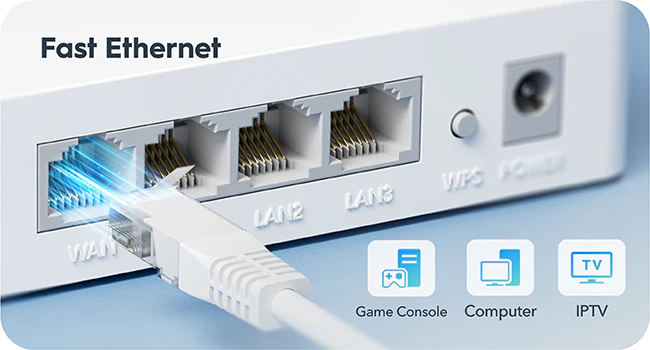
4つのイーサネットポート
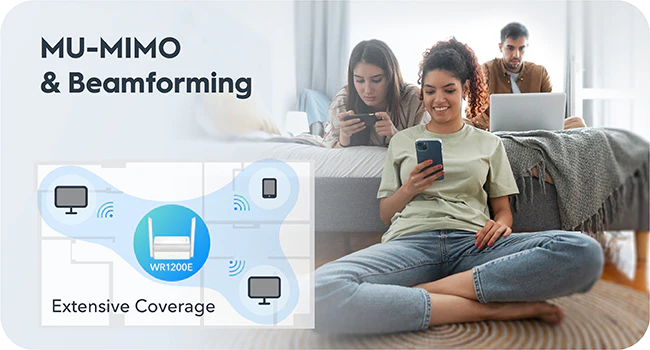
応答性に優れ, 広範囲をカバーするWi-Fi

簡単なセットアップ, 多彩な管理

ネットワークステータスパネル

デバイス管理

VPNクライアント

強化されたセキュリティ

Cudyアプリ
Cudyアプリ


| モデルバージョン | ||
|---|---|---|
| モデルバージョン | WR1200E 1.0 | |
| CPU | ||
| CPU | CPU Details | 580 MHz Single-Core, MIPS24KEC |
| Memory/Storage | ||
| Memory/Storage | Flash/ROM | 8 MB (64 Mbit ) NOR |
| DDR/RAM | 64 MB (512 Mbit) DDR2 | |
| Wireless | ||
| Wireless | 5 GHz Wi-Fi Speed | 867 Mbps |
| 2.4 GHz Wi-Fi Speed | 300 Mbps | |
| 5 GHz Wi-Fi Streams | 2 Spatial Streams | |
| 2.4 GHz Wi-Fi Streams | 2 Spatial Streams | |
| Wi-Fi Antennas | 2× Fixed | |
| FEM or PA/LNA | 5 GHz: 2× Internal, 2.4 GHz: 2× Internal | |
| Beamforming | ||
| Range Performance |
Max: 170 m (558 ft) Tested in open-space environments with minimal interference. Actual WiFi range may vary depending on layout and wall materials. Refer to the Wall Performance specifications for placement suggestions. |
|
| Wall Performance |
Two wooden walls with thickness < 10 cm (4'') One concrete wall with thickness < 20 cm (7'') |
|
| Interfaces | ||
| Interfaces | 10/100 Mbps RJ45 Ports | 4 |
| Ethernet Notes | 1× WAN port, the rest are LAN ports | |
| LED | System | |
| Physical Buttons | WPS Button, Reset Button | |
| Power | ||
| Power | Power Input Type | DC Jack |
| Power Methods | DC | |
| Power Input | 12V⎓1A | |
| Max Power Consumption (W) | 8W | |
| Idle Power Consumption (W) | 3W | |
| Power Adapter In the Box |
Input: 100-240V~, 50/60Hz Output: 12V⎓1A |
|
| Reliability | ||
| Reliability | Environment |
|
| Certifications | ||
| Certifications | FCC, CE | |
| Mechanical | ||
| Mechanical | Installation | Desktop |
| Dimension |
Main Part: 118×80×27.5 mm 4.65×3.15×1.08 inches |
|
| Product Weight | 100 g (3.53 oz.) | |
| Package Content | ||
| Package Content |
|
|
| Ordering Information | ||
| Ordering Information | Retail Package Weight | 350 g (12.35 oz.) |
| Retail Package Dimension |
176×140.5×56 mm 6.93×5.53×2.2 inches |
|
| Units per Carton | 40 | |
| Carton Dimension |
60×30×37.5 cm 23.62×11.81×14.76 inches |
|
| Carton Gross Weight | 15.3 kg (33.73 lbs) | |
| Carton Net Weight | 14.4 kg (31.75 lbs) | |
| モデルバージョン | ||
|---|---|---|
| モデルバージョン | WR1200E 1.0 | |
| Wireless | ||
| Wireless | Wi-Fi Standards | Wi-Fi 5 |
| Separate Client | ||
| Max Wi-Fi Modulation | 256-QAM | |
| Wi-Fi Efficiency | MU-MIMO | |
| Wi-Fi Efficiency Note | MU-MIMO available on 5 GHz | |
| Max Capacity | 128 | |
| Recommended Client Upper Limit | 40 | |
| Wi-Fi Channel Width | Auto/20/40/80 MHz | |
| Wi-Fi Security | WPA/WPA2/WPA3 | |
| Guest Network | 2.4 GHz, 5 GHz | |
| WPS | ||
| General | ||
| General | Operation Modes |
|
| WAN Mode |
|
|
| Network | ||
| Network | QoS | Per-User Rate Limiting |
| DHCP |
|
|
| IP Versions | IPv4/IPv6 | |
| IPv6 Protocols |
|
|
| Multicast | ||
| IPTV/VLAN |
|
|
| TTL Customization |
|
|
| IGMP |
|
|
| Forwarding |
|
|
| Firewall |
|
|
| Application Layer Gateway |
|
|
| Utilities | ||
| Utilities | VPN Client |
|
| DNS Options |
|
|
| Wake on LAN | ||
| Online Detection | ||
| Management | ||
| Management | Parental Controls |
|
| All Devices Management |
|
|
| Per-Devices Management |
|
|
| Content Management |
|
|
| System | ||
| System | LED Control | |
| Local Control Method |
|
|
| Remote Control Method |
|
|
| Firmware Upgrade | Local Update | |
| Reliability |
|
|
| Diagnostic Tools |
|
|
| Languages |
|
|
| Dashboard | ||
| Dashboard | Panel |
|
| Charts |
|
|
- 実際のワイヤレス データ スループットは, ネットワークの状態, クライアントの制限, 建物のレイアウト, 障害物, クライアントの場所などの環境要因によって異なります。
- 複数のデバイスを使用した場合の実際のパフォーマンスは, 使用するアプリケーションの種類, 利用可能な帯域幅の合計, およびデバイスの機能によって影響を受ける場合があります。古いWi-Fiデバイス(レガシー規格)に接続すると, 全体的な効率が低下する可能性があります。また, 効率化機能を使用するには, それらの機能をサポートする互換性のあるクライアントデバイスが必要です。サポートされている効率化機能の詳細については, 仕様スプレッドシートのソフトウェアセクションをご覧ください。
- ワイヤレスカバレッジの表記は参考値です。カバレッジ性能は, 建物のレイアウト, 障害物, 交通量と密度, デバイスの設置場所などの環境要因によって異なります。最適なカバレッジを得るには, Wi-Fiが必要なエリアの中心にデバイスを設置してください。