
このチュートリアルでは, Cudyマシンと他のコンピュータ間でVPNトンネルを設定する方法を説明します。ZeroTierは設定が最も簡単なVPNサービスの一つで, 最大50台のデバイスまで完全に無料でご利用いただけます。最初から最後まで, プロセス全体はわずか数分で完了します。
1. 作成するゼロティアアカウント
2. ネットワークを作成する
- ZeroTierにログインしたら, ネットワークタブ
- 「新しいネットワークを作成」をクリックすると, ネットワークIDがインターフェースに表示されます。

3. パブリックアクセスまたはプライベートアクセスを選択する
アクセスを管理するには, パブリックとプライベートの 2 つの方法があります。
パブリックネットワーク: ネットワークIDを持っている人なら誰でも接続できます。これは最も簡単な方法ですが, セキュリティは若干低くなります。
- ZeroTierインターフェースのネットワークをクリックします
- [アクセス制御] で, [パブリック ネットワーク] オプションを選択します。

プライベートネットワーク: すべてのマシンは, 接続する前に ZeroTier インターフェースを通じて承認を受ける必要があります。これはデフォルトのオプションであり, より安全です。
- マシンがネットワークに参加する場合(手順 4 を参照)は, [メンバー] セクションで承認を受ける必要があります。[認証?] 列の下のボックスにチェックを入れて, 各マシンを承認します。
4. Cudyルーターのセットアップ
- A. Webブラウザを開いてログインしますhttp://cudy.net/またはhttp://192.168.10.1/
- B. 「一般設定」→「VPN」に移動してZerotierを設定し, 「Zerotierマスター」を選択してZerotierネットワークIDを入力します。「保存して適用」をクリックします。

- C. ネットワークをプライベート ネットワークとして構成する場合は, [認証] 列の下のボックスをオンにして, Cudy ルーターを再度承認する必要があります。
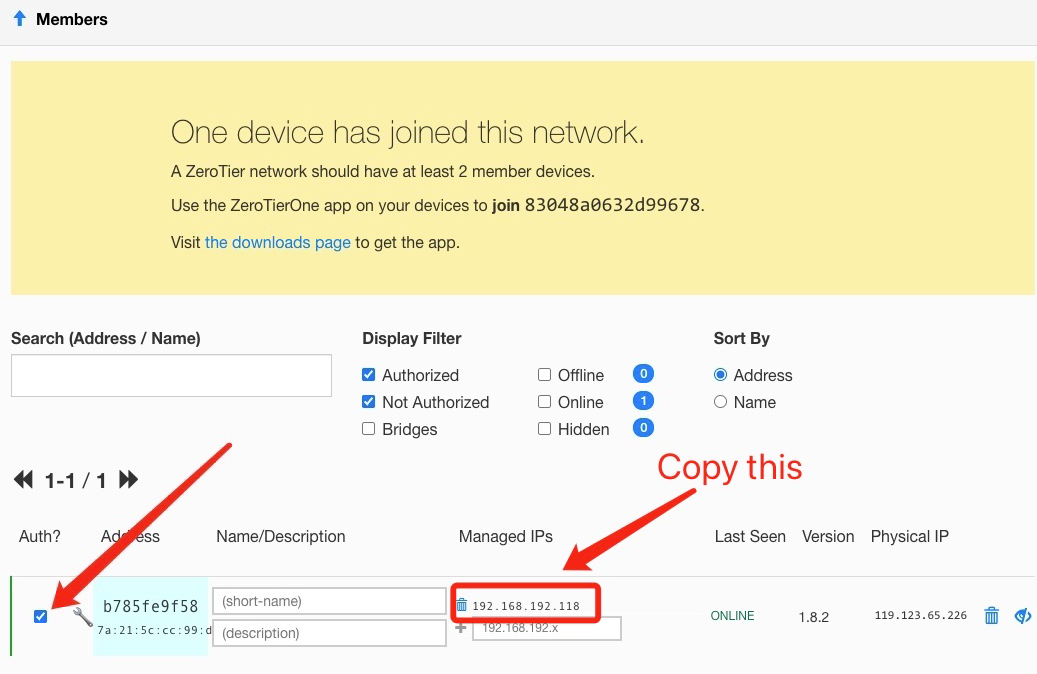
- D. Cudy ルーターのルートを追加します。

5. ZeroTierアプリをインストールする
ダウンロードしてインストールするZeroTierアプリ接続するすべてのマシンで。
6. マシンをネットワークに参加させる
ZeroTierアプリが起動したら, 「ネットワークに参加」をクリックします
手順 2 のネットワーク ID を入力し, [参加] をクリックします。パブリック ネットワークを作成した場合は, これで接続されます。プライベート ネットワークを作成した場合は, ZeroTier インターフェースで各マシンを承認する必要があります (手順 2 を参照)。
7.接続を確認する
ZeroTierアプリで「ネットワークを表示」をクリックすると, 正常に接続できたかどうかを確認できます。「ステータス」に「OK」と表示され, 「接続済み」ボックスにチェックが入っているはずです。別のマシンのプライベートIPアドレスにpingを実行して接続を確認することもできます。
8. リモートアクセス
その後, 192.168.10.1 (192.168.192.118) またはサブネット 192.168.10.xxx を使用して cudy ルーターにリモート アクセスできるようになります。
118件のコメント
@Dear Mariusz,
Our technical support has sent you the firmware via email. Please check.
“Can you send me the firmware with ZeroTier support for Cudy WR3000 v.1?”
Can you send me the firmware with ZeroTier support for Cudy WR3000 v.1?
@Dear Calvin,
Our technical support has sent you the firmware via email. Please check.
“Hello, can you send me the beta firmware with ZeroTier support for WR3000 v1.0? Thanks.”
Hello, can you send me the beta firmware with ZeroTier support for WR3000 v1.0? Thanks.
Dear Sdzix,
Our technical support has sent you the firmware via email. Please check.
“Can you send me the firmware with ZeroTier support for Cudy WR3000 v.1?”