
準備する
ルーターのファームウェアを最新版にアップグレードしてください。アップグレード方法がわからない場合は, 以下の手順に従ってください。Cudyルーターのファームウェアをアップグレードするにはどうすればいいですか?
見える
Cudy ルーターは, ほとんどの Visible ネットワークでプラグアンドプレイで動作することがテストされていますが, アクティブ化されたデバイスから Cudy ルーターに移動する, すでにアクティブ化された SIM を使用し, APN, TTL など, 特定の通信事業者プランに適したルーターとモデムの設定を行った場合にのみ動作します。
Visible の手順:
1. Cudyルーターの電源をオフにします。
2. Visible SIM カードを挿入します。
3. Cudy デバイスの電源をオンにし, LED が点灯するまで待ちます。
4. リセットボタンを 5 秒間押し続けてから放します。
5. LED が再び点灯するまで待ちます。
6. Wi-Fi またはイーサネット経由で Cudy デバイスのネットワークに接続します。
7. ウェブブラウザを開いてhttp://cudy.netまたはhttp://192.168.10.1
詳細については, Cudy ルーターの Web インターフェイスにログインするにはどうすればいいですか?
9. へ移動詳細設定 -> IPv6有効にします。
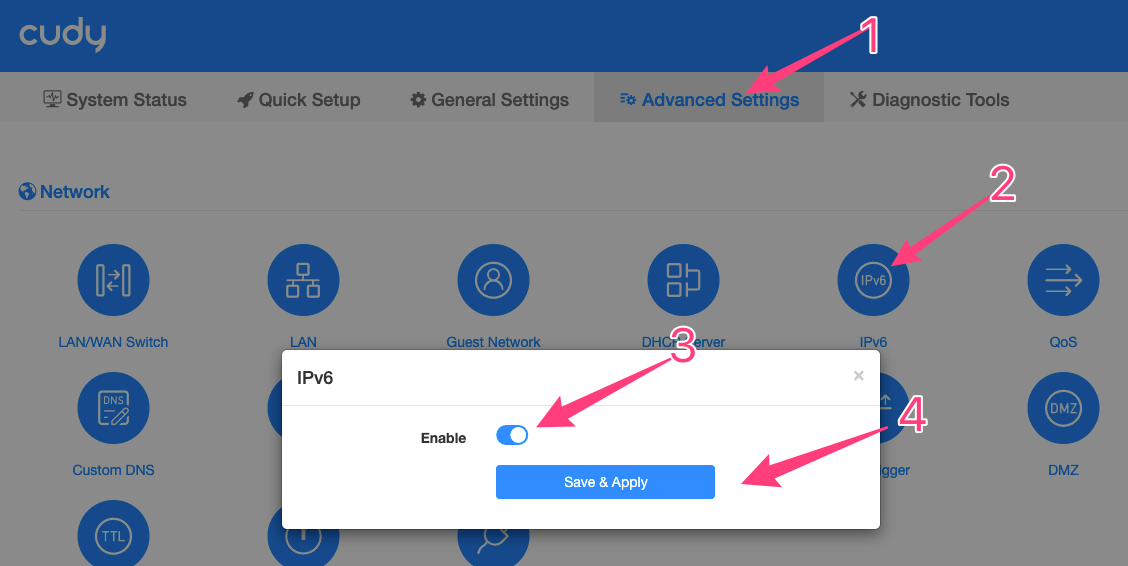
10. へ移動詳細設定 -> TTL -> カスタムそして
a. セットTTLに64
b. セットHLに65。

11. へ移動一般設定 -> モバイル。
a. 設定ネットワークモードとして4Gのみ
b. 設定APNプロファイルとしてマニュアル
c. 設定APNとしてVSBLINTERNETまたはvsblinternet。
d。離れるユーザー名そしてパスワード空白のまま。
e. 設定認証としてPAP+CHAP
f.セットPDPタイプにIPv4/IPv6

すべての設定を保存して確認します。完了です。
12. それでもインターネットが機能しない場合は, 5分待ってから診断ツール->診断->GO->ダウンロード名前を「Visible」に変更します。
13. 以下のものを送付してくださいsupport@cudy.com
a. ステップ12でダウンロードした診断binファイル
b. データプラン名
14件のコメント
@Dear Mike,
What is the device that connect to the LAN1 port of the router? Is it a phone? If the devices connected to the router can connect to the internet?
“i am using US Mobile as provider. lT500 is blue but no dial tone on device plugged into LAN1”
i am using US Mobile as provider. lT500 is blue but no dial tone on device plugged into LAN1
@Dear Jackson,
Our technical support has sent you the solutions via email. Please check.
“Is there any updated instructions for this? I see someone asked about settings under IPV6 in newer firmware. Can someone please send me the newer steps”
Is there any updated instructions for this? I see someone asked about settings under IPV6 in newer firmware. Can someone please send me the newer steps?
@Estimado José:
Puede intentar personalizar el TTL del router en la página «Configuración avanzada» – «TTL» a 64 o 65.
“En mi país los sim card tienen 2 diferentes paquetes unidos, plan de datos regular y junto con plan de datos para compartir por medio de wifi. Quiero saber como configurar el router LT500 para q solo use el plan de datos regular y no el de compartir. Ya que el plan de datos de compartir tiene un límite y se acaba rápido pero el plan regular es de data ilimitada.”