
ドライバーのみをインストールしたいユーザーもおり, ユーティリティ「REALTEK USB ワイヤレス LAN ユーティリティ」をインストールしたくない場合があります。その場合, ユーザーは「REALTEK USB ワイヤレス LAN ユーティリティ」ではなく, Windows の標準ユーティリティを使用して Wi-Fi 接続を管理します。
| REALTEK USB ワイヤレス LAN ユーティリティ (非推奨) |
デフォルトのWindowsユーティリティ (推奨) |
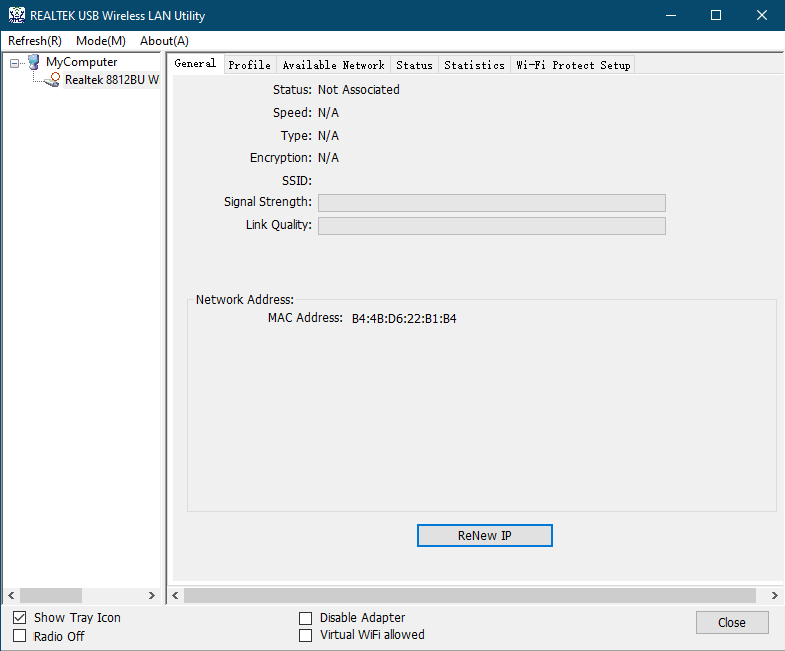 |
 |
1)USB Wi-FiアダプターをPCから取り外します。
2)キーボードとマウス以外のすべてのUSBデバイスをPCから取り外します。
3)USB Wi-Fi アダプタ用にインストールしたドライバとユーティリティをアンインストールします。
4)コンピュータを再起動します。
5)以下のファイルとディレクトリが存在する場合は削除してください。(または, 名前を変更して残しておくこともできます。)
C:\Windows\System32\drivers\rtwlanu.sys
C:\Program Files\Realtek
C:\Program Files (x86)\Realtek\USB ワイヤレス LAN ドライバー
C:\Program Files (x86)\Realtek\USB ワイヤレス LAN ユーティリティ
6)不要なユーティリティをすべて閉じます。
7)Windows Defenderを含むファイアウォールを無効にします。
8)以下のURLから最新のドライバーをダウンロードし, setup.exeを実行します。
2件のコメント
@
Dear Duane,
You can download the driver of your adapter on the website below.
https://www.cudy.com/pages/download-center/search
In addition, you can also use some software that can help the computer to install driver of the hardware. like Driver Booster, etc.
http://www.iobit.com/en/driver-booster.php
“This website is a piece of shit. Nothing works and I will be returning your shit wifi card, too. How should I install something without drivers you morons.”
This website is a piece of shit. Nothing works and I will be returning your shit wifi card, too. How should I install something without drivers you morons.