
טופולוגיית רשת נפוצה:

שלב 1:פתח דפדפן אינטרנט ועבור אלhttp://cudy.netאוֹhttp://192.168.10.1.
לפרטים, אנא עיינו באיך להתחבר לממשק האינטרנט של הנתב Cudy?
שלב 2:חלון ההתקנה המהירה יופיע, בחר 'מאריך אלחוטי, אז לך'הַבָּא'.

 שלב 3:בחר את שלך 'אזור זמן.
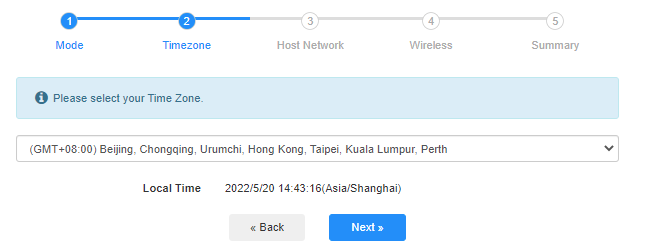
שלב 4:בחר את רשת המארח שברצונך להרחיב. לחץ על 'לְחַבֵּר'.

 שלב 5:הזן את סיסמת הרשת האלחוטית של הרשת המארחת.

 פֶּתֶק:ודא שסיסמת הרשת האלחוטית שאתה מקליד נכונה, אחרת, התצורה לא תצליח.
שלב 6:התאם אישית את שם ה-Wi-Fi (SSID) והסיסמה כך שתהיה זהה לאלו של הרשת המארחת שלך.

 שלב 7:לחץ על 'שמור והחלכדי להשלים את התצורה.

 שלב 8:חבר מחדש את המכשירים האלחוטיים שלך לרשת ה-Wi-Fi החדשה.

 פֶּתֶק:
1. אם תגדירו את מצב מאריך הרשת באמצעות מכשיר קווי, ייתכן שלמכשיר זה לא יהיה חיבור לאינטרנט לאחר ההתקנה. אנא נתק וחבר את כבל ה-Ethernet או השבת והפעל את מתאם הרשת כדי שיקבל את החיבור החדש.
2. לאחר הגדרת הנתב Cudy במצב מרחיב אלחוטי, כתובת ה-IP תוקצה על ידי הנתב המארח וכתובת ה-IP המוגדרת כברירת מחדל 192.168.10.1 לא תוכל להתחבר. אם עליך להתחבר שוב לנתב Cudy, הקלד 'http://cudy.netלתוך הדפדפן שלך או חפש את כתובת ה-IP של הנתב Cudy ברשימת הלקוחות של הנתב המארח שלך.
69 comments
@Christos,
Dear Customer,
Thanks for contacting the Cudy support team.
Yes, but you need to update the latest firmware 2.3.0 of WR1500 first. Then the router will support the range extender mode and WISP mode to connect the main WiFi.
https://www.cudy.com/pages/download-center/wr1500-1-0
“Hello.
Cudy WR1500 Wireless Router Wi‑Fi 6 with 3 Gigabit Ethernet Ports support wireless connection with the home internet route and act as repeater?”
Hello.
Cudy WR1500 Wireless Router Wi‑Fi 6 with 3 Gigabit Ethernet Ports support wireless connection with the home internet route and act as repeater?
@Uschi,
You can enable the WISP function to connect the main WiFi and share the network to all the client on LT400. Please have a try.
“Can I use the Cudy N300 4G LTE in Wireless Extender Mode?
In the Cudy App is no option for Wireless extender.”
Can I use the Cudy N300 4G LTE in Wireless Extender Mode?
In the Cudy App is no option for Wireless extender.
@Widny,
Dear Widny,
Thank you for contacting Cudy support team.
Sorry to tell you that all Cudy 4G/5G routers don’t support Bridge mode. We will provide feedback to the R&D department for evaluation to add this function.
“Good afternoon, I’m looking for a 5G router with Bridge mode and was wondering if your Cudy New 5G NR SA NSA AX3000 supports that feature.”