
Port Forwards (Port Forwarding) funktsioon võimaldab Interneti kaugarvutitel ühenduda konkreetse arvutiga või teenusega privaatse LANi sees.
Kõik teenused kasutavad erinevaid teenuse porte, palun kontrollige teenuse portide numbrit enne seadistamist.
Tähtis:
Varuge, et Cudy ruuter saab internetiteenuse pakkujalt avaliku IP (WAN IP), kui see on privaatne IP-aadress, tähendab see, et Cudy ees on veel üks NAT-seade. Ka selles seadmes peate avama teenuse pordid.
Kuidas kontrollida, kas IP-aadress on avalik või privaatne, vaadake seda linki:
http://en.wikipedia.org/wiki/Private_network
Kuidas kontrollida Cudy WAN-IP-i?
Wireless Router & Mesh (System Status->WAN->Status)

4/5 ruuter (süsteemi staatus->Mobiilside/4G->staatus)

Märkus:
1. Tavaliselt, kui avalik IP ja IP-aadress on samad, tähendab see, et teil on avalik IP. IP-aadress on WAN-IP-aadress, mille saate oma Interneti-teenuse pakkujalt. Ülaltoodud avalik IP-aadress on IP-aadress, mille teised seadmed leiavad teid interneti kaudu. Nii et kui Cudy ruuter saab privaatse IP-aadressi, peate välja selgitama, milline seade kasutab seda avalikku IP-d ja avama selle pordid.
2. Enamiku mobiiliruuterite puhul annab internetiteenuse pakkuja tavaliselt privaatse IP-aadressi. Seega, kui soovite portide edastamist teha, võtke ühendust oma internetiteenuse pakkujaga, et ta annaks teile avaliku IP-aadressi või teeks portide edastamise nende poolt.
Samm 1: Avage veebilehitseja ja minge aadressile http://cudy.net või http://192.168.10.1.
Üksikasjalikumalt vt Kuidas Cudy Routeri veebiliidesesse sisse logida?
Samm 2: Klõpsake täiendatud seaded -> Port Forwards jaotuses Võrk .

Samm 3: Vajutage Lisada , et lisada üks kirje loetelusse. Sisestage soovitud parameetrid väljale nagu allpool.
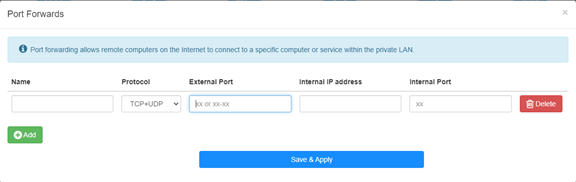
Et näiteks: Seoses järgmise konfiguratsiooniga avatakse internetti TCP-port 5000, UDP-port 5001 ja mõlemad TCP/UDP-port 6000 hostil 192.168.10.18.
.
Nimi:
Kande nimi, mida kasutatakse mälu hõlbustamiseks
Protokoll:
TCP, UDP või TCP+UDP
Sisemine port:
Servise port WAN-poolel, millele on võimalik pääseda internetist
Sisene IP-aadress:
Host'i IP-aadress, mis avab pordi internetti
Sisene port:
Host'i teenusport LAN-is
Note:
Üldiselt on sisemine port sama, mis väline port.
Sammu 4: Klõpsake seadete salvestamiseks nuppu "Save & Apply".
Minge olekulehele ja kontrollige ruuteri WAN IP-aadressi. Nüüd võite proovida kasutada http:// WAN IP: portnumbrit, et külastada avatud teenust.
42 comments
博主,你好!
最近使用tr3000路由器使用ipv6时测试端口转发,发现无法映射到内网ipv4地址,请问有解决办法吗?
@Dear Yuri,
Our technical support has contacted you via email. Please check.
“I eagerly awaited a response from someone who could help me with the problem I described… I followed your instructions and set up the ZeroTier network. But it doesn’t solve my problem!
The host I want to connect to via RDP does not have the ZeroTier network client – Windows 8.1. I installed different versions from 1.6.6 to 1.8.8, but the network on the host did not start (the firewall is disabled).
Perhaps to connect from my host (with ZeroTier), I only need one rule in the routing on the cudy 3600 router located in ZeroTier, and/or to create a bridge?”
I eagerly awaited a response from someone who could help me with the problem I described… I followed your instructions and set up the ZeroTier network. But it doesn’t solve my problem!
The host I want to connect to via RDP does not have the ZeroTier network client – Windows 8.1. I installed different versions from 1.6.6 to 1.8.8, but the network on the host did not start (the firewall is disabled).
Perhaps to connect from my host (with ZeroTier), I only need one rule in the routing on the cudy 3600 router located in ZeroTier, and/or to create a bridge?
@Dear Yuri,
You can add Routing rules on the Zerotier Management console page to meet you requirement. Please refer to this article on the website.
http://cudy.com/blogs/faq/how-to-remote-connect-cudy-router-via-zerotier?pos=1&_sid=33968118a&ss=r
“There is a Zerotier network with one host and one router. Physically, they are located in different networks with different providers behind grey IPs. How can I redirect an RDP connection on the router to another host that does not have Zerotier and is located in the same local network as the router?”
There is a Zerotier network with one host and one router. Physically, they are located in different networks with different providers behind grey IPs. How can I redirect an RDP connection on the router to another host that does not have Zerotier and is located in the same local network as the router?