
Port Forwards (Port Forwarding) funktsioon võimaldab Interneti kaugarvutitel ühenduda konkreetse arvutiga või teenusega privaatse LANi sees.
Kõik teenused kasutavad erinevaid teenuse porte, palun kontrollige teenuse portide numbrit enne seadistamist.
Tähtis:
Varuge, et Cudy ruuter saab internetiteenuse pakkujalt avaliku IP (WAN IP), kui see on privaatne IP-aadress, tähendab see, et Cudy ees on veel üks NAT-seade. Ka selles seadmes peate avama teenuse pordid.
Kuidas kontrollida, kas IP-aadress on avalik või privaatne, vaadake seda linki:
http://en.wikipedia.org/wiki/Private_network
Kuidas kontrollida Cudy WAN-IP-i?
Wireless Router & Mesh (System Status->WAN->Status)

4/5 ruuter (süsteemi staatus->Mobiilside/4G->staatus)

Märkus:
1. Tavaliselt, kui avalik IP ja IP-aadress on samad, tähendab see, et teil on avalik IP. IP-aadress on WAN-IP-aadress, mille saate oma Interneti-teenuse pakkujalt. Ülaltoodud avalik IP-aadress on IP-aadress, mille teised seadmed leiavad teid interneti kaudu. Nii et kui Cudy ruuter saab privaatse IP-aadressi, peate välja selgitama, milline seade kasutab seda avalikku IP-d ja avama selle pordid.
2. Enamiku mobiiliruuterite puhul annab internetiteenuse pakkuja tavaliselt privaatse IP-aadressi. Seega, kui soovite portide edastamist teha, võtke ühendust oma internetiteenuse pakkujaga, et ta annaks teile avaliku IP-aadressi või teeks portide edastamise nende poolt.
Samm 1: Avage veebilehitseja ja minge aadressile http://cudy.net või http://192.168.10.1.
Üksikasjalikumalt vt Kuidas Cudy Routeri veebiliidesesse sisse logida?
Samm 2: Klõpsake täiendatud seaded -> Port Forwards jaotuses Võrk .

Samm 3: Vajutage Lisada , et lisada üks kirje loetelusse. Sisestage soovitud parameetrid väljale nagu allpool.
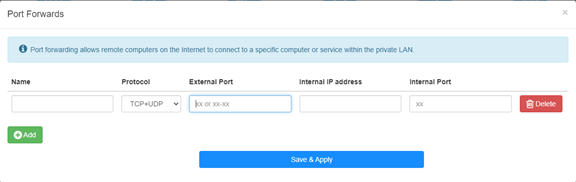
Et näiteks: Seoses järgmise konfiguratsiooniga avatakse internetti TCP-port 5000, UDP-port 5001 ja mõlemad TCP/UDP-port 6000 hostil 192.168.10.18.
.
Nimi:
Kande nimi, mida kasutatakse mälu hõlbustamiseks
Protokoll:
TCP, UDP või TCP+UDP
Sisemine port:
Servise port WAN-poolel, millele on võimalik pääseda internetist
Sisene IP-aadress:
Host'i IP-aadress, mis avab pordi internetti
Sisene port:
Host'i teenusport LAN-is
Note:
Üldiselt on sisemine port sama, mis väline port.
Sammu 4: Klõpsake seadete salvestamiseks nuppu "Save & Apply".
Minge olekulehele ja kontrollige ruuteri WAN IP-aadressi. Nüüd võite proovida kasutada http:// WAN IP: portnumbrit, et külastada avatud teenust.
42 comments
@Dear FRANCISCO,
Yes, port forwarding is limited to a single internal IP address. You can’t set like this.
“I have a question: Is port forwarding limited to a single internal IP address, or can the same port be opened for multiple internal IP addresses? For example, if I need to open port 443 for the internal address 192.168.10.5, and also for 192.168.10.8, how would I do that?”
I have a question: Is port forwarding limited to a single internal IP address, or can the same port be opened for multiple internal IP addresses? For example, if I need to open port 443 for the internal address 192.168.10.5, and also for 192.168.10.8, how would I do that?
@Dear Elshad,
Please enable the Remote Management function on the “Advanced Settings” -“System” -“Administrator” function page. Then you can try to login to the web page of the router from internet via the HTTPS protocol. You must use https://WAN IP address to access the management page. Not the HTTP.
“Dear support team.
I have 4G LTE N300 WiFi Routur
I get Public Static IP from Mobil operator but I can not reach from outside to my Cudy device 80 port.
I opened WEB 80 port
I tried from Port Forwarding side to add IP address of the Cudy 4G Routur IP address but can not reach outside internet to the Cudy modem.
Please support to solve this issue."
Dear support team.
I have 4G LTE N300 WiFi Routur
I get Public Static IP from Mobil operator but I can not reach from outside to my Cudy device 80 port.
I opened WEB 80 port
I tried from Port Forwarding side to add IP address of the Cudy 4G Routur IP address but can not reach outside internet to the Cudy modem.
Please support to solve this issue.
@Estimado Fran:
La dirección IPv4 celular es privada. Por lo tanto, no se puede acceder desde internet. Te sugiero usar la VPN Zerotier, que permite pasar la NAT. Aquí tienes las instrucciones.
https://www.cudy.com/blogs/faq/how-to-remote-connect-cudy-router-via-zerotier?pos=1&_sid=5ecdb2fb9&ss=r
Tengo un LT 500, la interfaces no es como esta , me dice wan / vpn y también tengo cliente wireguard ,como pudiera hacer, porque la ip addres y la publica son diferentes